

New Participant
September 17, 2015
Answered

How to prevent PDF documents from being converted to word

  • September 17, 2015
  • 7 replies
  • 108132 views

Hi there,

I have created a PDF document and would like to prevent it from being converted to Word to ensure that my document cannot be copied.

How can I do this?

Thanks.

Correct answer Tanvi Bhalla

Hi Theresh,


You can apply password security to restrcit editing on your document. Please follow the steps below:-

1) Open the document in Acrobat.

2) Right click on the document and click on "Document properties".

3) Go to "Security" tab.

4) Select "Password security" from security method.
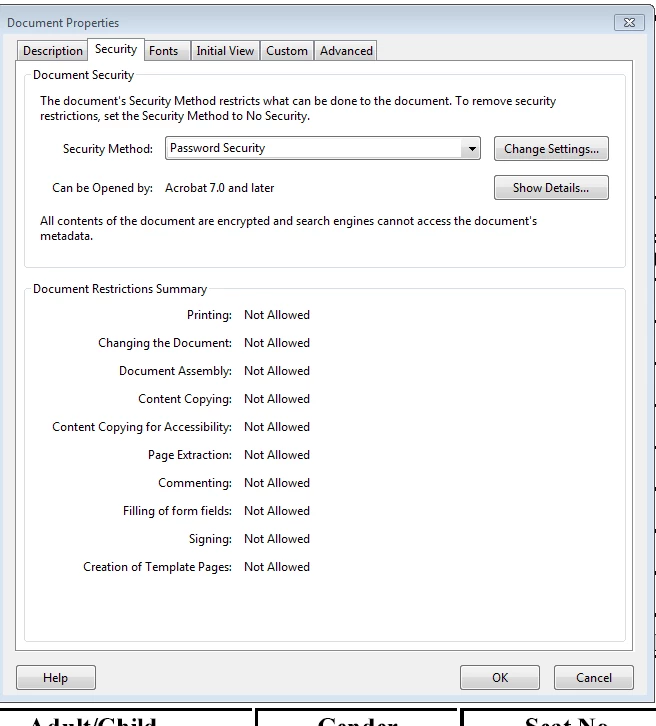
5) Click on "Change settings".

6) Check the box which says "Restrict editing
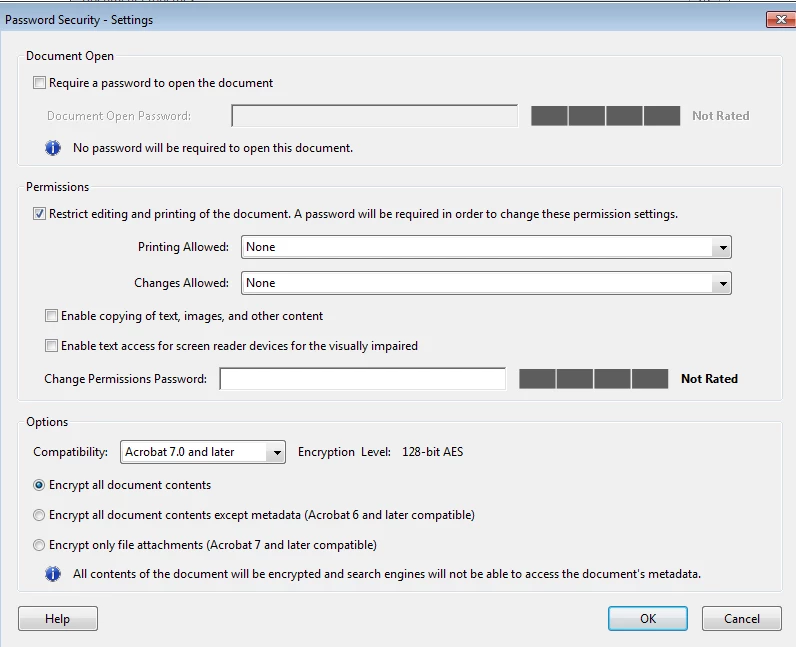
7) Un check all the other boxes.

8) Clcik on "OK" and enter the password.

9) Save the document.

Now, this document can not be converted to word.

Hope this helps!

Thanks,

Tanvi

7 replies

Roshan_Bhosale4909
New Participant
January 27, 2026

Hi,

Short answer: You cannot completely prevent a PDF from being converted to Word or copied.
PDF is a display format, not a secure vault. Any file that can be opened can potentially be converted or captured in some way.

However, you can reduce the risk significantly using these methods:

1️⃣ Apply PDF Security Settings (Best First Step)

  • Set a password to restrict editing and copying

  • Disable text extraction and conversion
    This can be done in Adobe Acrobat under Protect → Encrypt → Restrict Editing.

2️⃣ Convert Text to Images (Strong Protection)
If the content is rasterized (text becomes images), Word conversion tools cannot extract editable text.
Downside: Search and accessibility will be lost.

3️⃣ Add Watermarks or Digital Signatures
This discourages misuse and helps track unauthorized copies.

4️⃣ Use Flattened PDFs or Print-to-PDF
Flattening layers removes editable structure, making conversion harder.

Important Note:
No method is 100% secure. Someone can always take screenshots, OCR the text, or use advanced tools.

If you want to explore free tools and techniques to secure and manage PDFs, you can check this guide and tools here:
👉 https://propdftool.com/

It includes PDF protection, conversion, and utility tools that help you control document usage better.

Hope this helps!

New Participant
March 7, 2025

Hi everyone! 
Great tips on securing PDFs – super helpful! I’d also like to share that if you’re looking for a free, user-friendly PDF tool (especially for Arabic documents), check out ARPDF www.arpdf.com

It’s an all-in-one solution for editing, converting, and securing your PDFs easily. Give it a try and let me know what you think! Cheers!

New Participant
August 9, 2023

Hi,

Do you consider the option of zipping the file and adding password protection? If your intention is to make it viewable to the public without requiring a download, you could explore techniques such as Canvas preview and server-side PDF rendering mechanisms.


Brainiac
September 17, 2015

Please pay close attention to the warning you get about third party products. It is true, and makes your activity almost (not quite) pointless.

New Participant
December 2, 2021

Yes, if you upload the file to websites like www.ilovepdf.com you can extract a word document in 1 second. So the protection is useless.

New Participant
September 5, 2022

Dear Leonardo,

I have the same situation. After protect my pdf, but just 1 second later my pdf is being converted.

So there is any other way that I can protect my document and prevent people to convert it? 

Tanvi BhallaCommunity ManagerCorrect answer
Community Manager
September 17, 2015

Hi Theresh,


You can apply password security to restrcit editing on your document. Please follow the steps below:-

1) Open the document in Acrobat.

2) Right click on the document and click on "Document properties".

3) Go to "Security" tab.

4) Select "Password security" from security method.

5) Click on "Change settings".

6) Check the box which says "Restrict editing

7) Un check all the other boxes.

8) Clcik on "OK" and enter the password.

9) Save the document.

Now, this document can not be converted to word.

Hope this helps!

Thanks,

Tanvi

New Participant
September 17, 2015

Dear Tanvi and Rahul,

Presumably, this can only be done in Acrobat DC Professional & not DC Reader?

Thanks,

Theresh

Community Manager
September 17, 2015

Yes, that's true.

As Acrobat Reader is just used to view PDF, you will not be able to modify the properties of any PDF. We offer Acrobat PRO DC on a free 30 days trial. You can try it and see if you wish to buy it for future use.

Download free trial for Acrobat PRO DC from the link below:-

Download Adobe Acrobat free trial | Acrobat Pro DC

Hope this helps!

Thanks,

Tanvi

Bernd Alheit
Community Expert
September 17, 2015

How did you create the PDF document? Do you use Adobe Acrobat?

RahulTyagi_
Community Manager
Community Manager
September 17, 2015

Hi thereshp26112598,

You can set Password on your document to restrict editing and copying of the document, and unless the other users don't know the password, they won't be able to copy content or convert to word format.

Please refer the following Link for detailed information on how to set passwords on pdf files : Use security permissions to protect PDF files | Adobe Acrobat DC tutorials

Regards,

Rahul