


xAdamsilverx
New Participant
August 5, 2019
Question

How to remove the 'attempting to launch' prompt

  • August 5, 2019
  • 2 replies
  • 9770 views

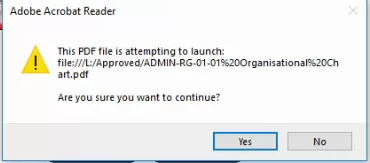
When I click on one of my links in the doc which opens another pdf, before it opens it says 'This PDF file is attempting to launch: '[File Location]'. Are you sure you want to continue?'

I don't want to have to click yes every time I open one, is there a way to disable this?
This topic has been closed for replies.

2 replies

New Participant
July 29, 2023

how can i remove adobe reader permission to open file

Amal.
Community Manager
Community Manager
July 31, 2023

Hi there


Thanks for reaching out.


Would you mind sharing a screenshot of the message you get while trying to open the PDF file? Is this an issue with a specific file or with all of them.


If you are on a work machine managed by IT please contact the IT at your end and see if that works.


Regards

Amal

Amal.
Community Manager
Community Manager
August 5, 2019

Hi Xadamsilverx,

Apologies for the trouble caused, As described above when you open a link to another PDF file, before it opens, it gives you a popup message saying "The PDF file is attempting to launch. Are you sure you want to continue?"

This is product behavior to protect you from any suspicious file that may harm your computer. To turn off these popup messages you may try the following troubleshooting steps:

  • Go to Edit > Preferences > Trust Manager > Internet access from PDF files outside the web browser > Change settings.
  • Select allow PDF files to access all web sites.
  • Select Allow Access under default behavior for web sites.
  • Reboot the system and check.

If that doesn't work, you may try to turn off the protected view.

Note: This is only for the testing purpose, Please turn ON the security after testing.

  • Go to Edit > Preferences > Enhanced Security > Turn Off the Protected view and uncheck Enhanced security.
  • Reboot the system and check.

Let us know if you need more help.

Regards,

Amal

xAdamsilverx
New Participant
August 6, 2019

Hi Amal,

I did try that but I still get the same popup. When I turn off protected view and uncheck enhanced security it did stop one of two windows popping up but the one I posted still comes up.

Please advise

Adam

Amal.
Community Manager
Community Manager
August 6, 2019

Hi

I am sorry to hear that the issue is still the same, we need some more information for a better understanding.

  • Are you on a home network or on a work domain?
  • Is the file locally available on your system or is it on a shared drive/cloud?
  • Is this a behavior with a particular file or with any file you try to open?
  • What is the application version you are using? To check the version please refer to the link - Identify the product and its version for Acrobat and Reader DC

In the meantime, you may try the following steps:

  • Please download the file to your computer.
  • Go to Edit>Preferences>enhanced security>Add File and select the file you want to open, to grant access to the file on the system
  • Go to Edit>Preferences>enhanced security>Add Folder and select the folder on the drive, to grant access to the folder.
  • Restart the application and check.

Let us know if that makes any difference to you.

Regards,

Amal