


Participant
June 27, 2018
Answered

How to Stop PDFs From Opening When Saved via MS Word/Excel

  • June 27, 2018
  • 20 replies
  • 418856 views

I just downloaded the latest version of Adobe Reader (18.011.20040) on my new computer. I create files all the time through Microsoft Word and Excel. When I save these files as PDFs, Adobe Reader automatically opens. I do not want that to happen. I simply want it to save as a PDF and go on with my life. How do I stop it from opening automatically?
Correct answer Raypeng

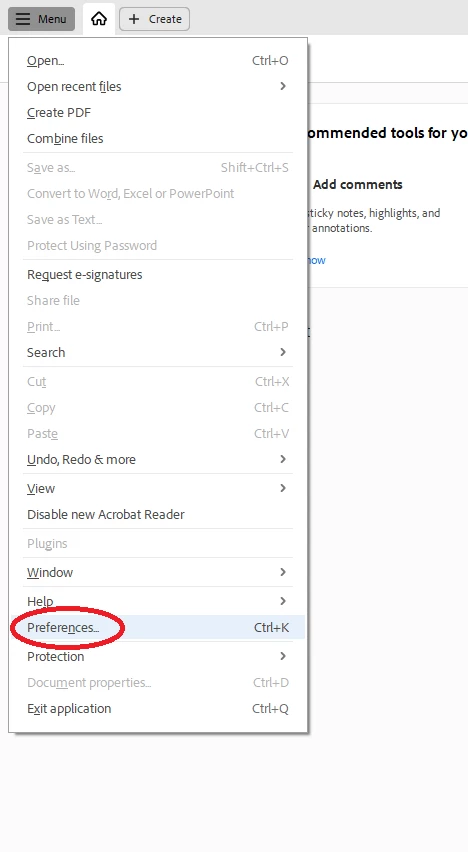
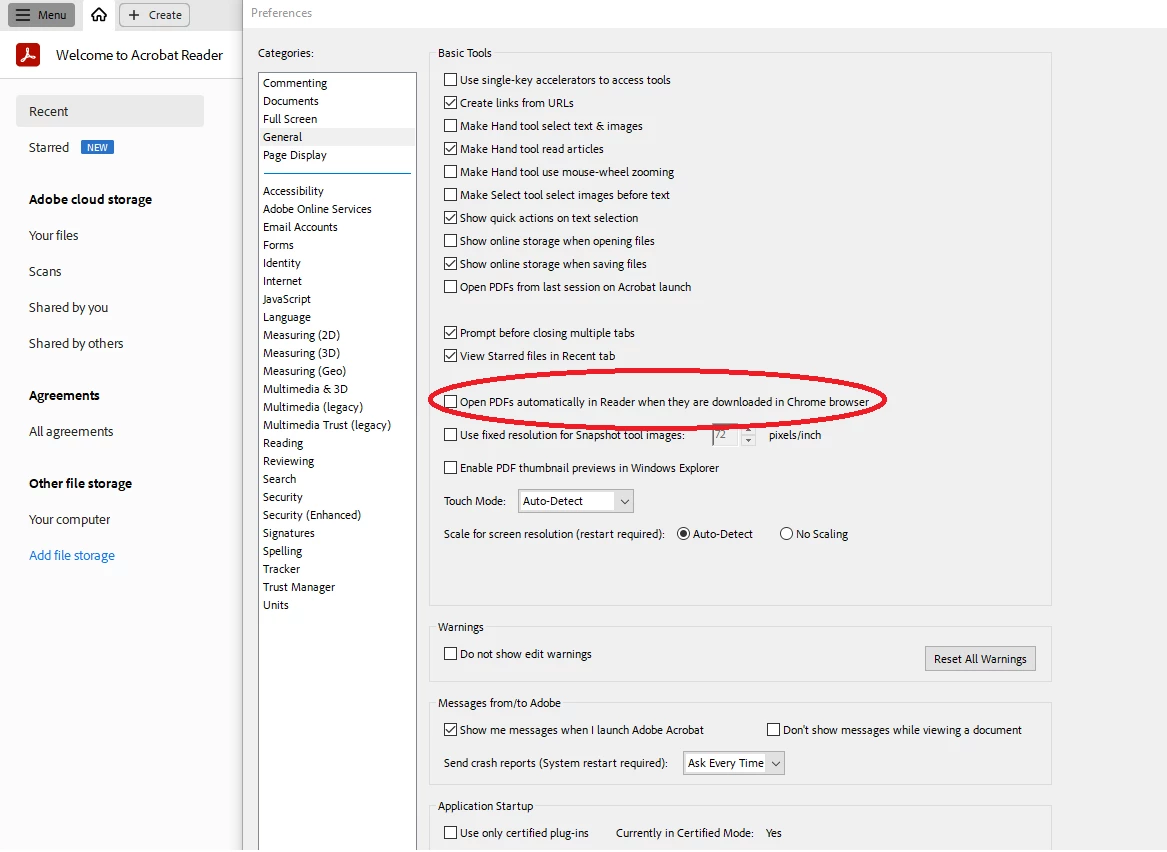
Open PDF, go to Menu > Preferences > General > Open PDFs automatically in reader when they are downloaded in chrome browser (uncheck the box)


Hope this help.

20 replies

Participant
October 20, 2021

I did all this that was suggested or at least tried some of it but my chrome options are not the same as suggested here. What else can I do? Its getting so annoying for every scan to open up right after scanning. HELP!

Participant
June 3, 2021

I have the same problem with Adobe program opening but this happens when I do a quick print from Outlook email.  I would love not to have to close the window everytime I quick print.  Any ideas?

eeroanjo
Participant
March 30, 2021

You can change this when you are saving the document as a PDF. When the Save As box pops up, there will be a checked box for Open file after publishing.  Uncheck that box to fix the problem.  Press Save and the issue should be fixed for any future Save As PDF documents. 

Participant
February 22, 2021

This was happening to me when I did Save As from Chrome.


From Chrome go to Settings under the Hamburger menu
Advanced
Site Settings
Additional Content Settings
PDF Documents
Download PDF files instead of automatically opening them in Chrome - Turn ON


December 2, 2020

I figured it out! Due to the fact that you are converting the file it will automatically pop up. Instead use Browser to print to PDF, it will save the file wherever you chose but not reopen. I used Microsoft Print to PDF.

Participating Frequently
November 21, 2019

I figured it out. When you are saving the new document, the print dialog box has a Properties button. Click that button and UNCHECK the box that says "View Adobe PDF results.


Participant
April 1, 2020

The setting you all were looking for can be found by selecting "save as" "PDF" & unchecking the box at the bottom of the windows prompt "View PDF after saving"  


Participating Frequently
November 21, 2019

I'm tired of people saying Adobe doesn't do this, because it does. I work in pdf's all day (not in Word or any other program.) I have a pdf open, I print selected pages from it and save them as a new pdf. It OPENS THE NEW DOCUMENT when I save it EVERY TIME and I hate it! I need to find the answer to this. 

Participant
March 25, 2020

I found a solution to the PDF file opening in Chrome immediately after download:


  1. Open Chrome Settings
  2. Expand Advanced
  3. Select Downloads
  4. Select Clear next to "Open certain file types automatically after downloading"
    • If you don't see this, your browser was not set to "Always open with system viewer"
  5. Go to Privacy and security
  6. Expand Site Settings
  7. Click on PDF Documents
  8. Make sure Download PDF files instead of automatically opening them in Chrome is enabled.


I don't use other browsers enough to verify these settings, but I imagine you can control this feature in a similar manner in IE and Firefox.


I did test this fix and was able to download a file from the internet without the file automatically opening.


Cheers!

Participant
May 1, 2020

@Sweet Pea & Rose, THANK YOU! I have to download lots of PDFs and this was driving me absolutely crazy. Such a monumental waste of time. Thanks so much for providing a solution to my annoying problem. Have a great day! 🙂

Participant
November 6, 2019

Respectfully, this does not, in fact, solve the problem.  It is not an issue in Word.  I already have that box deselected.  The problem occurs whenever a document is saved, be it from the internet, Word, Excel, or anything other than Adobe itself.  It is mightily annoying when I'm trying to work and suddenly the computer hangs while Adobe loads, just so it can display a document I'm already reading, or which I simply want downloaded without opening.  I have searched in vain for settings in various browsers or in other applications that create pdfs for a setting I can update.  Please provide a solution for this annoying "feature."

Participating Frequently
November 21, 2019

YES! I'm tired of people saying it doesn't do this because it does. I work in pdf's all day (not in Word or any other program.)I have a pdf open, I print selected pages from it and save them as a new document. It OPENS THE NEW DOCUMENT when I save it EVERY TIME and I hate it! I need to find the answer to this. 

layshapAuthor
Participant
June 27, 2018

This has been driving me nuts for about a week now. Thank you so much!

~graffiti
Legend
June 27, 2018

That won't be a setting in Reader. It will be in Word.

If you are using Words pdf generator, after using Save as>pdf, deselect the box that says "Open file after publishing". If you are using "Save as Adobe PDF" choose the box that says "View result".

Participant
September 23, 2020

My issue was not with Word.  Sweet Pea & Rose's answer below fixed the problem.  It's a CHROME issue for me.

Participant
November 10, 2023

Sweet Pea & Rose's answer fixed the problem for me too.   

+ a bonus!  -stopped a newly saved image opening every time I right clicked an image in chrome browser and selected "save as"!