


New Participant
June 27, 2018
Answered

How to Stop PDFs From Opening When Saved via MS Word/Excel

  • June 27, 2018
  • 20 replies
  • 418782 views

I just downloaded the latest version of Adobe Reader (18.011.20040) on my new computer. I create files all the time through Microsoft Word and Excel. When I save these files as PDFs, Adobe Reader automatically opens. I do not want that to happen. I simply want it to save as a PDF and go on with my life. How do I stop it from opening automatically?
Correct answer Raypeng

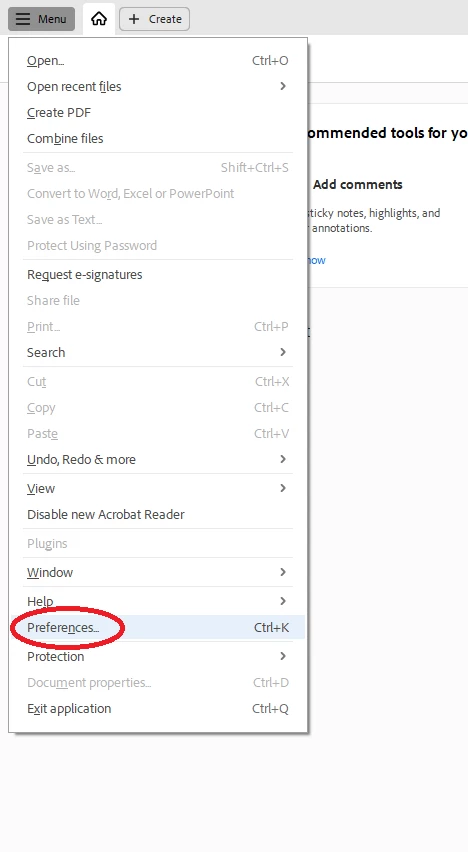
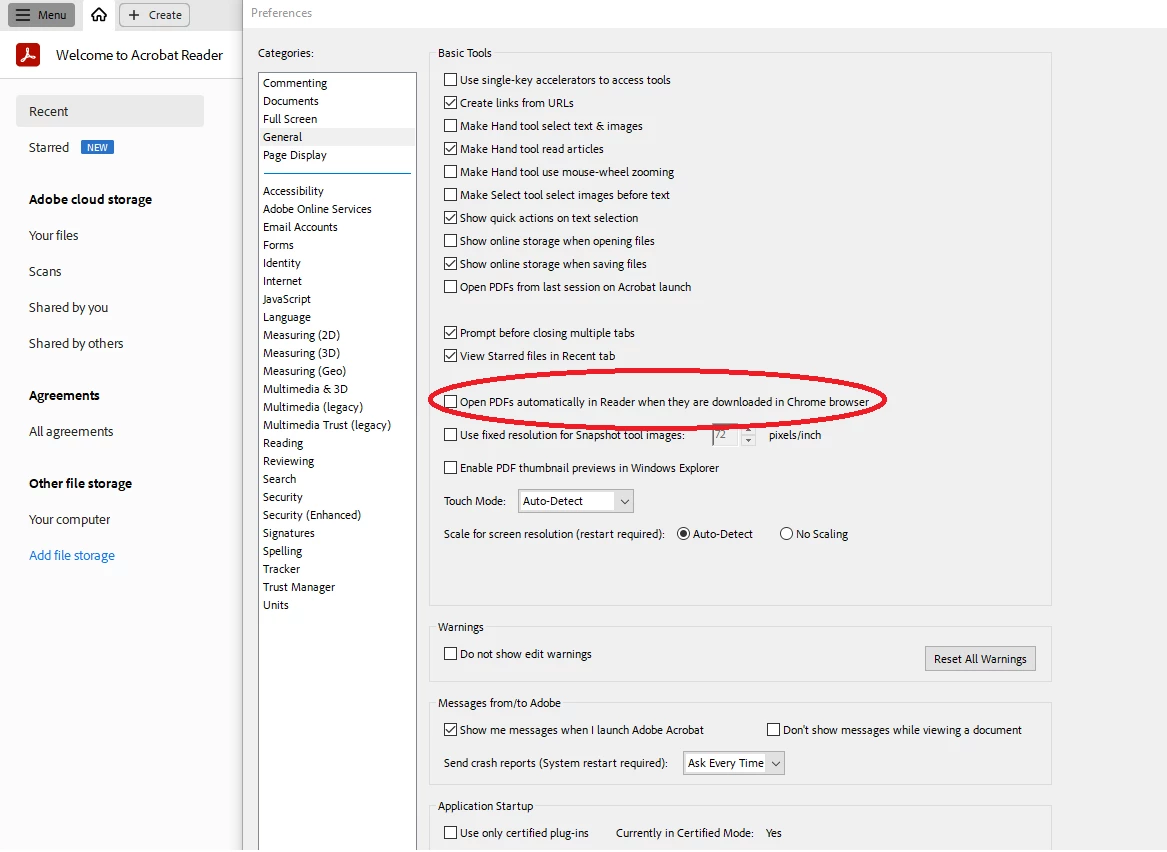
Open PDF, go to Menu > Preferences > General > Open PDFs automatically in reader when they are downloaded in chrome browser (uncheck the box)


Hope this help.

20 replies

New Participant
June 28, 2024


New Participant
June 28, 2024
  1. Open Chrome Settings.
  2. Expand Advanced.
  3. Select Downloads.
  4. Select Clear next to "Open certain file types automatically after downloading" ...
  5. Go to Privacy and security.
  6. Expand Site Settings.
  7. Click on PDF Documents.
  8. Make sure Download PDF files instead of automatically opening them in Chrome is enabled.
New Participant
June 28, 2024

For general purpuse it is a SETTING in Acrobat Reader


Open Acrobat Redaer > Menu > Preferences > General > REMOVE TICK from option "Open PDF-s automatically in Reader when they are downloaded in Chrome browser"


Done!


To stop PDF showing (opening) in new tab in Chrome


Menu (Options) > Settings > Privacy and security > Site settings > Additional content settings > PDF documents > CLICK ON option "Download PDFs"


Done!


To stop opening PDF file automatically when it is saved in Word, Excel, ...


When you go Save (Save As) > when you chose to save in PDF form > REMOVE TICK from option "Open page (file) after saving (publishing)


Done!


You welcome.

New Participant
April 25, 2024

Open Adobe reader; Menu> Preferences> General> Deselect "Open PDFs automatically in Reader when they are downloaded in Chrome browser"> Scroll down click Okay (if you dont do this, it will not save the new setting)

New Participant
March 26, 2024

Hello, for anyone having a similar problem in 2024, here's the steps if PDF keeps opening the documents you download on chrome:


1- open PDF and go to the top left menu

2- go to the tab labeled "general" 

3- untick the box that states "open PDFs automatically in reader when they are downloaded in chrome browser. 


Hope this helps or at least saves some time for someone out there. 

New Participant
March 15, 2024

open adobe acrobat app on your windows pc

go to prefrences(ctrl+K) ==> General ==> uncheck the setting for 'Open PDFs automatically in Reader when they are downloaded in Chrome browser" ==> DONE.

New Participant
February 13, 2024

Hi, Click on Menu (top left) > Preferences > General and tick off 


New Participant
December 18, 2023

You can uncheck the option of "View Adobe PDF results" in Acrobat's Preferences by navigating to Acrobat ribbon in Word>Preferences>Uncheck "View Adobe PDF result">Click Ok, Let us know how it goes and share your findings.

New Participant
December 18, 2023
This works fine until I get an automatic update for my Acrobat software.
It then defaults back to the view Adobe PDF results again and I have to
uncheck it again. So frustrating. Is there a way to permanently uncheck
view Adobe PDF results?

Charlie
E-mail from:

Charlie Grimes
New Participant
October 26, 2023

 I want pdf's to stop opening automatically, in any way, when I only want to download and save. Someone can fix my issue I appreciate.

RaypengCorrect answer
New Participant
December 16, 2023

Open PDF, go to Menu > Preferences > General > Open PDFs automatically in reader when they are downloaded in chrome browser (uncheck the box)


Hope this help.

New Participant
January 7, 2024

Thank you oh thank you oh thank you ... it has stopped popping open ... now I can work properly!!!


KareniCuellar
New Participant
July 2, 2022

If you've tried this and it didn't work, go to control panel > hardware & sound > Devices & printers, choose Adobe PDF printer, right-click, printing properties, and uncheck "view adobe PDF results", hit ok.


New Participant
April 9, 2024

Thank you so much. This was the only thing that worked.