

Participant
February 13, 2018
Question

I can't open pdf or excel files, I use windows 10 on desktop

  • February 13, 2018
  • 3 replies
  • 4765 views

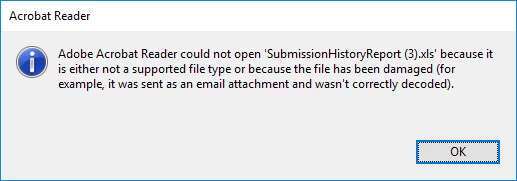
here's my error message  I can't run my business without pdf or excel! help
    This topic has been closed for replies.

    3 replies

    Participant
    November 20, 2021

    ok

    jane-e
    Community Expert
    Community Expert
    February 13, 2018

    Can you show an error message when you try to open a PDF in Adobe Acrobat Reader?

    And if you can't open Excel files when you try using Microsoft Excel, here is the link to the forum for Excel:

    http://www.excelforum.com/

    Participant
    September 17, 2021

    Hello,


    To problem is: no error message.
    Since update KB5005565 pc's where Adobe Acrobat Reader and Office are installed are causing issues:

    When trying to open Excel, instances of Adobe Acrobat Readerr are appearing in task manager, but not opening

    Nor does Adobe Acrobat Reader open.
    We have, in our company, this issue on more than 100pc's, the only ones not affected are the Windows 11 test-pc's.
    We tried to force an update to version 21.007.20091 but that does not solve the issue.
    Basicly the only way people are able again to use office is to completely desinstall Adobe Acrobat Reader...
    Wich is not an option

    try67
    Community Expert
    Community Expert
    September 17, 2021

    This has nothing to do with the original post. Post your question under a new thread.

    AnandSri
    Community Manager
    Community Manager
    February 13, 2018

    Hello karenm6603

    We apologize for the inconvenience caused, as per the description above, you are not able to open PDF files or Excel file in Adobe Reader, Is that correct?

    Adobe Reader cannot open an Excel file, as it can only open a PDF file. Only Adobe Acrobat Standard or Pro can open an Excel file.

    If you are not able to open a PDF file with Adobe Reader, please check for any pending updates of Adobe Reader from Help>Check for updates. Reboot the machine.

    Repair the installation files of Adobe Reader from Help>Repair installation(only for Windows). Reboot the machine and try opening the PDF file.

    You can also refer to Can't open PDF Link: https://helpx.adobe.com/in/acrobat/kb/cant-open-pdf.html

    Let us know how it goes, and feel free to update this discussion for any further assistance.

    Regards,

    Anand Sri.
