New Participant
May 23, 2017
Answered

I couldn't find 'Open documents as new tabs in the same window' [2017]

  • May 23, 2017
  • 7 replies
  • 52050 views

I knew that acrobat DC offer the function in which new documents is opened as new tabs.


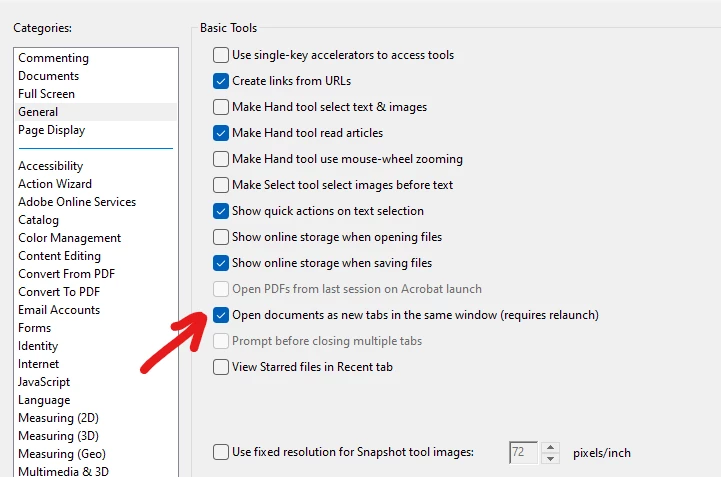
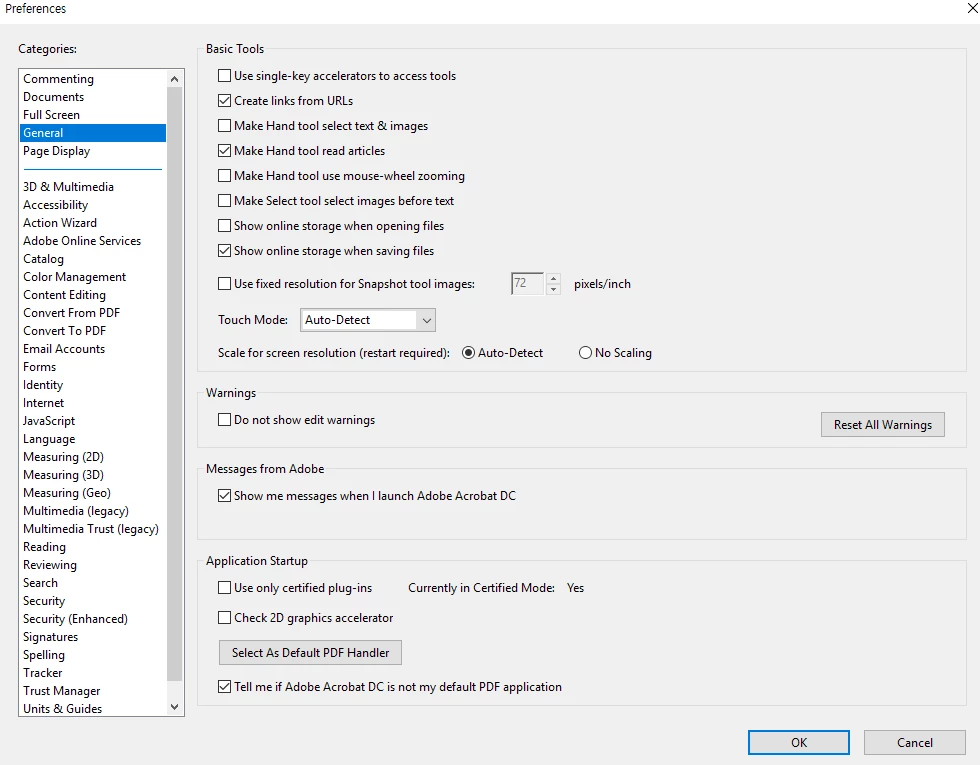
But I couldn't find that option in the setting menu(I had already saw the method for setting the function: Preferences > General > Open documents as new tabs in the same window (requires restart)).

There was no option below 'Show online storage when saving files'. ('Show online storage when saving files' was just the last option.)


How can I solve this problem?


-I can't reinstall acrobat DC because of 'error 28000'.(I'm using Windows 10)
 

This topic has been closed for replies.
Correct answer C.W.McCall

Argh! This thread appears to be some YEARS old yet it doesn't appear anyone has a solution yet. 

I also cannot find the mysterious setting option to have documents open in tabs. I want it back. 

I'm on 2023 verison of Acrobat so "watching for updates" has presumably not helped teh guy who had the problem in 2017... I wonder if he's still checking and waiting for it to fix itself. 


I found it.  Revert back to the old view for Acrobat.  Restart Acrobat.  Go to the General settings and you will see "Open documents as new tabs in the same window"; Uncheck it.


7 replies

New Participant
April 7, 2021

hi same here I don't find the open documents as tabs in same window, I have checked updates and it's showing no updates available


try67
Community Expert
April 7, 2021

What does it say when you look under Help - About Adobe Acrobat Reader?

Bernd Alheit
Community Expert
April 8, 2020

Your Acrobat version is too old. New versions of Acrobat Reader and Adobe Acrobat have this option.

New Participant
August 18, 2020

Can you help please ?  I am not a computer wizard....just a 50-something person trying to get by - and I LOVE my tabs....that I now cannot find. Same as initial user, the option is not offerred in preferences.  My version is below,  can you advise please how do I get "open new document in new tab ? "


Adobe Acrobat X.  copyright 1984-2010

Version 10.0


Brainiac
August 18, 2020

This is a nice simple one, Pilar. The tab thing was added long ago, around 2015, but your software is older than that - from about 2010. If you want to get up to date, and I'd recommend it, go to http://get.adobe.com/reader . Be warned, you will have to relearn Acrobat Reader, much is different, not just tabs.

New Participant
April 8, 2020

I ran update, restarted my Adobe Acrobat Standard DC:


Below there are suggestions (unsure if official Adobe responses), that you have to buy up? That doesn't make sense when the "reader" version offers this feature (nultiple docs to tabs, within one/same window), when I hold a paid subscription to an editor version? 


Brainiac
April 8, 2020

There's something confusing in your message romocop. You are running the "Classic" version of Acrobat Pro, which was released in 2015 as a normal product - pay for it once - features don't change - pay for an upgrade every few years. But you also say you have a subscription. Do you actually pay for an Acrobat DC subscription (please check your account details to tell us what the subscription name is)?

New Participant
September 17, 2018

Im sure i have the 2017 version, however when i split pages in a document before they would open in a new tab, now i have to save them in a folder each time which is so time consuming.

Bernd Alheit
Community Expert
September 18, 2018

Split pages doesn't open the documents.

Sunil_Soni
Adobe Employee
Adobe Employee
May 24, 2017

Kindly update the Acrobat via Help->Check for updates and keep us posted with your observation.

-Thanks

Sunil Soni

New Participant
May 24, 2017

Thanks for your help very much.

I updated my acrobat pro DC to latest version, then now I'm able to use a tab view function.

Meenakshi Negi
Community Manager
Community Manager
May 23, 2017

Hi 재윤이69280284,

It seems that you are using Adobe Acrobat DC classic version.

Could you please confirm the dot version of Adobe application you are using.

To check dot version, launch the application and go to Help menu > About Adobe Acrobat DC.

The option to "open PDF as a new tab in the same window" is not available on the classic track.

If you have the classic track, then you will not be able to open PDFs in a tab view.

Let us know if you need any help or if you have any questions.

Regards,

Meenakshi

New Participant
May 24, 2017

Thanks for your kind reply.

I'm using acrobat pro DC on continuous track version 2015.007.20033.

Doesn't it offer a tab view??

try67
Community Expert
May 23, 2017

Do you have Acrobat DC or Reader DC? If the former, what exact version number and what track (Continuous/Classic) are you on?