


October 30, 2017
Answered

I have selected grayscale but printing in colour?

  • October 30, 2017
  • 3 replies
  • 22517 views

hi there,

I have been on the forums and help pages and cannot find anything about printing in colour when the grayscale had been selected.

I am printing on the Adobe Acrobat Reader and have explicitly selected the print in Grayscale but the page has printed with Colour??

I am a universtiy student and it is imperative that I print in black and white.

I am hoping that someone can help me ASAP as I have now already spent 30 mintues trying to get in touch with you since you don't offer any E-mail address or any contact details for me to address this issue other than the forums which i felt was less that sufficient. That is 30 minutes of my studying that i won't ever be able to get back.

Please get back withn Help ASAP otherwise i will just have to assume that adobe Acrobat reader is incapable of printing in Grayscale.

Many thanks,

John.
Correct answer 1arrow1

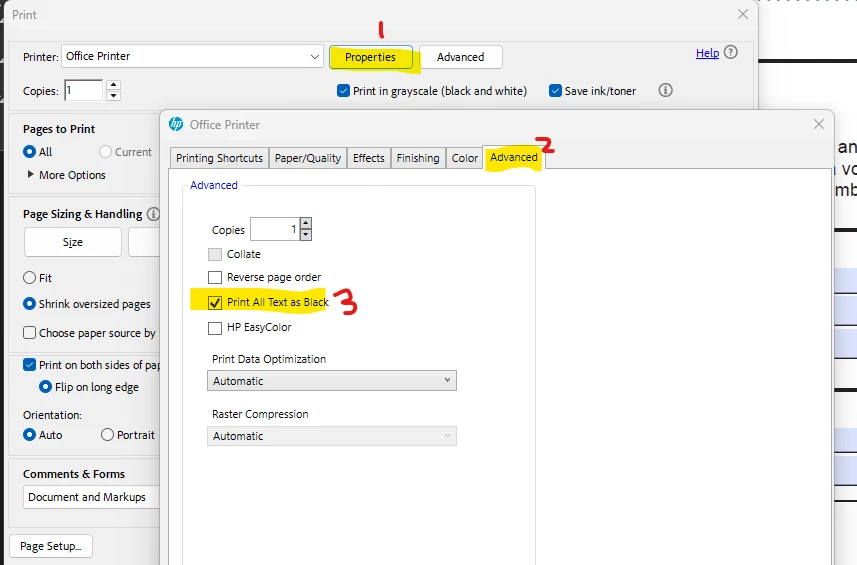
In 2025, this is what I did to fix this issue of it not printing in black and white, even though you select print in grayscale.

-go to print

-properties

-advanced

-print all text as black


3 replies

1arrow1Correct answer
Participant
April 29, 2025

In 2025, this is what I did to fix this issue of it not printing in black and white, even though you select print in grayscale.

-go to print

-properties

-advanced

-print all text as black


Participant
August 6, 2024

Hey you guys! I've experienced this problem too for months now. Privately and in my company. I've found the permanent solution to this;

Step 1:

Clean Acrobat from your PC with acrocleaner (https://www.adobe.com/devnet-docs/acrobatetk/tools/Labs/cleaner.html#downloads)

Step 2:

Download Acrobat Pro via this link but choose the 32-bit Version. In most cases, it will automatically know your adobe account and log you in as soon as you open the new version. No need to restart your pc by the way. Link: https://helpx.adobe.com/de/acrobat/kb/acrobat-dc-downloads.html


This has finally worked after months of frustration and questioning. 

Good luck and have fun with a now working grayscale box version :)!

Best regards from germany

Leon 

Participant
January 14, 2025

None of the above have worked for me and I am paying per colour print so this glitch is costing me a fortune

Adorobat
Community Manager
Community Manager
October 30, 2017

Hi John,

As per above-mentioned description, you have selected the option to print pdfs in black and white but that option is not working in Reader, is that correct?

Please try following troubleshooting steps:

1- Check for updates- Launch Reader > Help> Check for Updates.

2- If that doesn't work, click "Properties" under Print dialogue and enable the option to print the text in black.

Below is the screenshot of the options available on my printer:

3- Also, try printing another pdf and see if this behavior still continues.

4- If yes, download and run cleaner tool from here: Download Adobe Reader and Acrobat Cleaner Tool - Adobe Labs , reboot the machine, and install Reader DC from here: Adobe - Adobe Acrobat Reader DC Distribution

Could you let us know the version of Reader installed on the machine? You may refer to this link on how to: Identify the product and its version for Acrobat and Reader DC

And, the operating system installed on the machine- Mac/Windows?

Keep us posted with the results.

Shivam

Participant
September 29, 2023

I have the same issue, I am trying to print via Adobe PDF and I have tried Microsoft Print to PDF as well. The Grayscale option is there, but when I check the box nothing changes and when you go to print/save the file it is still in color. I have ran a repair, checked for updates, uninstalled, ran the cleaner tool, deleted the preferneces folder in roaming folder on the C drive, and rebooted. Printing to grayscale does not work within Adobe at all, even clicking advanced and selected black and white does not fix this. I can print to grayscale through every other app, even alternative PDF applications, just adobe will not let me print to grayscale, regardless of printer or settings. Please help!!!!

Participating Frequently
November 11, 2023

Same problem here. It is not working somehow. Please look into this #devs.