


Inspiring
November 20, 2010
Answered

Installation of Adobe Reader X (10.0.0.1) Fails

  • November 20, 2010
  • 12 replies
  • 56559 views

Running Windows XP SP3.

I used FTP to download AdbeRdr1000_en_US.exe from ftp.adobe.com/pub/adobe/reader/win/10.x/10.0.0/en_US and tried to install it.  I got an error popup indicating a file failed to register.  When I dismissed the popup, the installation continued.  However, I could not start AcroRd32.exe.

I removed Adobe Reader X.  I then used FTP to download AdbeRdr1000_en_US.msi from ftp.adobe.com/pub/adobe/reader/win/10.x/10.0.0/en_US and tried to install it. This time, I did not get an error popup.  However, I still could not start AcroRd32.exe.

This time, I captured some of the error data, the image of which is here.  The top is an error popup.  The bottom is what I got when I selected "click here" to see technical information.  No, I did not capture ALL of the technical information.
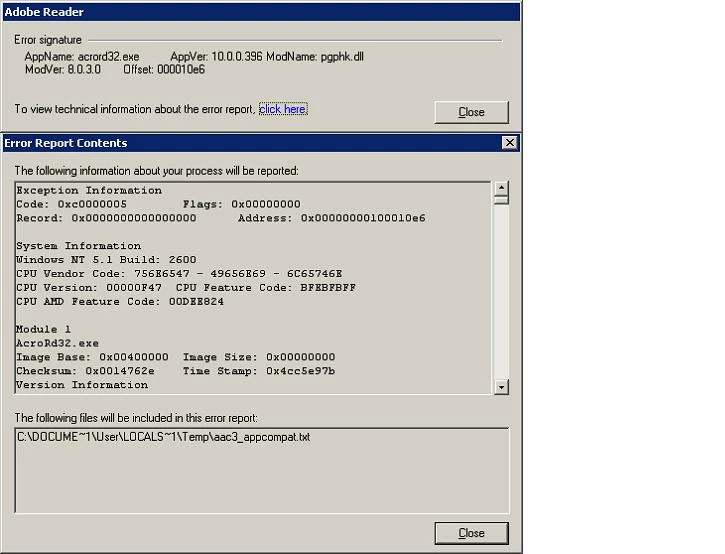
I have now reverted back to Adobe Reader 9.4.0.195.  Will not Adobe Reader X install in Windows XP?

    This topic has been closed for replies.
    Correct answer ParvezGHH

    Having encountering this issue and reading through the responses the best solution would be to use Adobe Readers whitelisting feature.  Below are the steps to follow:

      i.   Add a registry entry enabling the use of whitelisting:
           [HKEY_LOCAL_MACHINE\SOFTWARE\Policies\Adobe\Acrobat Reader\10.0\FeatureLockDown]
           "bUseWhitelistConfigFile"=dword:00000001

      ii.  Create a whitelist file called "ProtectedModeWhitelistConfig.txt" and place it
           in the Adobe Reader executable path i.e. C:\Program Files\Adobe\Reader 10.0\Reader

      iii. The ProtectedModeWhitelistConfig.txt file will need to contain the string
           SECTION_ALLOW_ANY = *PGPhk*

    I have some other information worth checking out on my blog www.greyhathacker.net regarding this issue which might be useful.

    12 replies

    ParvezGHHCorrect answer
    Participant
    March 11, 2011

    Having encountering this issue and reading through the responses the best solution would be to use Adobe Readers whitelisting feature.  Below are the steps to follow:

      i.   Add a registry entry enabling the use of whitelisting:
           [HKEY_LOCAL_MACHINE\SOFTWARE\Policies\Adobe\Acrobat Reader\10.0\FeatureLockDown]
           "bUseWhitelistConfigFile"=dword:00000001

      ii.  Create a whitelist file called "ProtectedModeWhitelistConfig.txt" and place it
           in the Adobe Reader executable path i.e. C:\Program Files\Adobe\Reader 10.0\Reader

      iii. The ProtectedModeWhitelistConfig.txt file will need to contain the string
           SECTION_ALLOW_ANY = *PGPhk*

    I have some other information worth checking out on my blog www.greyhathacker.net regarding this issue which might be useful.

    Leaf_MoldAuthor
    Inspiring
    March 12, 2011

    ParvezGHH:  Thank you, thank you, thank you.  Your suggestion (made today) works!  I can now use Reader 10 with PGP 8.

    Adobe Reader 10 now works on my PC both as a stand-alone application using a local PDF file and as a plugin for my browser (SeaMonkey) using a PDF on the Web.

    Participant
    January 25, 2011

    We just ran into this same issue.

    Has Adobe provided a permanent fix yet?

    January 25, 2011

    I have not seen anything new from Adobe on this matter.

    Participant
    December 25, 2010

    Workaround!

    What I did was enable the Windows 2000 compatibility mode via the properties on the shortcut to Abobe Reader X.

    This is quite often a useful trick for inter-program compatibility issues like this, and always worth a try.

    (Ok -not a total cure, the error dialogue still pops up about the PGP DLL, but you can just "ok" that away and Adobe Reader continues to work fine).

    Participant
    January 31, 2011

    Thank you BigAlUK2 - I can confirm that setting the properties of the "shortcut to Abobe Reader X" to "Windows 2000" compatibility mode enables me to use both PGP 8.0.2 and Adobe Reader X.  It does not appear to allow PDF files to be read via MSIE.

    I am running Windows XP professional Version 2002 Service Pack 3 with Adober Reader X 10.0.0 and PGP 8.0.2.  PGP is a paid for version so, I too, have no great need to upgrade it on my XP systems (I had to upgrade PGP on Windows 7 but that is a different story!)

    Leaf_MoldAuthor
    Inspiring
    January 31, 2011

    Besides IE, use of Windows 2000 compatibility mode also does not allow PDF files to be read via Firefox, SeaMonkey, or other Gecko-based browsers.  Thus, this is not an acceptable fix for the problem of having both PGP 8.x and Adobe Reader X on the same PC.

    As I indicated back in October, I really do not understand why Adobe Reader has any interaction with a PGP-specific DLL file.

    At the present, I cannot upgrade PGP to a compatible version since all such compatible versions are afflicted with a serious security vulnerability that Symantec (the current owner of PGP) declines to correct for freeware PGP versions.

    Participant
    November 30, 2010

    Originally, when Adobe Reader X failed to open after installation on Windows XP, SP3, I uninstalled Adobe Reader X and reinstalled Adobe Reader 9.4.

    Now, running the updater on Adobe Reader 9.4.1 produces the message "No updates available"; but when I go to http://get.adobe.com/reader/, Adobe Reader X is still offered for downloading.  Consequently, I'm getting mixed signals as to whether I should try another installation of Adobe Reader X at this time.

    Some guidance would be greatly appreciated.

    Participating Frequently
    November 29, 2010

    I'm using Windows XP Professonal, SP3, without PGP, and I also experienced failure of Reader X to open after initial installation in response to automatic updater notification.

    On 22 Nov 2010, I reinstalled Reader 9.4.1, which is functioning normally, and shortly thereafter, the updater stopped notification of an available update.  Indeed, as of this morning, 29 Nov, the updater still indficates no update available for Reader 9.4.1.  However, Reader X is still offered for downloading at the Adobe website.  This seems like apparently contradictory signals as to whether or not Adobe recognizes the problem with Reader X.

    I hope Adobe will make an announcement as to when it is advisable to try again to update to Reader X.  Meanwhile, I am continuing to use reader 9.4.1, and I am reluctant to risk going through the trouble of reupgrading to Reader X, reremoving it ,and reresintalling 9.4.1!

    Participating Frequently
    November 30, 2010

    Deleted.

    Message was edited by: Ibn Rushd

    Participating Frequently
    November 24, 2010

    This issue is observed with PGP 8.1 for Reader X. Reader X works fine with PGP 9.x and PGP 10.x products. PGP 8.x products have been marked for 'End Of Life' by PGP itself.

    Please check the following links.

    http://na.store.pgp.com/end_of_life_desktop8.html

    http://forum.pgp.com/t5/PGP-Announcements/PGP-Desktop-8-x-End-of-Life-Announced/td-p/35021

    The issue should not happen with latest versions of PGP.

    Participant
    November 24, 2010

    rdrXuser wrote:

    This issue is observed with PGP 8.1 for Reader X. Reader X works fine with PGP 9.x and PGP 10.x products. PGP 8.x products have been marked for 'End Of Life' by PGP itself.

    Please check the following links.

    http://na.store.pgp.com/end_of_life_desktop8.html

    http://forum.pgp.com/t5/PGP-Announcements/PGP-Desktop-8-x-End-of-Life- Announced/td-p/35021

    The issue should not happen with latest versions of PGP.

    @rdrXuser: Is this an official answer of Adobe that Reader X will be left incompatible with PGP 8.1? Or am I implying too much from your message?

    Regards,

    mpp

    Participant
    November 22, 2010

    That is very informative, thank you. I also have in my system PGP 8.1 installed and use it all the time. My antivirus software is Symantec. That does not seem to be the issue, as i understand, so, i have not tried disabling it, as i could install Acrobat X fine: Acrobat X would just not run for me.

    I also went back to Acrobat 9.4 and i am a bit baffled about this conflict between PGP 8.1 and Acrobat X.

    Out of curiosity, what is the reason for this conflict... is that because of new security features in Acrobat X....?

    AbhigyanModi
    Community Manager
    Community Manager
    November 23, 2010

    This is most likely due to the security features of Reader X. Thanks to this thread, I think we have enough information to investigate, we'll update the thread once we have a resolution.

    -abhigyan@adobe.

    Participating Frequently
    November 22, 2010

    Agree with Abhigyan that the crash looks in virus scanning module. The crash is in pgphk.dll which is a DLL file used by PGP Hook Library created by Network Associates Technology (McAfee).

    Can you please tell if you are using any McAfee products. If so, which version exactly? Moreover, are you using any other virus scanning product on your machine?

    Participant
    November 22, 2010

    I can confirm the above problem and might be able to provide a solution.

    Error and Symptoms: application error loading AcrRd32.exe - instruction "0x100010e6" refers to memory address "0x00000000" - read could not be performed. You will find a log entry in the system event log within windows.

    Systems affected so far:

    Windows XP ServicePack 3

    Adobe Reader X

    PGP Desktop Security 8.1


    Reason: Adobe Acrobat Reader X (version 10.0.0) is incomptible with pgphk.dll (version 8.1.0.0). PGPhk.dll belongs to an installation of PGP Desktop Security version 8.1.0.0, which is an older paid version of the well-known PGP.

    Workaround: As a workaround, you need to disable loading of "pgptray.exe", a helper application for the Windows XP systemtray which is being loaded at windows startup. As long as pgptray.exe is loaded, the startup of Adobe Reader X fails. You might also just kill the pgptray.exe process from the Windows Task-Manager before attempting to load Adobe Reader X.

    Can someone with the appropriate credentials pass the information on to the product manager in charge for further investigation?

    Regards,

    mpp

    Leaf_MoldAuthor
    Inspiring
    November 22, 2010

    Anti-Virus:

    I have not used McAfee products in many years.  I was using Norton Anti-Virus from Symantec until a little over 2 years ago.  Then I switched to AVG Anti-Virus (the freeware version, now at v.10.0.1153).

    PGP:

    I intalled PGP 8.0.3 on 29 July 2006, more than 4 years ago.  Again, this is the freeware version, whiich does not include Desktop.  I do have PGPhk.dll, but it is v.8.0.3.0 and not v.8.1.0.0.

    In any case, Adobe Reader 9.4 (and all prior versions of Adobe Reader) installed and worked okay with both AVG (at least back to Adobe Reader 8.1.3) and PGP.  If Adobe Reader X cannot install and work with those applications, then the problem lies with Adobe and not with either AVG or PGP.  However, I will try again to install Adobe Reader X while AVG is disabled; but there is no way that I will operate my PC on an ongoing basis without an anti-virus application running.

    Participant
    November 21, 2010

    Installed Acrobat X again, after installing Acrobat 8. For the record, here are the error screens i get:

    By clicking on "click here:

    and by view "technical info about the error report":

    AbhigyanModi
    Community Manager
    Community Manager
    November 22, 2010

    Looks like there is a crash in your virus scanning module. Which virus scanner are you using?

    To ascertain this, can you temporarily disable your scanner and see if you are able to launch?

    Participant
    November 21, 2010

    Having the same issue. I am on Windows XP SP3: con no longer view any pdf, as i am getting the error describe above, after upgrading to Acrobat X. Tried to install/uninstall again and again, no luck. Uninstalled and installed Acrobat 9, not working. Uninstalled Acrobat 9, installed Acrobat 8, no luck. Used a registry cleaner product, restarted Windows after uninistalling/installing multiple times. In the end looks like i made it work with Acrobat 8.

    Participant
    November 21, 2010

    ...nope, i take it back, with Acrobat 8 i am now getting an error dialog saying "There was an error opening this document. This file cannot be found", which does not make any sense as an error.

    I had opened a pdf file, which displayed fine. Then closed it. After a while (while i was posting the previous message), i got that dialog.

    After clicking OK on that dialog about 30 times, it brings back the pdf file i had closed.

    I am now basically unable to close a previously opened pdf file, because after few minutes, i get Acrobat popping up again and again with that message.

    Acrobat.exe does not show in Task Manager however, so, not sure how to remove this behavior other than uninstalling.