


New Participant
October 19, 2021
Question

Mcafee installed without permission, or any way to avoid it.

  • October 19, 2021
  • 7 replies
  • 18174 views

Recently downloaded Adobe Acrobat. During installation, noticed there were two additional programs downloading, McAffe Safe Connect, and McAfee Security Plan Plus. I did not want them, and had no way to expect they would be part of it. After looking through this community forum page I have seen many references to a checkbox regarding it. Where in the image below is that option regarding McAfee programs, as clicking download simply downloads the setup, and the setup automatically downloaded the other two programs. And the only checkbox present is for the chrome extension.
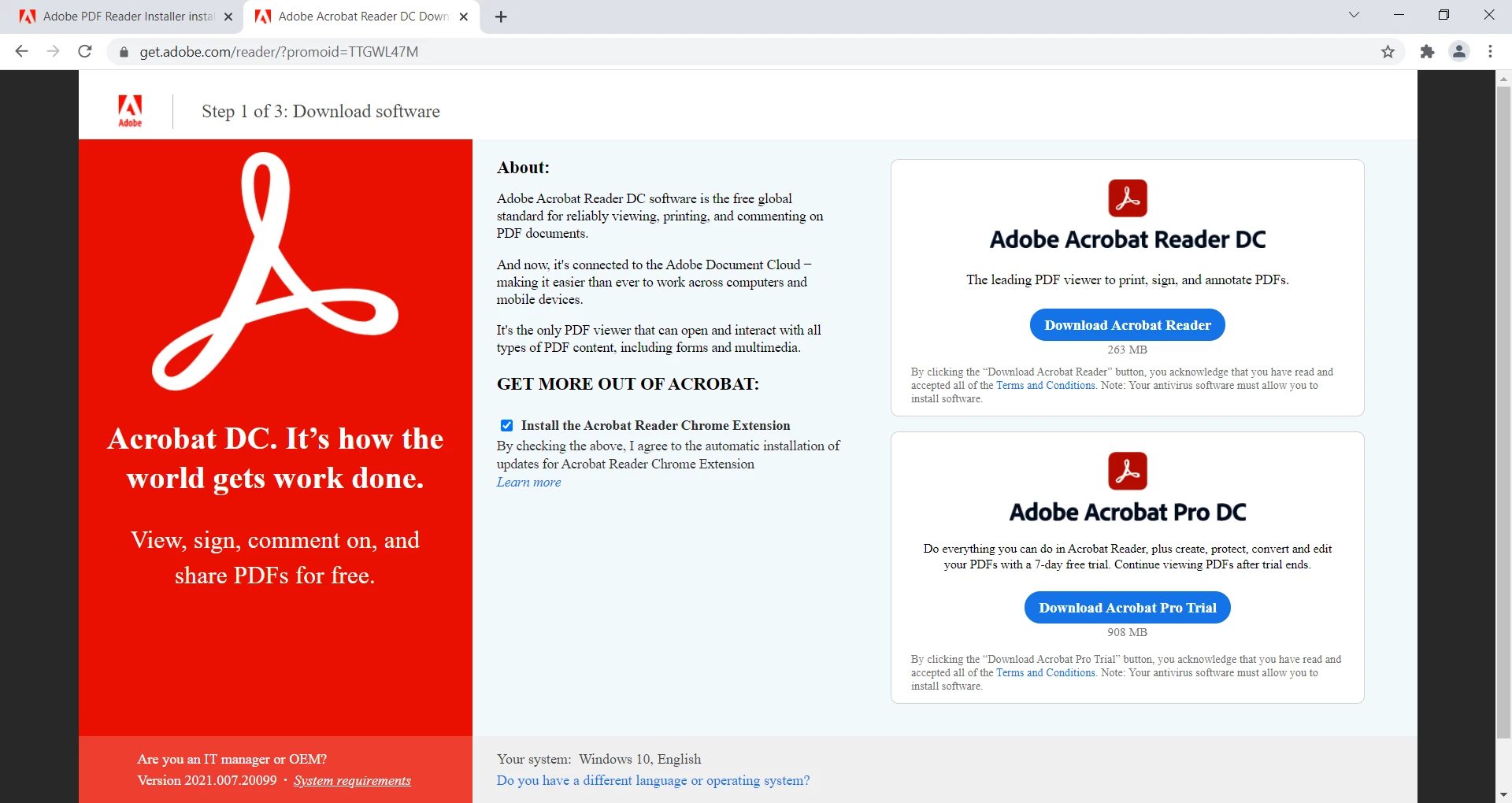
I am more than capable of uninstalling them after the fact, so not that big an issue. But when looking into why it happened, to have the answer apparently be, "you need to uncheck the boxes", is simply not an accurate or satisfying answer. Don't mind it being done, just the lack of transparency that's bothersome.


7 replies

New Participant
October 27, 2024

This is still a problem this time there isn't even a check box and dosent even tell you what you are installing this thing just popped up when i left my  Adobe for download there wasn't even an option this is unacceptable

Meenakshi Negi
Community Manager
Community Manager
October 28, 2024

Hi EssaManzor,


Sorry about the trouble caused.


The option to disable the McAfee download is still available. Please try clearing the cache and cookies before you download the application. 


As you have already installed the application, try uninstalling it. That will remove the McAfee installer. Then, you can directly install only the application from this page: https://adobe.ly/3AcfTyB.


Try reinstalling the application using the following steps:
-Remove the application and run the cleaner tool (https://adobe.ly/3NJVF2q).
-Reboot the machine
-Install Adobe Acrobat from the following page: https://adobe.ly/3AcfTyB.


Let us know how it goes.


Thanks,

Meenakshi

New Participant
May 27, 2025

This is disgusting - shame on you Adobe! If I wanted McAfee on my computer I would donwload it myself. It should not be an "option", you shouldn't try to push other software to people's computers. Shameful.

paulw68836425
New Participant
July 30, 2024

I installed Adobe today, without authorization they installed this junk. I thought I had malware. No check boxes, nothing, side loading apps.

New Participant
July 30, 2024
Adobe hid the pre-ticked check-box on the website when you clicked on
Download.
That way the executable stub installer "assumes" you wanted the trash app.
It's extremely sneaky of Adobe to do that.
New Participant
September 14, 2023

I installed Adobe and it installed McAfee without my consent. Now I'm uninstalling both Adobe and McAfee in favor of an alternative that asks you EXPLICITLY before it downloads and installs optional software. Its called Sodapdf if anyone is as frustrated about this as I am.

New Participant
March 3, 2024

This happened to me just yesterday, 03/02/2024. I did not know how McAfee was installed on my PC until I read the posts on here. There was no boxes to check or confirm when I installed Adobe Reader. I already have Norton and have no need for McAfee. When I tried to uninstall it, McAfee popped up a box with a warning of my PC not being protected, but there was no button to allow me to confirm that I still wanted to uninstall it. Tried to uninstall it from the Program Files. I could not do it either. What the heck?! This is beyond unethical.

S_S
Community Manager
Community Manager
March 4, 2024

Hi @Uyen35830782k2tw,


Hope you are doing well. Thank you for writing in!


When you get to the website to install Acrobat Reader, you should see a checkbox confirming if you want to install McAfee antivirus and reader installation.


To avoid that, you can try downloading the installer from here: Adobe - Adobe Acrobat Reader Distribution


Hope this helps.


-Souvik

New Participant
June 19, 2023

I understand your frustration with the installation process and the unexpected additional programs that were downloaded along with Adobe Acrobat. It can be frustrating when software installations include bundled programs without clear notification or options to opt out. While I can't directly see the image you mentioned, I can provide you with some general guidance on how to avoid such bundled programs in the future.


During the installation process of Adobe Acrobat or any other software, it's essential to carefully review each step and read all the information presented to you. Often, bundled programs are mentioned in the installation wizard, usually in the form of checkboxes or options that are preselected by default.


To ensure that you only install the software you want, follow these steps:


  1. Pay close attention to the installation wizard: Look for any additional options or programs that are being offered during the installation. Read each screen carefully before proceeding.
  2. Look for checkboxes: Checkboxes are typically used to indicate whether you want to install additional programs. These checkboxes are usually located on the same screen where you accept the terms and conditions. Make sure to uncheck any boxes related to bundled software that you don't want.
  3. Decline or skip the offers: If you encounter screens or prompts offering additional programs, make sure to decline or skip those offers. Sometimes, there may be buttons labeled "Decline" or "Skip" that allow you to bypass the installation of bundled software.
  4. Download from trusted sources: Always download software from the official website or trusted sources to minimize the risk of downloading bundled programs or malware.


By being attentive during the installation process and carefully reviewing the options presented to you, you can avoid installing unwanted bundled programs in the future. It's understandable that you find the lack of transparency frustrating, and it's important for software developers to provide clearer information and options during installations.

Bernd Alheit
Community Expert
June 19, 2023

"... and the unexpected additional programs that were downloaded along with Adobe Acrobat."


The installation of Adobe Acrobat doesn't install other programs.

Inspiring
June 5, 2023

Download and Install Adobe Reader Without Mcafee and Error.

https://youtu.be/VMy-n1i6WTY

JR Boulay
Community Expert
December 8, 2022

This box is not pre-checked in countries where it is forbidden, like France and certainly the whole EU.

Acrobate du PDF, InDesigner et Photoshopographe
New Participant
June 2, 2023

After the exe file clicked it loaded 2 McAfee program and the adobe reader without permission on Win 10 PC..

New Participant
June 23, 2022

I just had the same thing happen. The "uncheck the box" is not a sufficient answer when it is never proposed as an option prior to installation. About 10 minutes ago, I was pinged with a notice that Adobe Acrobat Pro DC needed a manual upgrade, and I followed the link to the site. At which point I selected updated Adobe Acrobat Pro DC and Adobe proceeded to install two separate McAfee programs. I am adamantly against using McAfee, and have been since 2008. I would NEVER have approved this install as McAfee is an extremely aggressive and invasive anti-viral software that can easily significant damage to PC's, often worse damage than viruses. I quickly canceled the download, which promptly told me that my Adobe Acrobat Pro DC software was actually up to date and was not in need of updating.


It appears, with almost absolute certainty, that this ping to manually update Acrobat Pro DC was a ploy to download McAfee programs. I have refused Acrobat Pro DC uploaded McAfee before, two weeks ago, when I installed the program on my computer. I have never elected for this. This is borderline illegal, and a definitively unethical business practice on behalf of Adobe.

New Participant
June 28, 2022

Such a shameful act by Adobe to try to install Mcafee without permission. I am really upset and concerned about the ethics of this company called Adobe.


S_S
Community Manager
Community Manager
June 28, 2022

@Vineet250455275juk 

Hello,


I hope you are doing well. I am sorry for your experience with Acrobat Reader Mobile.


Please try installing the application from the below link:

Adobe - Adobe Acrobat Reader DC Download | Free PDF viewer for Windows, Mac OS, Android


Upon clicking on the link, you will get the below page:

Please uncheck the options to install McAfee and it will not be added to your installer package.


Let me know if it helps.


Thanks,

Souvik.