


Participating Frequently
January 29, 2020
Question

Missing "I need to sign" field

  • January 29, 2020
  • 1 reply
  • 1851 views

Hi Everyone,


I have created a fillable form in Acrobat, and decided to test it out in Adobe Reader XI (11.0.10), and my options for signing the document are a bit limited
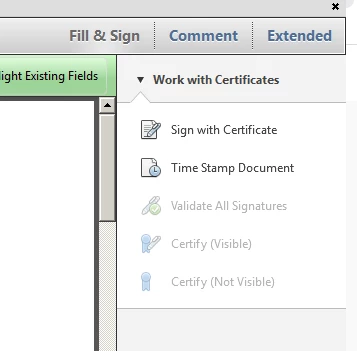
 These are the options I have, and I do not wish to have the user create a new ID
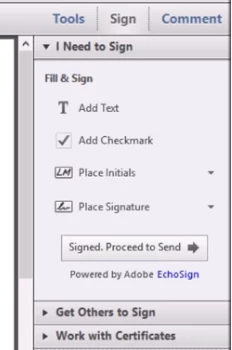
 

This is what I had in mind, I got this snippet off of a youtube video that uses Adobe Reader XI (11.0.07). 

I was wondering why this menu doesnt show up for me when I open my form on my Adobe Reader. 


Is my version too old? Am I missing something? Did I save the PDF incorrectly?

This topic has been closed for replies.

1 reply

ls_rbls
Community Expert
January 29, 2020

Yes your version is quite old, but maybe repairing the installation and applying the latest optional update for that version can resolve certain issues that are not supported anymore.


You can just try and apply the latest opt

onal update for your version from the link provided below.


If just applying this update doesn't resolve the issue, consider repairing the installation


To repair, click on Help-->> Repair Installation.


If you need to reinstall the product  instead of repairing, download the full offline installer from here: ftp://ftp.adobe.com/pub/adobe/reader/win/11.x/11.0.06/en_US/ 


Once the repair or reinstalltion is achieved successfully don't forget to apply the latest optional update that was publsihed for that version.


You can get it here:  https://www.adobe.com/devnet-docs/acrobatetk/tools/ReleaseNotes/11/11.0.23.html#elevenzerozerotwentythree 

Participating Frequently
January 29, 2020

Thank you!

Im wondering how the guy in the youtube video did it now

ls_rbls
Community Expert
January 29, 2020

Seems like he was using the Fill & Sign tool.


If  you notice in the youtube snippet, he is not using certificate based digital signature fields.


Your document, on the other hand, seems like it was created with the idea of applying digital signatures, not electronic signatures.


However, I may be wrong; but if you want to see more clearly what I'm referring to, upload that file to your mobile device and open it up with the free  Adobe Reader Mobile App. You'll notice that the digital signature fields dissappear and you are able to use Fill & Sign tool  with the mobile app.


This doesn't seem to be the case of the desktop version of Adobe Reader XI.