


Participating Frequently
April 12, 2023
Question

Ms Gothic texts are missing while opening .ai file into acrobat reader

  • April 12, 2023
  • 2 replies
  • 4351 views

Dear team,

have good day,

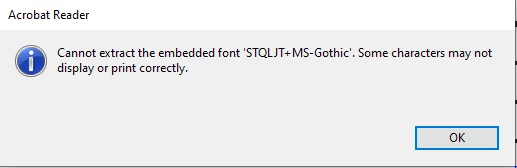
Ms Gothic font some texts are missing while opening .ai file into acrobat reader.

Error through as below image. kindly support us to resolve this.


Thanks

Saravanan S

This topic has been closed for replies.

2 replies

Meenakshi Negi
Community Manager
Community Manager
April 12, 2023

Hi Saravanan S293477805nof,


Thank you for reaching out.


Please confirm if the issue occurs with a particular PDF.

It seems to be font related issue. This happens when the font is not embedded in the PDF and is unavailable on the machine.

You may check if the fonts are embedded from the File menu > Properties> Fonts.

Would you mind sharing the PDF with us? We will check and confirm the same.


Thanks,

Meenakshi

Participating Frequently
April 13, 2023

Thanks for your support.

This issue occurs only for this pdf file.

we couldn't share PDF since it is confidential.

we checked the font settings , all required fonts installed in system.

Please lets us know if any other issues apart from font issue for this pdf.

Participating Frequently
May 9, 2023

Hi Saravanan S293477805nof,


Sorry about the delay in response.


We have checked the file, and it looks fine after converting it to PDF.

As per the message, it appears to be a font-related issue. That is the reason the text is not displayed. However, there are no other issues with the file.

As the issue is file specific, please ask the user to recreate the file and check if this happens again. Ensure that the fonts are embedded.


Thanks,

Meenakshi


Thanks for your support !!!

We ensure that Coverrting in to PDF has no issues & all the fonts are embedded.

Could you please confirm that  same AI file has no issues on opening directly in adobe acrobat as PDF.

Also we would like to have virual Teams call to discuss on this issue.

Please confirm.

Best Regards,

Saravanan S

kglad
Community Expert
April 12, 2023

in the future, to find the best place to post your message, use the list here, https://community.adobe.com/


p.s. i don't think the adobe website, and forums in particular, are easy to navigate, so don't spend a lot of time searching that forum list. do your best and we'll move the post if it helps you get responses.


<moved from using the community>