


Participant
May 16, 2023
Question

New Adobe look - undo button?

  • May 16, 2023
  • 8 replies
  • 20042 views

Hi,

Adobe has made a new look for Acrobat. And now I need the undo button on the Ribbon.

The only way I can is ctrl+z (but it is a touch screen I have without a keyboard.)

and On the menu: Menu > Undo, redo & more > Undo.
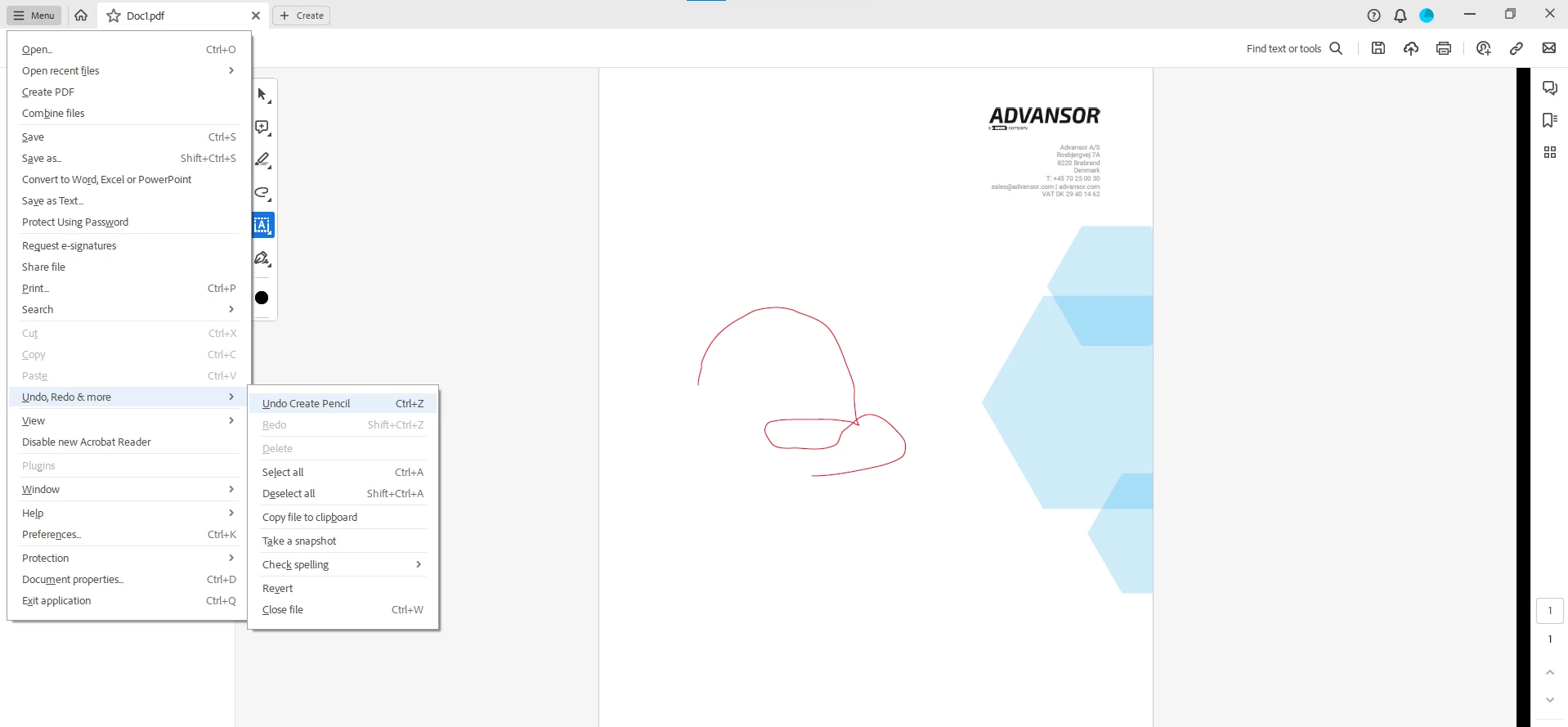
 

Please help me to get the button back in the new Adobe look.


8 replies

Participant
January 26, 2024

For some things you can select what you need to remove and then delete it by hitting delete. I had to remove some boxes I added when trying to add text to the pdf. click on the unwanted item and hit delete. Or right click on it and hit delete. Hope this helps some!


Best,

Forest 

Participant
March 25, 2024

So is there a undo button or not?? And where in the world is it?? Theres no way they would get rid of a necessary tool!!

Bernd Alheit
Community Expert
Community Expert
March 25, 2024

There is no Undo button.

Participant
December 4, 2023

This was the best news I saw for the current changes and I was so relieved when the old look reappeared when I disabled it!! I can finally get back to work without the confusing interruptions. I will review the new Adobe look and the changes but am so glad to have a work around to stop slowing down the workflow. Good luck!

Participant
April 18, 2024

Thank you for pointing out the Disable New Acrobat option.  I hate that there is no undo button.  I have been searching for over an hour now and have to start my entire edit again because I accidentally deleted one too many pages and can't undo it.  I'm also sick of this switching of the tools back and forth from left to right stuff.  There is no point to it.  Leave the tools on one side or another.  You can improve them without moving them back and forth.  Start thinking about the actual end user and what makes their job easier.  We don't care how fancy you make it look.  We care that it is easy to use and efficient to getting our work done.


Participant
September 12, 2023

This is the most awful redesign I have ever seen.  Horrible.  

Participant
October 27, 2023

Please tell me Adobe is in the process of changing this "revamp" they did!!!! It's so irritating to have to go through all of these steps every time you want to undo/redo an action.

Amal.
Community Manager
Community Manager
October 30, 2023

Hi there


Hope you are doing well.


Please go through the help page https://community.adobe.com/t5/acrobat-discussions/learn-about-new-acrobat/td-p/14078856 for more info. on new Acrobat.

If your critical workflows are impacted, you can switch to the old UI from the “Menu” on the top left corner of Windows and View Menu on MacOS.


~Amal

Participant
September 5, 2023

Bring back the undo button at the top of the menu bar. To bury this function in a menu is a BAD DESIGN. The undo button is one of the most used functions in many programs. It should be quick and easy to access. Please fix.

Participant
September 6, 2023

I agree with you! Bring back the UNDO button!

Participant
September 6, 2023

I agree!!! Bring back the button!!!

AnandSri
Community Manager
Community Manager
September 5, 2023

Hi All!


We appreciate your valuable feedback! We're always looking for ways to make Acrobat better, and we appreciate the time and effort you have taken to share your feedback with us.

We acknowledge that the new Acrobat represents a notable change, however we hope that as you get familiar with the new interface, you are able to be more productive & get more out of Acrobat. With the new interface, we aim to:


  1. Provide a simplified viewing experience that helps reduce clutter & optimise it for most used PDF actions that are relevant while viewing a document.
  2. Easily allow users to discover PDF tools they need by ensuring tools are intuitively grouped and a click away,
    • For example, all tools that allow content, page & file level edits can be found under one action-based verb called “Edit”; tools that allow converting files to & from PDFs can be found under “Convert”; tools that allow filling & signing documents or requesting signatures from others under “Sign”.
  3. Most importantly, the new interface enables users to effortlessly move between different PDF tools to complete their document related tasks.
  • For example, someone viewing comments in a PDF should also be able to easily edit the text of it without interrupting their workflow.
  • A user can seamlessly perform page level edits such as reordering, inserting, extracting, rotating or deleting pages while editing content and/or commenting on the file.


Rest assured, we have been actively listening to the feedback from this community to swiftly incorporate them into our upcoming releases, few of which are as below: 


1.    Lack of an ability to customise the user interface.

  • Users will soon be able to drag the floating quick tools bar anywhere within the viewer to prevent overlap with the top left of the document.
  • Ability to pin commonly used tools for easy access

2.    Discoverability of certain top user actions & tools

  • Easy access to undo & redo on the top bar.
  • Easy access to all page display, navigation & zoom tools such as 2 page view, 2 page with scrolling, marquee & dynamic zoom etc, from the bottom right menu.
  • Improved discovery of common file level actions such as Save As, Print, Protect using password from the Menu.

3.    Bugs, performance & stability issues:

  • Fixed several crashers and bugs, and continue to address these issues with the highest priority.


A point to note is that as we made these changes in the interface, we have ensured all tools & features that are currently supported, retain their familiar functionalities and workflows as they did in the previous version. We are proactively addressing any gaps or issues reported by users related to any break in current workflows.


We will follow up on this response with a detailed article explaining the changes, a guide to help familiarise you to the new interface, along with regular updates on upcoming changes.


Thank you once again for your feedback and do look forward to our upcoming releases!


~Anand Sri.


Participant
September 6, 2023

Undo button please.  I still havent found it. Talk about a break in workfllow.  I haven' t worked on my doc in 10 mins because I can't find the undo button and my head is about to explode.  How in the world does burying oft used buttons deep in menu's enhance workflow?  Fell like I'm in the Twilight Zone being gaslighted by evil overlords.  We bought your stuff, can you please not now make it unusable? Please? 

Participant
August 30, 2023

So what you are saying is that, instead of having that one button we could quickly click to undo, we now have to click a menu, then click on the sub menu , then click on the approriate selection. well...that doesn't seem user friendly at all.  ???

Not understanding this logic at all...

Participant
September 1, 2023

Ctrl Z works if you have a keyboard. Which I just found/learned here. I was starting over every time I goofed up! 

Participant
June 21, 2023

Same problem. Crazy!

Bernd Alheit
Community Expert
Community Expert
May 16, 2023

You can disable the new look.

AdvansorAuthor
Participant
May 16, 2023

I know, but I want the new look. But I just don't understand why remove the button.