


- Home
- Acrobat Reader
- Discussions
- Re: Où trouver la fonction "Prendre un instantané"...
- Re: Où trouver la fonction "Prendre un instantané"...

Copy link to clipboard
Copied
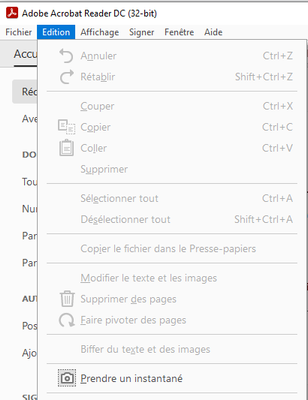
Où trouver la fonction "Prendre un instantané" (capture de l'écran) ?


 2 Correct answers


Hi Philippe
Hope you are doing well and sorry to keep you waiting.
Please go to Edit > More > Take a Screenshot and see if that helps.

Regards
Amal

Hi there
The option lies in the right-click context menu, when you open the PDF in Adobe Acrobat.

Regards
Amal
 14
Replies
14
14
Replies
14


Copy link to clipboard
Copied
Elle se trouve dans le menu Edition. Si vous ne la trouvez pas là, il se peut que votre version de Reader soit corrompue.
Si tel est le cas, je crains qu'il ne vous faille soit :
- Essayer de réinitialiser les préférences, https://helpx.adobe.com/fr/incopy/using/customizing-preferences-defaults.html
- Ou de ré-installer Acrobat Reader proprement. C'est à dire d'employer Adobe Cleaner Tool, une fois que vous aurez désinstallé la version corrompue du Reader. https://www.adobe.com/devnet-docs/acrobatetk/tools/Labs/cleaner.html
Copy link to clipboard
Copied
Hi Philippe
Hope you are doing well and sorry to keep you waiting.
Please go to Edit > More > Take a Screenshot and see if that helps.
Regards
Amal

Copy link to clipboard
Copied
is this fonction only in Acrobat but not in reader... ?
I think that in Reader, it is like Lena mentioned, on first level...
I also add some trouble after update, that this menu disappear... I think that it was during the p^hase where Adobe merge Reader, adn Acrobat in the same installer

Copy link to clipboard
Copied
It's in both applications, but it was moved by Adobe recently to the More sub-menu.

Copy link to clipboard
Copied
Thank you so much ! I was searching for this tool since the new version !

Copy link to clipboard
Copied
Même problème depuis la dernière version ! Où est "Prendre un instantané" ?


Copy link to clipboard
Copied
Même problème !
avez vous trouvez la solution. ?
merci par avance !
Copy link to clipboard
Copied
Hi there
The option lies in the right-click context menu, when you open the PDF in Adobe Acrobat.
Regards
Amal
Copy link to clipboard
Copied
En français ça donne ça : Clic Droit puis "Prendre un instantané"


Copy link to clipboard
Copied
Bonjour,
Je recherche également comment prendre un cliché instantané. Sur ma version DC, il n'y pas le menu "Edition", ni clic droit "Prendre un instantané". Où est cette option?


Cordialement
Copy link to clipboard
Copied
Bonjour,
Voilà où se trouve cette fonctionnalité maintenant :

Copy link to clipboard
Copied
MERCI Beaucoup ! !!! J'ai cherché un moment pourtant !
Copy link to clipboard
Copied
Effectivement, merci ! Par contre aucun raccourcis ou moyen de l'ajouter dans les outils ? C'est bien dommage

Copy link to clipboard
Copied
Hello @Sunna-Maxime
I hope you are doing well, and thanks for reaching out.
You can use the Acrobat Wish form to raise a feature request to change any existing features in the app and share it directly with the product team.
Thanks,
Anand Sri.


Find more inspiration, events, and resources on the new Adobe Community
Explore Now
 AdChoices