

June 17, 2016
Answered

On Adobe Reader I have a black square instead of the mouse pointer.

  • June 17, 2016
  • 2 replies
  • 62179 views

On Adobe Reader I have a black square instead of the mouse pointer. How do I get the pointer back?

    This topic has been closed for replies.
    Correct answer Adorobat

    Unfortunately I do not have an AppData folder and even searching the other folders I cannot find any file beginning IconCache.

    I have Acrobat version 9 so is it worth deleting the whole thing and trying to reinstall it?


    Hello ,

    To view the AppData folder , please perform the following steps :

    On Windows 7 - Click on Start>Computer>Organize(top left)> Folder and search options>View tab>Click "Show hidden files, folders and drives".

    On Windows 10- Click on Start>File Explorer>View(top left)>Options>Change folder and search options>View tab>Click "Show hidden files, folders and drives".

    Below is the screenshot :
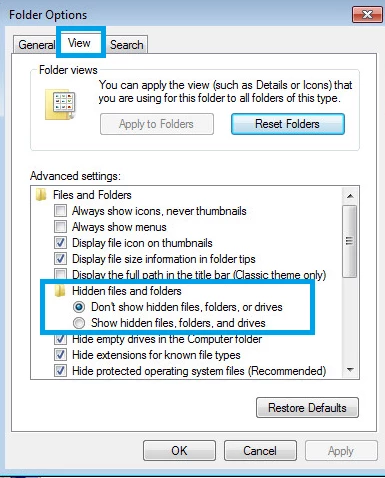
    Let us know about the results.

    Thank You!

    2 replies

    December 26, 2019

    I'm having the same problems as well.  I've deleted the IconCacheRdr.dat file, I've tried to do the repair installation but nothing works.  Someone requested a screen shot of the box:

    My version is 2019.021.20061 and I'm running windows 10.

    New Participant
    December 29, 2019

    Hello

    My computers just updated on 12/17/19 and the Win7 PRO got the black box now. I don't have access to any functions on a PDF file such as save ,print, up or dn arrows, % or size for viewing, or the side bar arrow to expand or collape the side bar to make viewing easier. I,ve deleted the IconCacheRdr.dat file as per instructions for Reader DC. This does NOT work. So today I turned on my Win 7 HOME computer to see what kind of grief to expect, only to find there is NO black box on the HOME computer and it updated on the same day 12/17/19. So I copied and pasted the PDF files from Win7 PRO computer to the Win7 HOME computer and guess what NO black box. So I checked the HOME computer for the IconCacheRdr.dat file for again Reader DC and there it is and Acrobat Reader DC works fine.I use this reader to access files downloaded from the Feds such as 940 &941 for payroll for my business so they are very important to me and my bussiness. Something tells me the problem is with some kind of setting in Win7 PRO with Adobe. My only way out is to download to PRO then copy & paste to HOME then back again. Could someone out there PLEASE HELP ME !!!

    New Participant
    June 10, 2020

    Another way i found out how to get rid of the adobe icons on the desktop having a black square instead of the file is to go to disk clean up (type in search bar) and when opened scoll down to the bottom make sure thumbnails is checked and run cleanup and then reboot and it should be back to normal.. Kevin

    Adorobat
    Community Manager
    Community Manager
    June 17, 2016

    Hi philiph29979417 ,

    Could you please post a screenshot of the pointer ?

    Assuming that you are using Windows ,try to disable thumbnail previews by going into Edit>Preferences>General>Uncheck the box next to "Enable PDF thumbnail previews in Windows Explorer" , then restart the computer and see if the issue is fixed.

    Below is the screenshot :

    Let us know about the results.

    Thank You!

    Shivam

    June 20, 2016

    Sorry but I do not know how to get to the menu you have shown. Can you tell me how to do that?

    I am using Windows.

    New Participant
    December 30, 2019

    Same thing here - was working fine just a week ago.  Tried everything above and no fix. 


    My Adobe Reader DC suddenly started doing the black square cursor a few weeks ago, but only over tabs, icon toolsbars and sidebar menus.


    I finally fixed it by deleting C:\Users\xxx\AppData\Local\Adobe\Acrobat\DC\IconCacheRdrXXXXX.dat  There were several of these files with different 5-digit numbers for the XXXXX. I had to delete all of them and restart.