

Answered
On Adobe Reader I have a black square instead of the mouse pointer.
On Adobe Reader I have a black square instead of the mouse pointer. How do I get the pointer back?

On Adobe Reader I have a black square instead of the mouse pointer. How do I get the pointer back?
Unfortunately I do not have an AppData folder and even searching the other folders I cannot find any file beginning IconCache.
I have Acrobat version 9 so is it worth deleting the whole thing and trying to reinstall it?
Hello ,
To view the AppData folder , please perform the following steps :
On Windows 7 - Click on Start>Computer>Organize(top left)> Folder and search options>View tab>Click "Show hidden files, folders and drives".
On Windows 10- Click on Start>File Explorer>View(top left)>Options>Change folder and search options>View tab>Click "Show hidden files, folders and drives".
Below is the screenshot :
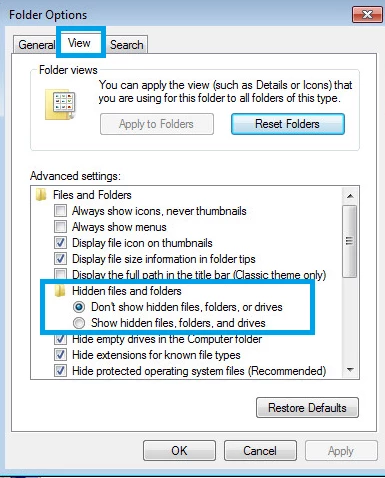
Let us know about the results.
Thank You!
Already have an account? Login
Enter your E-mail address. We'll send you an e-mail with instructions to reset your password.
 AdChoices