

marks33061248
New Participant
October 21, 2015
Answered

Open each PDF file in a new window?

  • October 21, 2015
  • 6 replies
  • 181376 views

When opening multiple PDF files, Acrobat Reader DC groups them in the same window as tabs.  How can I change so that each PDF file opens in a new window?

This topic has been closed for replies.
Correct answer bhawnaarora

I have version 23.001.20093.0 - after updating the check box for "Open documents as new tabs in the same window" is no longer available. Does anybody know how, in this version, I can have each document open in a new window - I HATE TABS!!!


Many thanks


Dear User,


We are delighted to inform you that we have extended support for opening multiple PDF files in separate windows (SDI - Single Document Interface Mode) in the latest updates of Acrobat.


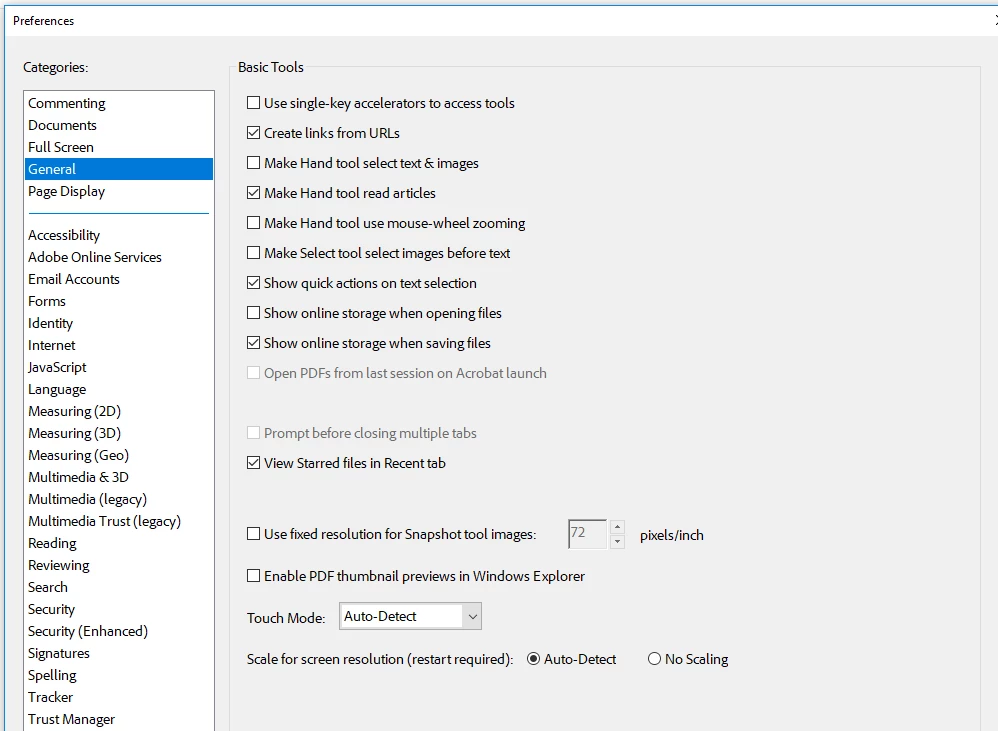
To use this preference, simply go to Preferences > General > Open documents as new tabs in the same window and disable this. Relaunch Acrobat and open the documents, they will open in individual window instances (reference image attached for navigation to the preference)


We look forward to receiving your feedback and fostering seamless integration.


Thanks,

Bhawna.

6 replies

New Participant
June 22, 2024

This is not possible in the "new UI" apparently.  Why some manager at Adobe, perhaps that morning seething because the charred coffee pot had only cold remnants from yesterday's brew, would walk into a UI session and say, "from now on, we are denying users the ability to open documents in new windows," is beyond me.  Please do two things: (1) restore the ability to uncheck "open new documents as tabs in the current window", and (2) someone please get that manager a nice, fresh latte from the Starbucks in the lobby.  They must have been underpaid and overworked to carry that level of user hate with them into design meetings.

Known Participant
December 4, 2023

Adobe Acrobat 2023 ("New Acrobat") needs the option to open each document in a new window.


This should be possible without disabling New Acrobat.

New Participant
October 30, 2023

The new version is horrible -- you can't open new documents in separate windows and you have to hide those annoting toolbars and menus every time.

New Participant
October 27, 2023

The new version of Acrobat PRO has a dreadful UX, it's archaic and has gone back in time. Simply awful. I screenshot files and go into keynote to comment as there are too many glitches now. I also like many other users cannot choose the option for the PDF not to open within the same window. Needless to say, that it's gone backward again on this option. This is not an improvement nor an upgrade. Can the developers look into it as it's regressed from the previous version? The typeface layout is also worse than previous versions. 

New Participant
June 20, 2023

We're now in June of 2023 and I cannot find this option in the General tab. Was it moved or removed? I recently reinstalled Acrobat after a reinstall of Windows, and I'm no longer able to change this setting.


Brainiac
June 20, 2023

If you have the "new UI" tabs cannot be turned off. See discussion above.

New Participant
June 20, 2023

Hallelujah! I was able to disable new Acrobat and now I can disable "Open in new tab". Thank you!

October 21, 2015

Hi ,

Launch a PDF>Navigate to Edit>Preferences>General>Uncheck the option "Open documents as new tabs in same windows" and then relaunch Acrobat.

You would now see PDF' opening in new Windows and not in a tabbed format in the same window.

Regards

Sukrit Dhingra

New Participant
September 13, 2016

Hi, I don't seem to have this option in Preferences->General.  I am using Adobe Acrobat XI Pro.  Which menu is this option stored in XI Pro?

New Participant
October 30, 2016

For the latest version Adobe Reader version, do the following:

1) Open any pdf document on your desktop

2) Click "Edit" at the top left

3) Click "Preferences" in the resultant drag-down menu

4) Click "General" in the window that then opens

5) Put a check-mark in the little box at the ninth line down that says "Open documents as new tabs in the same window (requires restart)"

This will solve your problem


I made a big mistake in my last reply. It should have said "Uncheck" the little box at the beginning of the ninth line entitled "Open documents as new tabs in the same window )requires restart)."

Sorry about that typo!!