


michaelr73758304
New Participant
October 24, 2023
Answered

PDF downloaded from Chrome automatically opening in Acrobat Reader

  • October 24, 2023
  • 26 replies
  • 280701 views

We had a user report an issue to our helpdesk yesterday, she was downloading a PDF document via Chrome, and the document was opening up in Adobe Reader automatically.


We checked the settings in Chrome and it was not set to automatically open Adobe Reader after downloading the PDF, and the Adobe Reader extension was not installed, so we weren't sure why this was happening.


On further investigation we found a setting in the Preferences - General tab called "Open PDFs automatically in Reader when they are downloaded in Chrome browser". Initially when we tried to turn this setting off it would re-enable itself when we closed and reopened Adobe Reader, however clearing the user's preferences from the registry and trying again worked for us. The setting is under HKEY_CURRENT_USER\Software\Adobe\Adobe Acrobat\DC\AutoDocOpen - bIsAutoDocOpenFeatureEnabled dWord 1.


The user is on the current DC build 2003.006.20360.


Has anybody else experienced this, and is there any further documentation available about this feature?


Correct answer KumarVishal

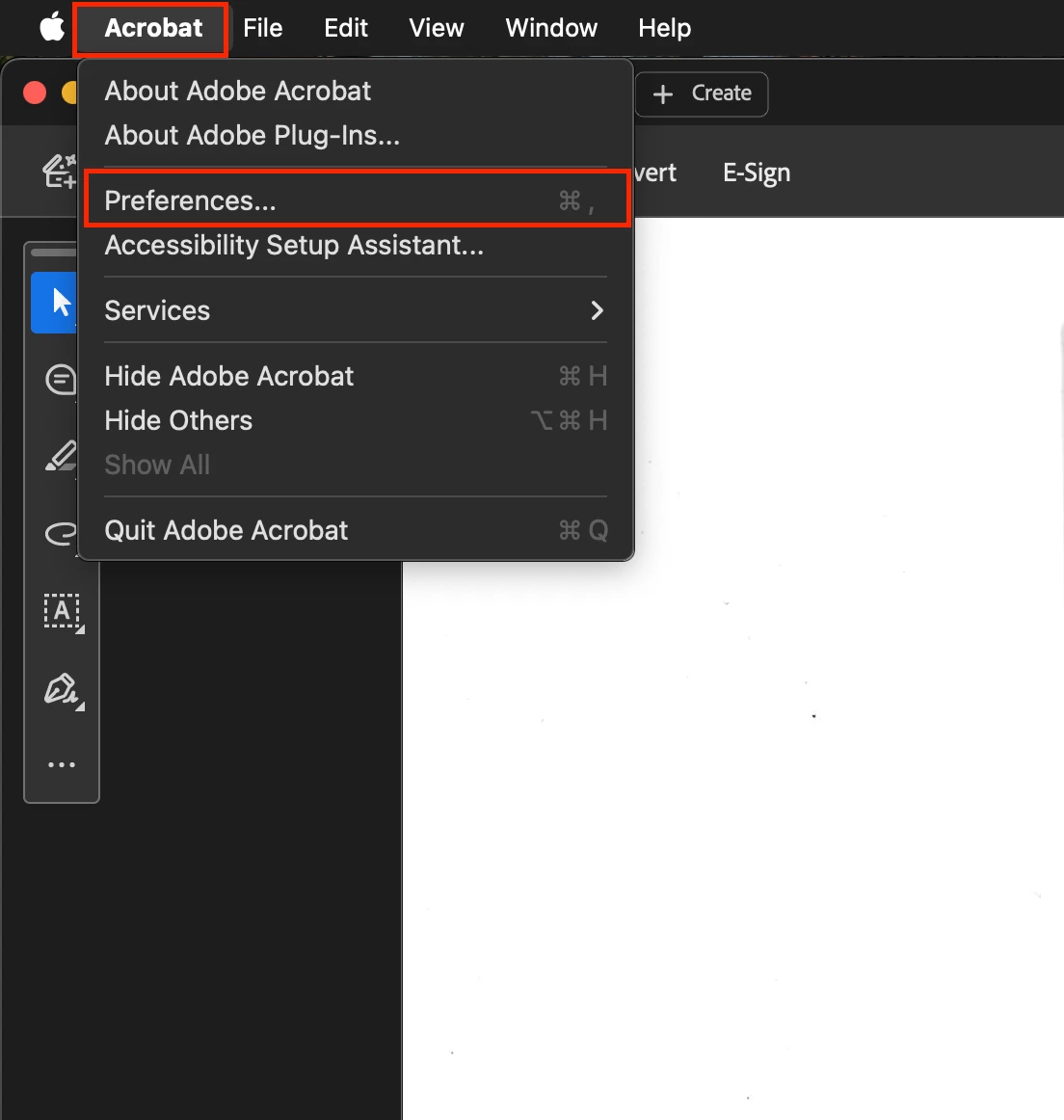
Open installed Adobe's PDF software on your PC. (I'm sharing steps w.r.t MacBook)

  1.  Click on "Acrobat" on top left corner.
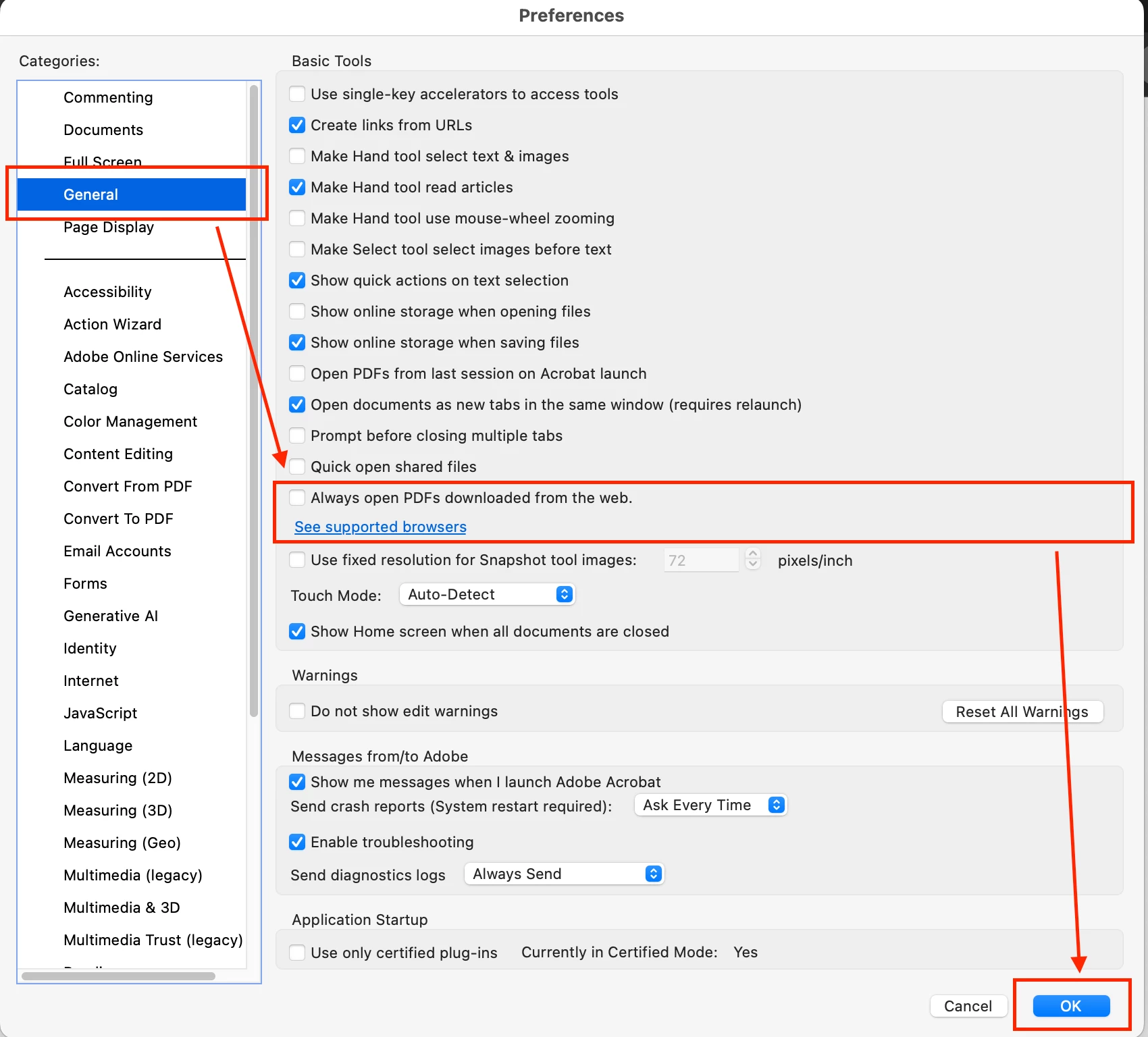
  2.  Click on "Prefrences".
  3. De-select the check box next to "Always open PDFs downloaded from the web".

    Restart you software. see images for ref:


Step 1:


Step 2:


26 replies

Uberpaws_69420
New Participant
April 30, 2024

Hello everyone,

I agree with the user who said that this is basically malware behavior.  Fix this, Adobe.

Here is the solution that I found.  Go into Adobe-->Menu-->Preferences-->General

About halfway down the screen, you will see a checkmarked box for "Open PDFs automatically in Reader when they are downloaded in Chrome browser."  See the attached image.

WTH, Adobe.  This should not be a default.

New Participant
May 16, 2024

Great... Its working perfectly without making any change in the registry key

New Participant
April 25, 2024

Changing the Reg Key value from 1 to 0 fixed the issue for me as well.  Thanks!

New Participant
July 10, 2024

After all the other advice failed, I also opened up the registry, and mine already has a 0 there, so no clue how it is even opening the PDFs since Windows is telling it not to.   I agree with others - this is basic malware behavior, added to their recent attempt to steal everyone's data via an AI agreement, Adobe is losing their mind. 

New Participant
April 17, 2024

This issue has started for me as well all of a sudden but neither of those options show in Chrome or Adobe. They've probably updated/changed by now but I can't see how to find how to fix it now.

Participating Frequently
April 17, 2024

Just fixed this for someone.  There is two views of Adobe, "New Adobe" and "Old Adobe".  You likely have "Old Adobe" going at the moment and that is why you cannot see the feature.  I think this is a bug on the "Old Adobe" settings view.

To correct this, you'll want to go to View at the top and select Enable new Acrobat (about 2/3 of the way down).  It'll prompt you to relaunch.  From here follow the instructions from above by clicking on menu on the top left and going to prefrences.  Uncheck the box and scroll down and click Ok. 

Next is just a precaution for me, but close out of Adobe and reopen it.  Then under the menu option there should be something about Disable New Acrobat, also about 2/3 of the way down.  Click that and it'll prompt to relaunch.  When it does, you'll have the old layout back and hopefully the automatic opening of your PDF files will stop.  


Once again, I think this is a bug not being able to see the function under the Old Adobe layout.  It exists, but end users can't manage it without being under the new view they made.

New Participant
April 21, 2024

Thanks! Great help

tiktoksaverpr0
Participating Frequently
March 18, 2024

It appears the issue stemmed from a specific Adobe Acrobat setting in the Preferences - General tab, related to automatically opening PDFs in Chrome. Despite Chrome settings indicating otherwise, Adobe's setting overrode it. Clearing user preferences from the registry resolved the problem. Further documentation on this feature may be available from Adobe support or forums.

New Participant
July 24, 2024

Thank you! This has been driving me BONKERS.


New Participant
February 20, 2024

This is malware-like behaviour. Actually astonishing for Adobe to try and pull this off. Think I'm going to uninstall Adobe immediately and find a free open source alternative.

New Participant
March 18, 2024

Not open source, but PDFgear is free and works great

New Participant
January 25, 2024

Uncheck the box that says  "Open PDFs automatically in Reader when they are downloaded in Chrome browser" then press "Enter" That saves the settings. If you just un check it and then close out it will default back on. 


Cheers

New Participant
March 4, 2024

Also, if you scroll to the bottom of the window, there will be an "OK" button.

New Participant
September 23, 2024

Yes, this was helpful, even though I figured that part out before seeing this. I wish I had seen this before. It could have saved me a minute. It was also challenging for me to find the tiny scroll bar on the right side of the popup widow to scroll down to the ok button.