


michaelr73758304
New Participant
October 24, 2023
Answered

PDF downloaded from Chrome automatically opening in Acrobat Reader

  • October 24, 2023
  • 26 replies
  • 280863 views

We had a user report an issue to our helpdesk yesterday, she was downloading a PDF document via Chrome, and the document was opening up in Adobe Reader automatically.


We checked the settings in Chrome and it was not set to automatically open Adobe Reader after downloading the PDF, and the Adobe Reader extension was not installed, so we weren't sure why this was happening.


On further investigation we found a setting in the Preferences - General tab called "Open PDFs automatically in Reader when they are downloaded in Chrome browser". Initially when we tried to turn this setting off it would re-enable itself when we closed and reopened Adobe Reader, however clearing the user's preferences from the registry and trying again worked for us. The setting is under HKEY_CURRENT_USER\Software\Adobe\Adobe Acrobat\DC\AutoDocOpen - bIsAutoDocOpenFeatureEnabled dWord 1.


The user is on the current DC build 2003.006.20360.


Has anybody else experienced this, and is there any further documentation available about this feature?


Correct answer KumarVishal

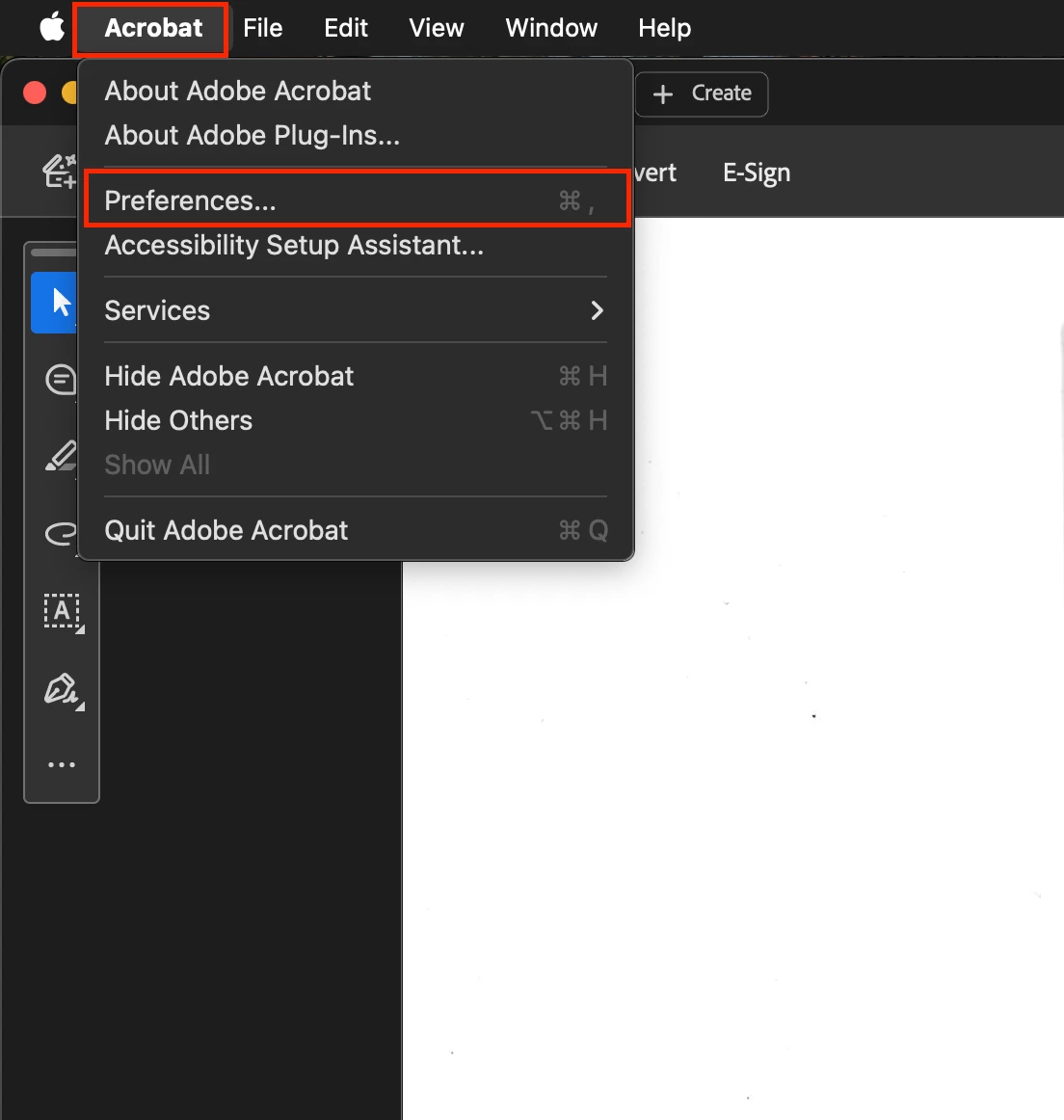
Open installed Adobe's PDF software on your PC. (I'm sharing steps w.r.t MacBook)

  1.  Click on "Acrobat" on top left corner.
  2.  Click on "Prefrences".
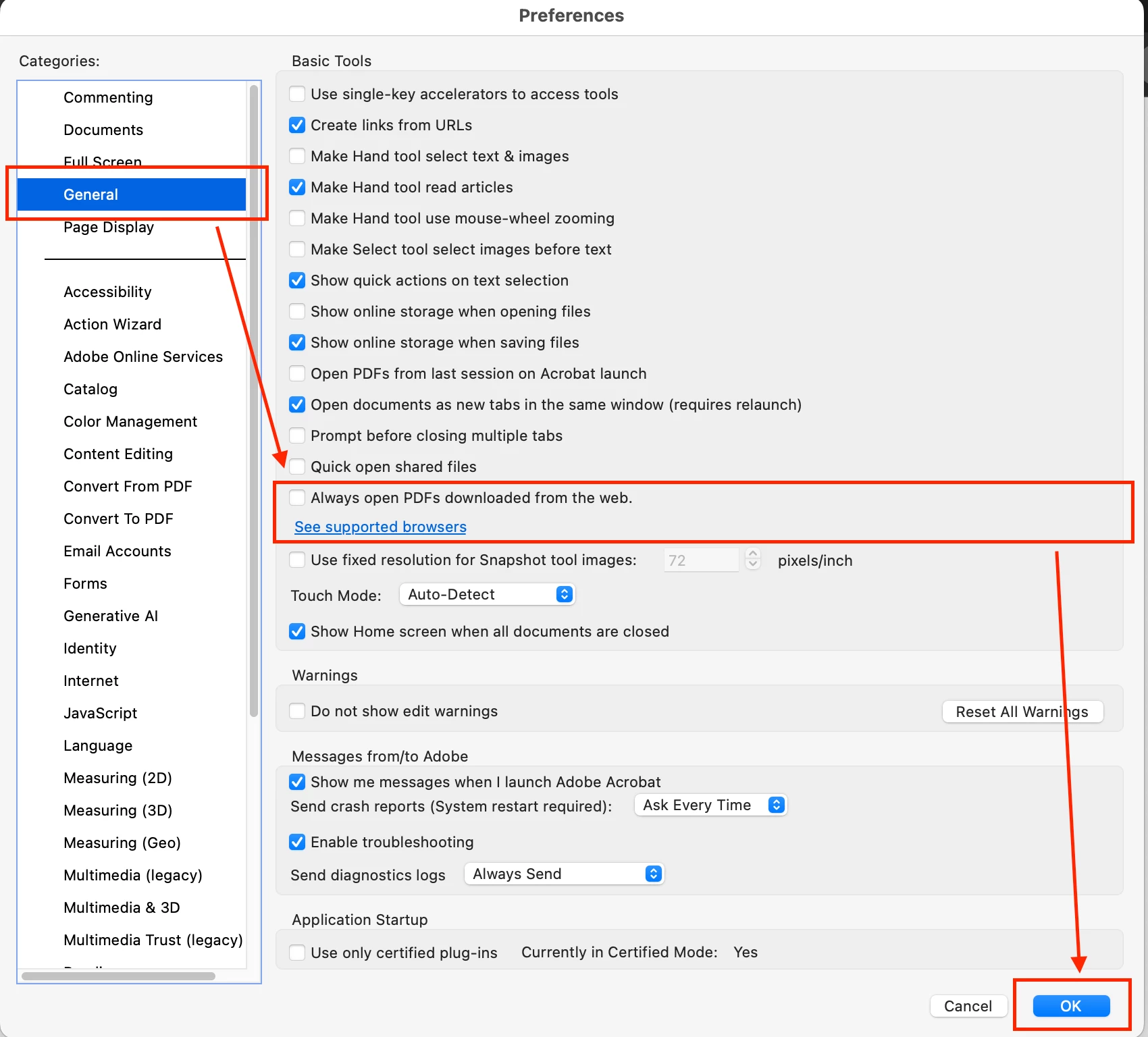
  3. De-select the check box next to "Always open PDFs downloaded from the web".

    Restart you software. see images for ref:


Step 1:


Step 2:


26 replies

Meenakshi Negi
Community Manager
Community Manager
July 15, 2024

Hi All,


Thank you for your patience.


The issue has been resolved in the July update released today. Please try updating the application to the latest version. In Acrobat, go to Menu > Help > Check for updates.

For more information on the update, refer to the following page: https://www.adobe.com/devnet-docs/acrobatetk/tools/ReleaseNotesDC/continuous/dccontinuousjuly2024.html#dccontinuousjulytwentytwentyfour.


Let us know how it goes.


Thanks,

Meenakshi

New Participant
July 23, 2024

This worked!!

New Participant
July 12, 2024

I do not have the the option to uncheck anything in the general settings of adobe and my Chrome settings are correct.  It is still auto opening and it is insanely annoying.  How do I stop this?  Why did adobe have to do this?

Adobe Employee
July 26, 2024

Could you please update to the latest version and check if the issue persists?

New Participant
July 11, 2024

I had the same issue with a user here. None of the suggested fixes worked. The user did not have "Always open in system viewer" enabled for PDFs in Chrome. I enabled/disabled this setting and it stopped.

Participating Frequently
July 10, 2024

A 2-step process solved this for me since I didn’t have the “Open PDFs Automatically…” setting, nor adobe extension on my Chrome.
1) chrome://settings/content/pdfDocuments
Enter that into a URL and check “open PDFs in Chrome” rather than “Download PDFs.”
This solves the automatic downloading problem but does not stop downloaded PDFs from opening automatically.
2) In adobe "Preferences> Internet > unclick the "display in read mode by default," save changes, and restart your adobe"
This solves the downloaded PDFs opening automatically.

New Participant
July 2, 2024

Ok, It is adobe issue and not Chrome. Try this, It worked for me.

Open adobe and go to the menue button on top left corner. Preferences> Internet > unclick the "display in read mode by default"   
save changes and restart your adobe 

Adobe Employee
July 3, 2024

@Katya38116196120n Are you facing this issue on Adobe Acrobat or Adobe Acrobat Reader?

New Participant
July 1, 2024

Does anyone have a recent solution for this? The "Open PDFs automatically in Reader when they are downloaded in Chrome browser".  isn't available in Chrome settings anymore after the recent update and all my PDFs are opening after download which I need to turn off. Thank you!

Participating Frequently
July 1, 2024

chrome://settings/content/pdfDocuments

Enter that into a URL and check “open PDFs in Chrome” rather than “Download PDFs”

New Participant
July 2, 2024

Thank you, though this does not solve the issue either as the issue is that when dowloaded, the file automatically opens. I still want to be able to 'view' (open) PDFs in Chrome to preview them before downloading, but do not want PDF to open in Adobe once downloaded.

New Participant
June 21, 2024

Has anyone raised this with Adobe to see why the option has been removed from the recent update?

New Participant
June 4, 2024

Thank you. 

New Participant
May 23, 2024

THANK YOU!!!
I have no idea why Adobe would think they are entitled to force such an option on us without even asking, thank goodness I found this post because I was trying to fix the problem in chrome


New Participant
May 16, 2024

I need help!!  Somehow I am stuck from poor Adobe software implementation. 


Using Adobe Acrobat Pro 2024.002.20736 - but considering cancelling as a paid customer due to unwanted product updates, broken features, loss of previous functionalities in the new versions, Adobe is messing up a good product IMHO.


The General > Preferences does not have this option:


The REGEDIT key: is already set to 0.


Computer\HKEY_CURRENT_USER\SOFTWARE\Adobe\Adobe Acrobat\DC\AutoDocOpen


Please advise on how to remove the auto doc open as I wish to opt-out from this feature I never asked for.

New Participant
June 17, 2024

I also am not seeing that "Open PDFs automatically in Reader when they are downloaded in Chrome browser." option.  I'm using Adobe Acrobat Pro 2024.002-20857.


How can we turn this off?


New Participant
June 18, 2024
[image: image.png]
Preferences (Ctrl-K) > General > Uncheck Box "Open PDF's automatically
etc." > Scroll down > Press OK

this isnt an option