


Participant
December 12, 2022
Question

PDF protected document not asking for a password

  • December 12, 2022
  • 2 replies
  • 2877 views

Hey,


So we have a bit of an odd issue here. We map OneDrive & SharePoint libraries (cloud storage) via a network drive letter on Windows computers via a technology called WebDav.


A client called and said when password protecting a PDF document and saving it, then going to Outlook and attaching the file from the "Recent files" list - the document will attach, if you then open the file preview when in the draft email the document opens in Adobe Reader and doesn't ask for a password.
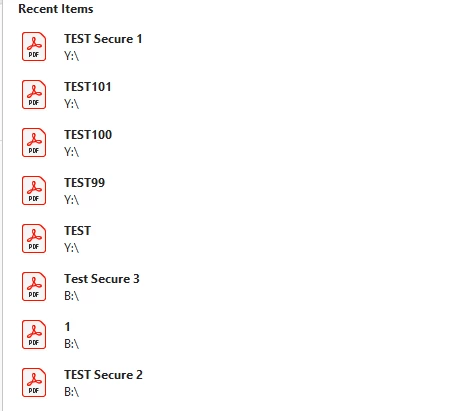

If you attach it via browsing the computer directory, going into the network drive then attaching the PDF, when opening it this way it asks for a password. It's like a strange Adobe Reader cache and bypassing it somehow in Outlook.


Has anyone ever come across this or similar behaviour?


Running Adobe Acrobat Reader 2022.003.20282 32bit

Microsoft 365 Apps for enterprise Version 2211 Build 15831.20190 64bit


Thanks

Curt


2 replies

AkanchhaS8194121
Legend
December 13, 2022

Hi @CurtBlunt 


Thanks for reporting this to us. 

Try what the expert has suggested below if that doesn't help.

Please share the exact steps of applying a password to the document and how it's being attached in outlook. For password protection, did you use Adobe Acrobat, as Acrobat Reader doesn't have this functionality? 

Share a sample password-protected file with us. We want to test the same on our end. 

With the password-protected file, we cannot reproduce the same behavior. So, probably a file-specific issue as well. 


You can upload the file on Document Cloud web https://acrobat.adobe.com/link/home/ and share the link with us here.

https://helpx.adobe.com/document-cloud/help/sharing-pdfs.html


Thanks,

Akanchha 

try67
Community Expert
Community Expert
December 12, 2022

They should save and then close the file after applying the security policy.

Participant
July 8, 2023

I also save golf site data but it's not be pass protected but finally got solution. Thanks

Participant
July 8, 2023
  1. It is working now on my best cavity back irons files and be a pass protected.