


kqf_chris
Participant
October 23, 2017
Answered

Permanently hide Navigation Pane Buttons

  • October 23, 2017
  • 2 replies
  • 14702 views

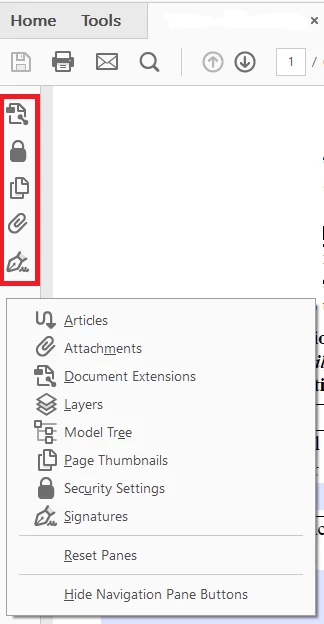
How do I permanently hide the Navigation Pane Buttons? I can choose the option at the bottom but when I re-open Adobe Reader they are back.

I need to be able to do this with a preference to deploy to our organization.

Thanks!

Adobe Reader 2017.011.30066
    This topic has been closed for replies.
    Correct answer AnandSri

    Hello kqf_chris

    As per the description above, you want to disable the left navigation pane permanently in Adobe Reader DC, is that correct?

    There is no such option to hide/remove the left pane permanently, however, you can use the Adobe Customization Wizard to Customize the View Preferences and deploy it and make customization, Welcome to the Wizard — Acrobat Customization Wizard DC for Windows

    You may also refer to the following KB docs which discuss the similar scenario Default Hide Navigation Pane On Left Side Acrobat Reader DC

    Is there a way to permently disable the navigation tool on the left panel (Acrobat Reader) Link: https://answers.acrobatusers.com/Is-permently-disable-navigation-tool-left-panel-q103315.aspx

    Let us know how it goes.

    Regards,

    Anand Sri.

    [Edited response]

    2 replies

    jane-e
    Community Expert
    Community Expert
    February 7, 2018

    Be aware that if someone creates an Initial View in File > Properties using the paid version of Acrobat, the Left Hand panels will open with the document.

    AnandSri
    Community Manager
    AnandSriCommunity ManagerCorrect answer
    Community Manager
    February 7, 2018

    Hello kqf_chris

    As per the description above, you want to disable the left navigation pane permanently in Adobe Reader DC, is that correct?

    There is no such option to hide/remove the left pane permanently, however, you can use the Adobe Customization Wizard to Customize the View Preferences and deploy it and make customization, Welcome to the Wizard — Acrobat Customization Wizard DC for Windows

    You may also refer to the following KB docs which discuss the similar scenario Default Hide Navigation Pane On Left Side Acrobat Reader DC

    Is there a way to permently disable the navigation tool on the left panel (Acrobat Reader) Link: https://answers.acrobatusers.com/Is-permently-disable-navigation-tool-left-panel-q103315.aspx

    Let us know how it goes.

    Regards,

    Anand Sri.

    [Edited response]