


New Participant
March 22, 2023
Answered

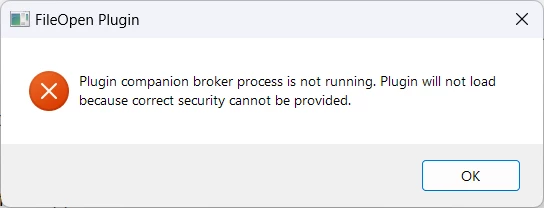
Plugin companion is not running.

  • March 22, 2023
  • 3 replies
  • 77524 views

Hello! I've been getting the error message below for the past week or so with ALL pdf docs I try to open, whatever the file, whereever the location. Once I click OK, the message disappears and the document opens, but it will come back each time pdf Reader loads. 


So for, I have tried the following, without effect on the issue:

  • unchecked the "use only certified moduyle on launch" option - as stated on Adobe forum
  • unchecked the protected mode on startup in the sandbox protection menu - as stated on FileOpen forum
 

Thank you for your help

Correct answer au_Business_Owner

Hi,  After some deep consideration, I decided to simply re-run the latest version of  "FileOpenInstaller.exe".  The good news is that it fixed the problem.  It was straightforward as I have a habit of keeping a copy of the latest version of the executable each time FileOpen requires that it is renewed.  I hope this feedback helps everyone!

3 replies

New Participant
February 12, 2024

I get the same error.  If I reinstal the file open plug in, it will work fine until the next time I reboot the computer.  At which time, the error comes back until I reinstal it again.

The fileopenmanager service is running .  

I am not sure where to go next to try to figure out the problem.

New Participant
March 11, 2024

File open support responded to requests for help and we finally found this to work for me.


If you just installed the FileOpen client plug-in and this is your first time trying to open a protected file, then you need to get the FileOpenBroker64.exe running. You will also want the FileOpenBroker64.exe to start every time you log in to the machine. To do this you can create a shortcut to

C:\ProgramFiles\FileOpen\Services\FileOpenBroker64.exe

via

C:\Users\YOUR USERNAME\AppData\Roaming\Microsoft\Windows\Start Menu\Programs\Startup

for launching the FileOpenBroker64.exe at login time. After creating the shortcut you can start FileOpenBroker64.exe manually by double-clicking either on the original .exe file or the shortcut. Once you have verified that the FileOpenBroker64.exe is running as a process in your Task Manager, you should be able to open protected documents for which you have permission.

au_Business_Owner
au_Business_OwnerCorrect answer
New Participant
January 29, 2024

Hi,  After some deep consideration, I decided to simply re-run the latest version of  "FileOpenInstaller.exe".  The good news is that it fixed the problem.  It was straightforward as I have a habit of keeping a copy of the latest version of the executable each time FileOpen requires that it is renewed.  I hope this feedback helps everyone!

New Participant
August 7, 2024

Could you please ellaborate on where I can re-run the latest verision of "FileOpenInstaller.exe" please?


S_S
Community Manager
Community Manager
August 7, 2024

Hi @Jamison33446518wfwq,


Hope you are doing well. Thanks for writing in!


To re-run the latest version, you need to remove the plugin first. You can try the steps here: 

  1. Close Adobe Acrobat or Reader.
  2. Search for and delete all copies of FileOpen.api
  3. You may have in the same location as FileOpen.api another file fowpkbd.api, if so delete this also.
  4. In some cases, you may have a folder C:\Documents and Settings\<your login>\Application Data\FileOpen (on Vista or above, this will be C:\Users\<your login>\AppData\Roaming\FileOpen). If so, delete this folder.
  5. If you installed it via the web via IE without Java, you may have FileOpen ActiveX control. From IE, invoke Tools > Internet Options > General > Temporary Internet Files > Settings > View Objects, then delete FileOpenInstaller.


Once done, you can download the latest version of the installer from here: FileOpen: All Client Installers


Hope this helps.


-Souvik

S_S
Community Manager
Community Manager
March 24, 2023

Hi @sophiel90593090,


Hope you are doing well. Sorry for your experience with Acrobat Reader.


This error is caused due to the file FileOpen Client Broken getting corrupted. This can be caused due to a lot of reasons.


However, let's try reinstalling the application using the cleaner tool.

Please run the Acrobat cleaner tool https://www.adobe.com/devnet-docs/acrobatetk/tools/Labs/cleaner.html, reboot the computer once, and install the application using the direct link Adobe - Adobe Acrobat Reader DC Download | Free PDF viewer for Windows, Mac OS, Android and see if that works for you.


This also ensures that you are running the latest version.


Hope this helps.


-Souvik

New Participant
March 30, 2023

Thank you! I tried the cleaner tool and reinstall and so far, so good!

S_S
Community Manager
Community Manager
March 30, 2023

@sophiel90593090 Thank you for taking the time and informing us that it worked. 


Would you mind marking the solution that worked for you as a correct answer? Marking a reply or response “Correct” will help future users with the same issue quickly identify the correct answer.


-Souvik