


November 24, 2015
Question

Preventing 1 Window Close from Closing ALL windows?

  • November 24, 2015
  • 2 replies
  • 24366 views

"At work we've been using Acrobat 7 Pro, but we have an annoying problem that we perhaps just haven't figured out yet. If we open an Acrobat file by double-clicking under WinXP Pro, it pops open as expected. If we open a second Acrobat file by double-clicking, it too opens with a separate button on the Taskbar. All is as expected.

Now, if we close one window via the red X close button in the upper right hand corner, Acrobat 7 closes ALL open Acrobat windows. This is not our desired effect, and it is frustrating, especially when we are reading from a variety of sources. Word, for example, will spawn separate instances for each open Word document, so closing one doesn't close all.

I've rooted for registry settings, preferences, and so forth (even tried using a /n parameter), but cannot find a way to get Acrobat to not close ALL windows when you click "close" on a single one. Is there any way/setting to prevent this from happening? You can imagine how irritating it is to have 3 different references (in PDF form) open on your workstation, close 1, and have the other 2 go with it. Note, also, that if we go through the motion of right-clicking the taskbar button and selecting close, it will not close all of the other windows - this only happens when you use the normal Windows "red-X" close button, which our programmers do often out of habit.

Thanks for any help..."


This was copy/pasted from here: Acrobat 7: Preventing 1 Window Close from Closing ALL windows? - Adobe Acrobat Reader (For Windows) because it describes my problem absolutely accurately.


Yes, I know that if I close the top right button it closes Acrobat and that there is small Xs on each tab to close document tabs, but myself and probably 98% of the population that's used to using Acrobat Reader would be happy if you return this to how it was before.
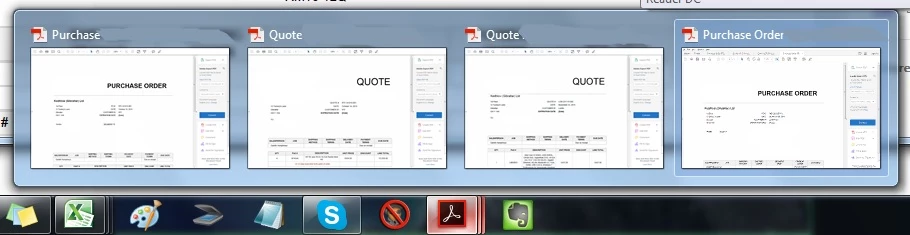

We see them all as different documents from the taskbar and as per the screen shot above, you can clearly close them separately from the "small window view" ... it just makes no sense to close ALL windows with the top right X.


Please include the old way into your next update, like I said, millions of people will be grateful you did.


Thanks!

dabzyy

    2 replies

    New Participant
    September 16, 2016

    Hi Dabzyy, may I know how did you resolve this issue?

    Thanks!

    October 19, 2016

    Bernd Alheit
    Community Expert
    October 19, 2016

    In the preferences enable the entry "Prompt before closing multiple tabs".

    abhissha
    Community Manager
    Community Manager
    December 1, 2015

    Hi dabzyy,

    I will recommend you to use our latest offering that Acrobat DC which gives you number of file viewing options as tabs and separate window. Acrobat 7 is already end of life, and in this case I will suggest you to use File > Close option instead of Quit which completely shuts down the application.

    Thanks,

    Abhishek

    December 1, 2015

    Thanks for the "help". Looks like you've not even read my thread.

    December 2, 2015

    Do you view the documents in tabs or in seperate windows?


    When you open 3 (for example) documents it shows them in one main window. If you use the X on the top right corner (the way people are used to closing ONE document not the whole program) then it closes ALL of the documents you had opened. This is the issue, it's very annoying because everyone is used to using the top right X to close a certain document and now that it closes everything you had opened, makes for a very frustrating experience... It's just a force of habit and when I googled the problem seems that everyone is begging for Acrobat to make it as it was before - the top right X closes the document you are viewing in that moment.

    As you can see in below pic, the documents open in different tabs within that ONE Acrobat window. And yes, you can close them individually from the small Xs on each tab (top part of pic); and yes, if you hover with the mouse on the Acrobat icon on the taskbar it shows them as separate little windows that you can close individually. The problem is that for years and years people have been using the top right X to close the current document you're viewing and now it's all gone to hell Obviously I haven't got my hopes up that you will change this back, so I have started to push myself to close the from the small top Xs tabs... but still, like I said, it's a force of habit... so I end up closing 5 completely random documents (that I've spent time finding and opening throughout the day) with that 1 click, that used to be a "close button" for just one document, not the whole program. I hope this is clear enough now....

    Gabi