

Participating Frequently
September 29, 2021
Question

Printing problems

  • September 29, 2021
  • 5 replies
  • 2023 views

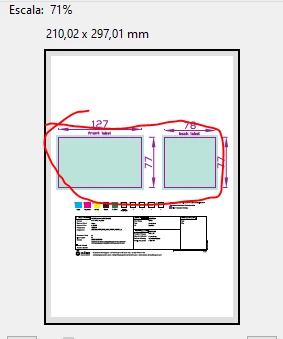
PDF created with Adobe Illustrator does not print as seen on Acrobat. The image appears green in print preview and printed page



This topic has been closed for replies.

5 replies

JR Boulay
Community Expert
October 27, 2021

This PDF was not created with Adobe Illustrator:


Acrobate du PDF, InDesigner et Photoshopographe
JR Boulay
Community Expert
October 27, 2021

Be sure to open this PDF with Acrobat, then hide the "Vernis" layer before printing:


Acrobate du PDF, InDesigner et Photoshopographe
JR Boulay
Community Expert
October 26, 2021

You have to give us the link to the file, we can't guess.

Acrobate du PDF, InDesigner et Photoshopographe
Oscar5C53Author
Participating Frequently
October 26, 2021
Meenakshi Negi
Community Manager
Community Manager
September 29, 2021

Hi Oscar,


Thank you for reaching out and sorry for the trouble.


Please elaborate on the workflow use to create and print the PDF. 

Also, confirm if this happens with a particular file.

Would it be possible to share the PDF with us so we can check it on our end?

Share the Acrobat and OS currently in use.


Thanks,

Meenakshi

Oscar5C53Author
Participating Frequently
September 29, 2021

I have received this file by mail. I can open and see correctly but, when I try to print, I see the green squares on print preview dialog box and the printed page is like the preview


It happens with this file by the moment


Yes I can share the file


Acrobat Reader DC version 2021.007.20091

Windows 10 Pro 21H1 19043.1237

Oscar5C53Author
Participating Frequently
September 29, 2021

How Do you want to share the file?

Brainiac
September 29, 2021

What would you expect to see instead of the green? Please share a screen shot of the Illustrator document too, so we know what you are comparing with.

Oscar5C53Author
Participating Frequently
September 29, 2021