
Inspiring
August 28, 2024
Answered

"Adobe Acrobat does not allow connection to: <an internal URL>"

  • August 28, 2024
  • 3 replies
  • 3460 views

This issue has already been reported (https://community.adobe.com/t5/acrobat-reader-discussions/help-with-error-quot-adobe-acrobat-does-not-allow-connection-to-quot/m-p/10724318) but after 9 months since I first reported this it seems to be being ignored, so I am creating a new thread here in the hope that someone at Adobe will see and act on it.


PROBLEM:

In Adobe Acrobat Reader the error message: "Adobe Acrobat does not allow connection to: <URL>" is received when clicking on a hyperlink in a PDF document which points to a server on a local network, despite the correct preferences being applied and all troubleshooting steps followed:
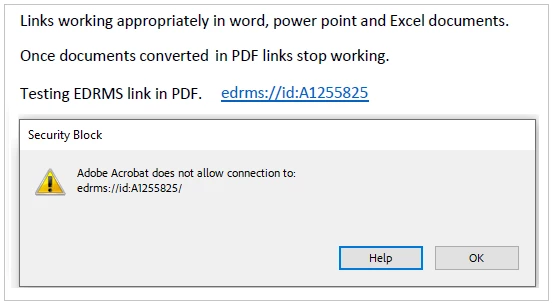


Other PDF readers e.g. Foxit Reader and Nuance PowerPDF do not have this problem - they all allow the hyperlinks to work (some may give a prompt to the user e.g. "Do you want to open this link?", but they all work).

Myself and others have tried all the various troubleshooting suggestions:


In my case the internal URL is "edrm://id:A1255825", and is to an internal server.
Another person reported their own internal URL " file:///C|/Users/<username>/AppData/Local/Temp/<some wierd html file name>"


In both cases these are just internal URLs. You can reproduce the issue with any valid 'internal server' type URL.


The issue is EASILY reproduced, my example came from a customer of mine and I easily reproduced it.


None of the troubleshooting steps work.


I believe this is a defect in the Adobe Acrobat Reader application.


I have not tested on a later version than "2023.006.20380 (64-bit, continuous update)", which was the latest version at the time I reported the issue. I am not going to try again on a later version as I have already spent way too much time attempting to convince Adobe (via https://community.adobe.com/t5/acrobat-reader-discussions/help-with-error-quot-adobe-acrobat-does-not-allow-connection-to-quot/m-p/10724318) that there IS an issue here.

Hoping someone will look at it, as myself and others have gotten nowhere via the aforementioned link.

Thank you.

Correct answer dm46583704

Hi @gut Feeling,


Hope you are doing well. Sorry for the trouble with Acrobat Reader.


Adobe Reader has stricter security settings than Acrobat by default. It often blocks hyperlinks to local network paths or intranet servers (like \\server\folder or http://internalserver), even when they’re allowed in Acrobat.

This is a built-in security feature in Reader, intended to prevent untrusted PDFs from triggering malicious network actions.


Here's what you can try:


  • Open Reader.

  • Go to Menu >Preferences.

  • In the left pane, choose Trust Manager.

  • Click the "Change Settings" button next to “PDF File Attachments and External Links.”

  • Check the box saying "Allow opening of non-PDF file attachments with external applications"

  • Also go to the Security (Enhanced) section and uncheck "Enable Protected Mode at startup" and "Enable Enhanced Security"

    • Note: Disabling these may reduce security, so only do this for trusted environments.
  • Click OK and restart Reader.


Let us know how this goes.


Regards,
Souvik.


Hi Souvik,

Thank you for the reply. I just checked the functionality with 'Continuous Release | Version 2025.001.20474 | 64-bit' and I do not see the options you recommended. However, from what I can tell, Adobe has fixed the problem now.

In this version of Adobe Reader:

  1. I click my custom URL.
  2. I am prompted with a 'This document is trying to connect to:.... Do you trust....' popup dialog box.
  3. I tick the 'Remember this action for this site for all PDF documents' checkbox, and click the 'Allow' button.
  4. The URL opens successfully.
  5. The URL's domain has been added to the Help > Preferences > Trust Manager > Change Settings" Web Sites list (as a result of clicking the 'Remember this action for this site for all PDF documents' checkbox).

    Regards,

3 replies

Inspiring
December 30, 2024

We wait...

Inspiring
March 26, 2025
S_S
Community Manager
Community Manager
April 24, 2025

Hi @gut Feeling,


Hope you are doing well. Sorry for the trouble with Acrobat Reader.


Adobe Reader has stricter security settings than Acrobat by default. It often blocks hyperlinks to local network paths or intranet servers (like \\server\folder or http://internalserver), even when they’re allowed in Acrobat.

This is a built-in security feature in Reader, intended to prevent untrusted PDFs from triggering malicious network actions.


Here's what you can try:


  • Open Reader.

  • Go to Menu >Preferences.

  • In the left pane, choose Trust Manager.

  • Click the "Change Settings" button next to “PDF File Attachments and External Links.”

  • Check the box saying "Allow opening of non-PDF file attachments with external applications"

  • Also go to the Security (Enhanced) section and uncheck "Enable Protected Mode at startup" and "Enable Enhanced Security"

    • Note: Disabling these may reduce security, so only do this for trusted environments.
  • Click OK and restart Reader.


Let us know how this goes.


Regards,
Souvik.

Inspiring
December 19, 2024

...

Participant
September 3, 2024

Same problem here, but it's happening with a normal website URL. Anything with the root www.parl.ca, which is the website of Canada's Parliament. My Reader app is up to date. I haven't fiddled with its settings because my goal isn't that I be able to open the link, but rather that readers of my publication will be able to open it. Most of whom will likely view it in Reader, with whatever the app's default settings are.

Inspiring
September 4, 2024

You'll probably find that for your URL, users will need to turn off Protected View (Edit > Preferences > Enhanced Security > Turn off Protected View and untick 'Enhanced security'). That's just something Adobe Reader has these days.


Note to Adobe: this is not the solution to my reported problem, you still have a defect in the Adobe Reader.