


Participant
February 9, 2021
Answered

"Choose paper source by PDF page size" not working

  • February 9, 2021
  • 11 replies
  • 21513 views

In my business, I need to be able to print packets of 100 pages or more utilizing both letter and legal sized paper within the same packet.  Yesterday the "Choose paper source by PDF page size" button worked, today it does not.  I checked my printer to confirm that the trays were correctly designated as letter or legal and I've checked the forum for an answer to no avail.  I attribute it to the recent update (2/9/21)?  Is there a fix for this?  
This topic has been closed for replies.
Correct answer swapnilsrivastava


Hi There,


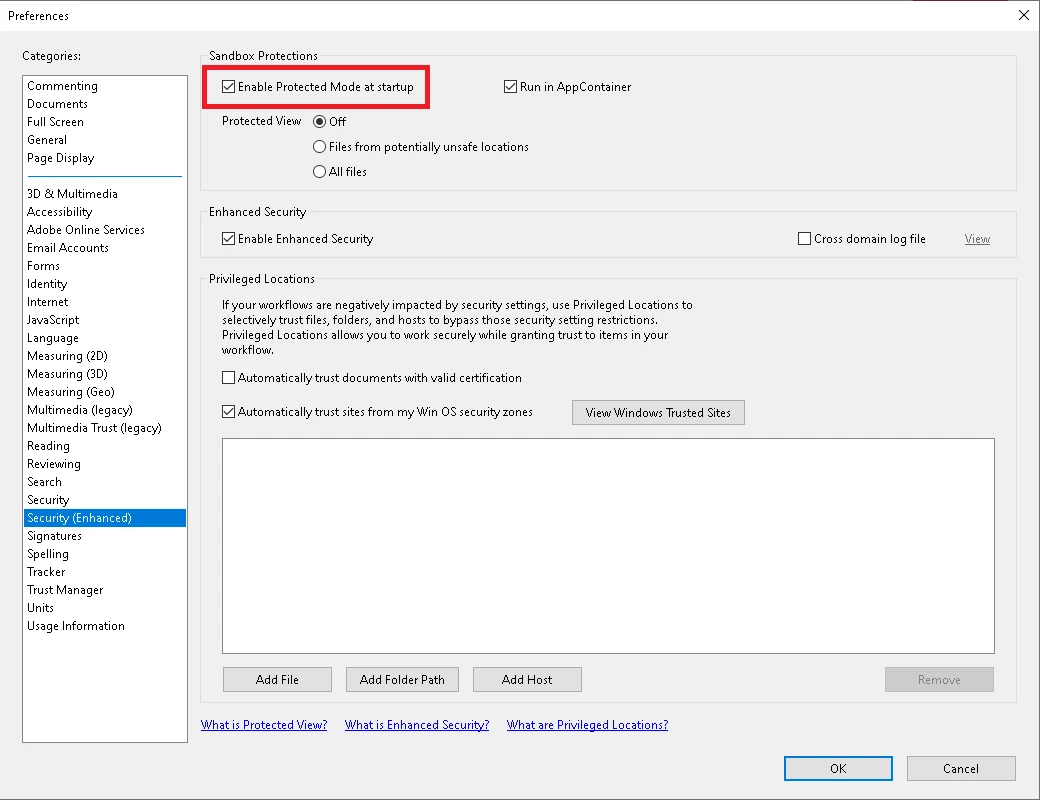
Please try the same workflow, with turning off the 'Protected Mode' and then try printing the same.

Steps to turn off the 'Protected Mode' :

  1. Launch Acrobat
  2. Click on Edit (from Menu Bar) > Preferences
  3. Click on 'Security (Enhanced)'
  4. Uncheck 'Enable Protected Mode at startup (Preview)' > Click Yes (on popup)
  5. Click on OK > Close & Re-Launch application (reader)


Please do let us know if the same fixes your issue.


Regards,

Swapnil Srivastava

11 replies

Participant
February 10, 2021

Same Problem!!  Lots of fun prnting 120page packet twice today with out the PDF page size not working!!! 


Have you found any solutions???

Curt1234Author
Participant
February 10, 2021

Nothing yet.  I've checked around and haven't heard anything.  Hopefully Adobe will answer this thred.  PLEASE!!!

Participant
February 10, 2021

Im on chat with them now.  I will let you know what they say!   If you find a solution will you please!!  please!!  post here!!