


Participant
February 9, 2021
Answered

"Choose paper source by PDF page size" not working

  • February 9, 2021
  • 11 replies
  • 21513 views

In my business, I need to be able to print packets of 100 pages or more utilizing both letter and legal sized paper within the same packet.  Yesterday the "Choose paper source by PDF page size" button worked, today it does not.  I checked my printer to confirm that the trays were correctly designated as letter or legal and I've checked the forum for an answer to no avail.  I attribute it to the recent update (2/9/21)?  Is there a fix for this?  
This topic has been closed for replies.
Correct answer swapnilsrivastava


Hi There,


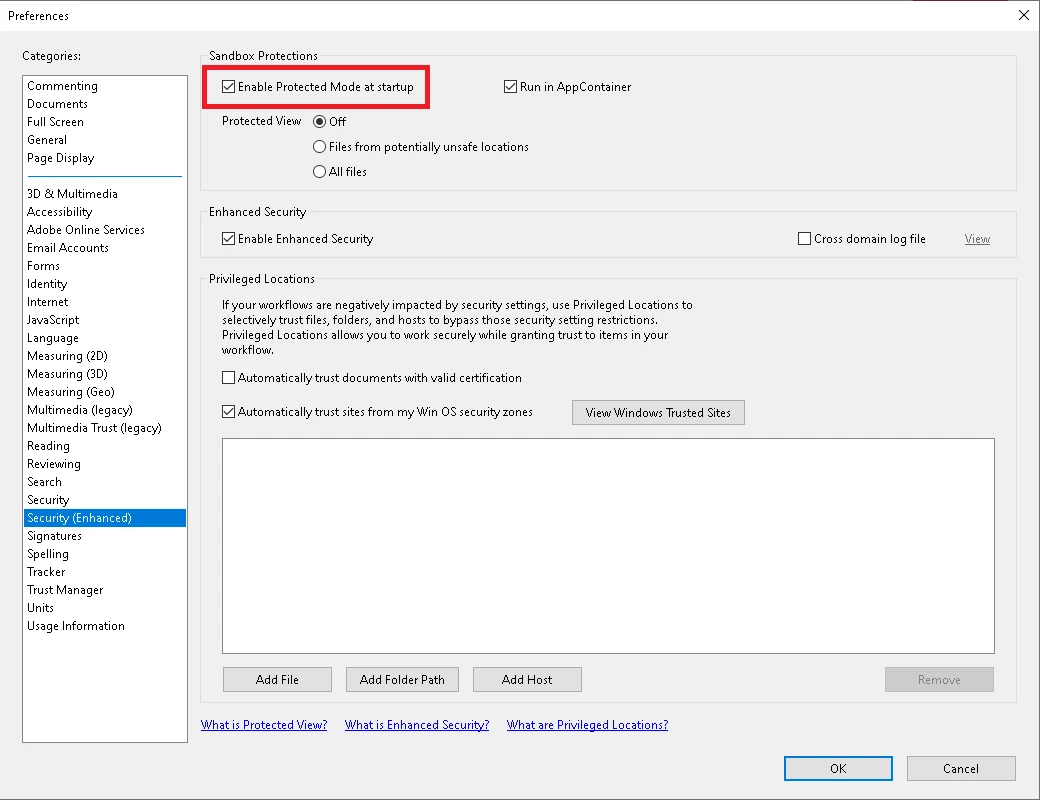
Please try the same workflow, with turning off the 'Protected Mode' and then try printing the same.

Steps to turn off the 'Protected Mode' :

  1. Launch Acrobat
  2. Click on Edit (from Menu Bar) > Preferences
  3. Click on 'Security (Enhanced)'
  4. Uncheck 'Enable Protected Mode at startup (Preview)' > Click Yes (on popup)
  5. Click on OK > Close & Re-Launch application (reader)


Please do let us know if the same fixes your issue.


Regards,

Swapnil Srivastava

11 replies

Participant
April 17, 2023

Go into printer and devices. Find your printer. Manage. Printer properties. Advanced. New Driver... And then just follow what the device is recommending. And you are welcome in advance for being amazing and actually giving an answer. Unlike the actual Adobe employee who responded!


Participant
August 19, 2024

We are having this issue as well  I have turned unselected "Enable Protected Mode at Startup"  and Restarted the Adobe Acrobat Reader and the entire document prints at 8.5X11  when it should print 3 pages 8.5x11, 1 page at 11x17 and 1 more at 8.5x11, then 1 at 8.5X14 and the last page is 8.5x11.  

I am testing the issue on Mac Mini 2020 M1 with a fresh install of MacOS Sonoma 14.6.1 using Adobe Acrobat DC version 24.002.21005 to a Kyeocera Printer Taskalfa 4053 Ci but the issue also occurs using Kyocera Printer Ecosys M4125idn and on a Mac Mini 2018 again running a fresh install of Sonoma 14.6.1 and Adobe Acrobat DC version 24.002.21005 with same two printer configurations. 

If I use these options from the Windows version of Acrobat Reader there is no issue

Participant
February 19, 2021

That works!  Thanks.

Participant
October 27, 2021

Hi

I have the same issue which has just started with version 2021.007.20099

I have tried all suggestions mentioned above....

Security setting

Re install

Still same issue

Any other fixes?

Running On Windows 10


Participant
April 17, 2023

See my response. This resolves it. 


Participating Frequently
February 16, 2021

This fix did nothing to help.  It will print the first page of say 4 consecutive legal pages in a mix of legal and letter, but the it does not do it automatically.  If I pick print by PDF size in there are 100 pages of mixed legal and letter, it prints all of it on letter size.  But if I go back and pick out 4 legal pages, and print them all by themselves, it will print the 4 pages on legal.  I need this to print both letter and legal as it did before someone at Adobe did an update on February 9, 2021 when all these problems started.

Adobe, please fix this to AUTOMATICALLY print letter AND legal, like it is supposed to.  Can we get this fixed NOW?  This is costing me hours and hours of time to get my packages printed correctly.

HELP!

Participant
February 16, 2021
Hi,
Please try uninstalling Adobe. Reinstall.
Should work. It was a glitch in Adobe update. They fixed it.

Hope this helps.
Karrey
--
Treat others better then you are treated;-)
Participating Frequently
February 16, 2021

Thank you, Karrey.  I will try uninstalling and reinstalling again.  I did it once before, but did not turn off my computer before reinstalling.

Thanks again.


Participating Frequently
February 16, 2021

Hello.  I installed from my computer the latest update on the Help tab.  I am checking pick PDF size, and even though there are legal size pages, all is printing only on letter size.  Help.

Participant
February 16, 2021
Hi
Uninstall Adobe turn off computer and reinstall. This should work. Select
Actual for paper.

Hope this helps

Karrey
--
Treat others better then you are treated;-)
Meenakshi Negi
Community Manager
Community Manager
February 15, 2021

Hi All,


Thank you for your patience and sorry for the inconvenience caused.


We have released an update for Acrobat and Reader DC(version 21.001.20138) that addresses this issue.

Please update the application to the latest version. In the application, go to Help > Check for updates.


For more information about the latest version, please refer to this link: https://www.adobe.com/devnet-docs/acrobatetk/tools/ReleaseNotesDC/continuous/dccontinuousfeb2021qfe.html#dccontinuousfebtwentytwentyoneqfe  


Let us know if that resolves the issue for you.


Thanks,

Meenakshi

Participant
February 15, 2021

Hello 

Sir/ Madam

Since this weekend. I can't have my printers print a mixed ( letter and legal)   pdf document.  I have a 6 H-LL brother 6200 dw printer. I called my brother they told me it's an Adobe issue. Please help me with this issue. I print a thousand of documents. Now I have to use pdf sorter to print from separate trays. This printer worked fine, something happens all of a sudden.  The printer doesn't recognize legal or letter on a single document. I checked all the settings came to the conclusion it has to do something with adobe

Thank you


Participant
February 15, 2021

Good Morning 😃 

Adobe fixed the issue!

 I did try Amars instructions it worked!
Thank you 😊 

 Karrey

Scribbles Notary & Loan Signing Services

Participant
February 12, 2021

It did it trick. 👍

Participant
February 12, 2021

THIS IS A VERY GREAT SOLUTION. IMEDATE FIX. THANK YOU. Amal  thanks for your lightening response.

Participant
February 11, 2021

Yes! This worked for me! I tried the solutions on some of the other threads about this without success, but Swapnil's recommednation fixed the issue. Many thanks!

swapnilsrivastava
Community Manager
Community Manager
February 10, 2021
 

Hello Curt,


Thanks for reporting the issue with us.

We verified on the latest Acrobat/Reader build(s) and found the same to be working as expected at our end. We're able to print expected size page(s) when checked on 'Choose paper source by PDF page size' checkbox for WIN and MAC both.

Please can you provide some more detail(s) regarding the issue you're facing.

  • Acrobat/Reader's version on which the issue is observed (DC/Classic)
  • OS version (MAC/WIN and version as well)
  • Printer details on which the same is observed at your end (driver as well)
  • Is the same observed for a specific file? or is happening. for a set of file(s)
  • Is the same happening for any other file as well, say MS Word file?
  • Is the same happening when the PDF is printed from any other application? or only Acrobat?


These queries might help us identify the exact issue, accordingly we'll be able to provide support for the same.


Regards,

Swapnil Srivastava

Participating Frequently
February 13, 2021

I tried this fix, and it doesn't work if you are printing more than one consecutive legal page.  First legal page of 6 prints correctly, and then pages 2 through 6, goes 4 inches down the page and starts printing, which cuts off the bottom of the document.


Help Adobe, please fix this problemASAP .  Doing the fix of unchecking, doesn't help at all.  

Participant
February 13, 2021

Hi Betty,


Try this step Ctrl + P

Page Sizing & Handling

Select the "Fit"

"Choose paper source by PDF page size"

is checked on Commnet's and forms

make sure "Documents & Markups are showing"

that should work. Also when you click Ctrl + P

you can go on to the page and view the preview. If the size is still off it shows size 8.149 by 11.16 it's a custom scan and your printer will have an issue all the time. Unless you manually change the settings in the printer it's self. I hope his helps