New Participant
March 13, 2017
Answered

"create PDF files" not working?

  • March 13, 2017
  • 2 replies
  • 12575 views

I have been all over the forum and can find an answer to this.

I am trying to convert a file from a word document into a PDF but every time I go in and press "select file to convert to PDF" I select my file all fine but then when I press "convert" I get an error message of "an error occurred while trying to access the service" and then I can do anything else.

This happens on any file type I try to convert. I can convert on line with no troubles but just not with the programme on the computer.

Does any one know why its doing this and how I resolve it?

    This topic has been closed for replies.
    Correct answer Test Screen Name

    no need to get rude I'm not thick, all I'm telling you is what I've done in the past and the software I have and the way it has worked in the past!
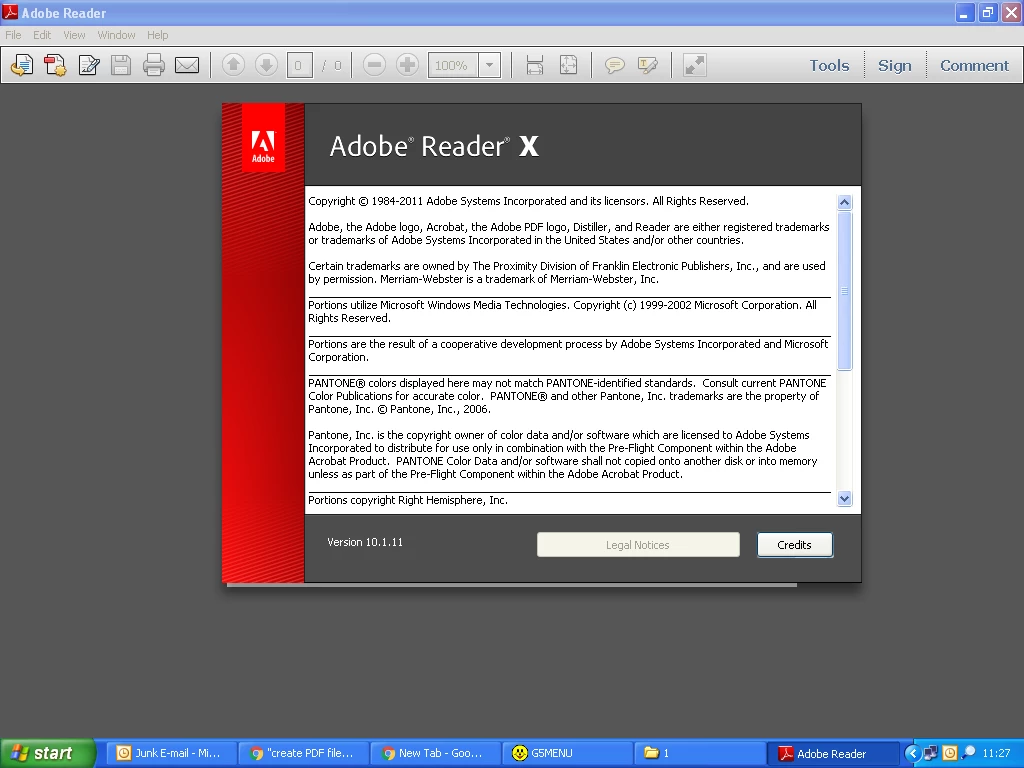
    This is what we have and we have always used it to create PDF's.


    Ok, let's try and unravel this.

    Reader CANNOT create PDF files by itself. But you can pay for an additional service each year, called Adobe PDF Pack. Maybe $79. This would have been worth mentioning, as it would have avoided the misunderstanding. This makes the Create PDF button work in Reader (but see below). Reader doesn't create PDFs but it sends stuff to Adobe to do the work, which is convenient (but not essential), see below.


    Adobe's position is that you need the latest Reader to use these add-ons. Reader X is NOT the latest Reader. It's a very, very long way from being the latest Reader. You cannot, however, run the latest Reader (called Acrobat Reader DC) on Windows XP. But you could have upgraded to Adobe Reader XI (11). This is not an update, you have to choose to download it. Still may not work with PDF Pack, because it still isn't the latest.

    So, what can you do? Well, you should probably be on Reader XI because at least it has several years of security fixes. But if you're on Windows XP, security fixes may not be your main interest. But you can use the service with a browser. This is the help page for PDF Pack: How to Use Adobe PDF Pack  In short, you can go to https://cloud.acrobat.com/convertpdf 

    2 replies

    Kelly McCathran
    Inspiring
    March 14, 2017

    Do you own Acrobat Standard or Professional? That software is required to make Adobe PDFs from Microsoft Office. When you install a paid version of Acrobat (not the free reader), it installs the PDFMaker add-in. The Adobe Reader application does not give you the ability to create PDFs, it gives you the ability to open, search, and print PDFs.

    Here is the feature list for Acrobat DC Pro or Standard.

    Plans and pricing: Compare versions | Adobe Acrobat DC

    I notice you are running Windows XP (I'm not sure if that is supported anymore). The link below has some troubleshooting tips if you do own a full version of Acrobat:

    Troubleshoot Acrobat PDFMaker issues in Microsoft Office on Windows

    New Participant
    March 14, 2017

    We have been creating PDF's up until now, but it has suddenly stopped allowing us to do so.

    New Participant
    March 14, 2017

    I don't know how I can be more clear... Reader CAN'T create PDF files. So either you're using Adobe Acrobat, not Adobe Reader, or you're using some third-party application to create your files.


    no need to get rude I'm not thick, all I'm telling you is what I've done in the past and the software I have and the way it has worked in the past!

    This is what we have and we have always used it to create PDF's.

    AkanchhaS8194121
    Brainiac
    March 13, 2017

    Hi Paulf16185509,

    What is the exact version of the application that you have installed on your computer?

    Is it Adobe Reader or Reader DC? Please check Launch Adobe Reader> Help > About Adobe Reader

    Also, check for the updates under> Help (if any update it pending)

    Regards,

    Akanchha

    New Participant
    March 14, 2017

    We have Adobe Reader x version 10.1.11 running in Windows XP Professional version 5.1.2600.

    I have checked for up dates and it is telling me that there are none available.

    try67
    Community Expert
    March 14, 2017

    Reader can't create PDF files, only display them, so the problem is with some other software.

