


Inspiring
December 13, 2018
Answered

Reader 2019.010.20064 - XFA forms open twice then fail to load data

  • December 13, 2018
  • 13 replies
  • 18080 views

Hi

Since upgrading to Reader 2019.010.20064 our XFA forms open twice but fail to load data from the server.

An example can be found here:  http://www.aduk.net/xfa/test.pdf

The page creates the XFA then matches it with the PDF.  The date time should display in the 3rd text box. 

This was working globally before the 2019.010.20064 update.

What do you need from me to help you fix this?  It's business critical.

Regards

Andy Davey
    This topic has been closed for replies.
    Correct answer keiths5887882

    Anand,

    Do you have an install version, not the updater. I cannot get the Upd to work.


    I updated on my PC by using 'Check for Updates' in Adobe Reader DC. It works fine to open my xdp.

    I updated on my Mac by using 'Check for Updates' in Adobe Reader DC. It does not open my xdp as if the fix is not there.

    13 replies

    AnandSri
    Community Manager
    Community Manager
    January 7, 2019

    Hi all,

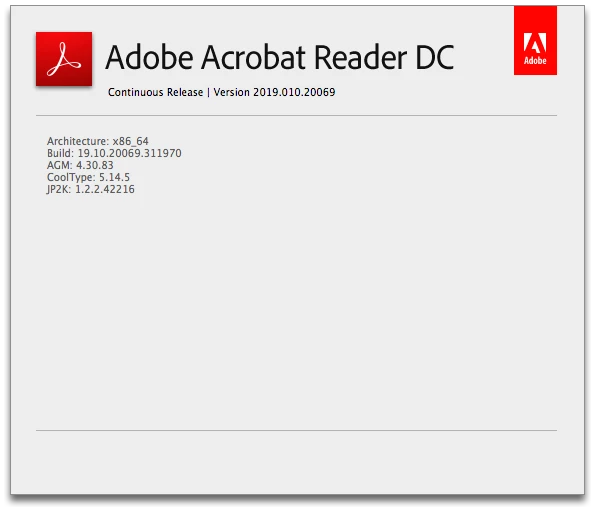
    I am sorry for the trouble you had, would you mind sharing the Mac OS version you have on which you are facing the issue after installing the latest patch of Adobe Reader 19.010.20069?

    Is it specific to one PDF file or is it with all the PDF files?

    Thanks,

    Anand Sri.

    Participating Frequently
    January 7, 2019

    MacOS: Sierra 10.12.6

    Safari: Version 12.0.2 (12606.3.4.1.4)

    It happens on all my print routines which execute and outputs….

    I can send you the entire output xfa if needed.

    Keith Stephenson

    Millennium Information Services

    [Personal info removed by Mod: Phone number]

    AnandSri
    Community Manager
    Community Manager
    January 3, 2019

    Hi All,

    Thank you for your time and patience on this, the official patch of Acrobat/Reader

    Reboot the machine if possible and check.

    Let us know if you experience any issue.

    Thanks,

    Anand Sri.

    teresaf11279499
    Participant
    January 3, 2019

    Thank you for the update.  I have 2 questions:

    1. I received a notice on Dec. 24 stating the case was closed and to fill out survey. I didn't try the program because it was Christmas Eve. But, today, I tried "Help" & "look for updates" but no updates were available; but, the form actually worked.

    2. To make sure it wasn't a fluke, I downloaded the first of the two below.  Do I need to download the second one?

    ReaderOut of cycle updateAcroRdrDCUpd1901020069.msp218 MBAllDC base
    ReaderOut of cycle updateAcroRdrDCUpd1901020069_MUI.msp117 MBAllDC base MUI

    Thanks!

    Participating Frequently
    January 3, 2019

    Anand,

    Do you have an install version, not the updater. I cannot get the Upd to work.

    January 3, 2019

    So Far So good - we are updating Users as they call in.  Keeping our fingers crossed!

    Thanks,

    Steve

    MayaUFCW
    Participant
    December 21, 2018

    Any way for customers to get an email of the test patch? We have dozens of users with this problem - our web server uses Adobe forms constantly -  and have had to uninstall 2019 Reader DC repeatedly this week as it keeps updating itself, despite applying the supposed registry key that disables auto updates.

    Also, bring back the checkbox for disabling updates in the next DC release!

    Thanks

    Inspiring
    December 24, 2018

    Adobe - is there any news on the patch being released?

    Participating Frequently
    January 3, 2019

    Confirmation - Adobe DC updated using menu Help > Check for updates.


    Thanks Andy and Team,

    It seems to be working as expected now at our smoke test. We will provide our complete feedback once its done.

    Thankyou again..

    Varad.

    December 20, 2018

    Are there any updates here?  This is critically affecting our business.

    Thanks,

    Steve

    AnandSri
    Community Manager
    Community Manager
    December 17, 2018

    Hi All,

    Thank you for your time and patience on this. The Engineering team has identified the issue and working on a fix on high priority. To confirm the fix, we shared a workaround/fix to the users reported the issue according to their environment and requested them to test it.

    The fix/workaround shared with the users was not a production binary and should not be used on Production environments. We are working on an official patch which will be released shortly.

    Thank you all for your co-operation.

    Regards,

    Anand Sri.

    Inspiring
    December 17, 2018

    Hi Anand Sri

    Thank you for continuing to keep us appraised of the situation.

    >> We are working on an official patch which will be released shortly.

    The $64k question is ... do you know when that might be as I would like to give my customers some good news and an ETA for the fix?

    Regards

    Andy

    AnandSri
    Community Manager
    Community Manager
    December 17, 2018

    Hi Andy,

    The official patch will be available soon. The date is yet not decided as the fix is still under validation. I will keep a follow-up and will share an update on this thread and on email as soon as it is available.

    Thanks for your time and patience.

    Regards,

    Anand Sri.

    Participant
    December 16, 2018

    Hi Anand Sri.

    Have you planned to deploy the update automatically ? If not, how can I get the fix for my company and our customers ?

    Thank you in advance for your return.

    Best regards.

    Frédéric

    Participant
    December 15, 2018

    We have the same problem in our company. Could you send me the weblink.api file to solve this issue?

    Thank you

    Participant
    December 14, 2018

    Great. This patch worked for us too. Now we are now back in business and we need to let our customers apply this patch. Awaiting on when the patch will go to the main release.

    December 14, 2018

    Thank you SQNAdministrator for bringing this issue to the attention of Adobe.

    Can someone from Adobe acknowledge that they are looking into this issue? It's understandable that a fix will take time but it would be nice to know someone is looking into it.

    AnandSri
    Community Manager
    Community Manager
    December 14, 2018

    Hi DP,

    We're sorry for the trouble and inconvenience caused, the issue is already reported to the Engineering team and we're working on a fix on high priority. We'll share an update as soon as a fix/workaround is identified.

    Thanks for your time and patience on this.

    Regards,

    Anand Sri.

    Known Participant
    December 14, 2018

    One hour ago I received a very strange e-mail message from someone pretending to be Anand Sri (the staff member above). The message is containing a wrong link to a patched weblink.api file, pretending to be a fix for the problem. The link is wrong, because it points to a local file system, but not to a Web URL. Even if it was a Web URL, I would not try it, because I cannot verify the identity of the issuer.

    Has anybody else received such message?