


New Participant
January 11, 2017
Answered

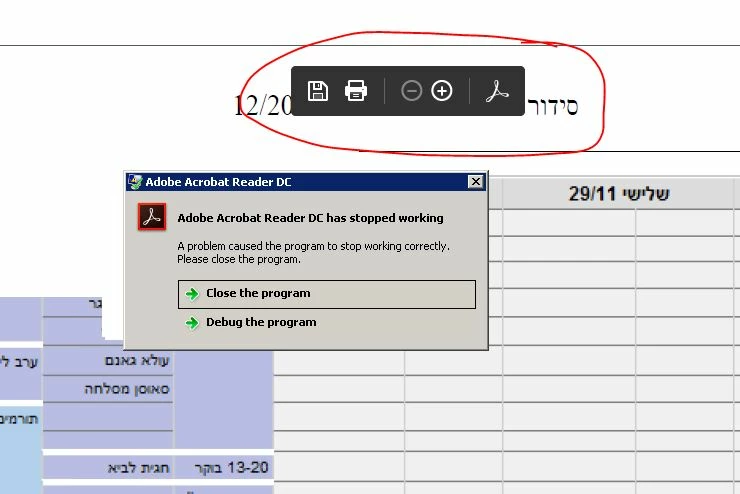
Reader crashes when clicking on page control toolbar after installing the latest update

  • January 11, 2017
  • 5 replies
  • 11665 views

Hello

i having a problem with couple of programs that opens PDF files after yesterday version.

when i click on the quick action bar its crashing.

is there any solution?

thanks

Faulting application name: AcroRd32.exe, version: 15.23.20053.15062, time stamp: 0x585d5608

Faulting module name: AcroRd32.dll, version: 15.23.20053.15062, time stamp: 0x585d55dc

Exception code: 0xc0000005

Fault offset: 0x00100242

Faulting process id: 0x24a0

Faulting application start time: 0x01d26c08d2e23891

Faulting application path: C:\Program Files (x86)\Adobe\Acrobat Reader DC\Reader\AcroRd32.exe

Faulting module path: C:\Program Files (x86)\Adobe\Acrobat Reader DC\Reader\AcroRd32.dll

Report Id: 229eb33d-d7fc-11e6-87b4-005056856334

s
    This topic has been closed for replies.
    Correct answer AshuMittal9644438

    Hi,

    We have released an update today that fixes this issue. This update will be automatically applied to all existing installations of Acrobat and Reader DC. You can also open Acrobat or Reader DC and visit Help > Check for updates to make sure you are on the latest patch.

    Details about the release: Acrobat Help | Release notes | Acrobat DC, Acrobat Reader DC | Update  

    Please also turn Protected Mode ON once you have applied the new update.

    Please let us know how it goes.

    Thanks,

    -ashu

    PS: Please mark the post as answered if this resolves your issue.

    5 replies

    January 17, 2017

    @ Shakti K

    I seem to be having the same issues as related above.

    I am running Win 10 Home with Adobe Reader DC 15.023.20053.15062.

    I have done the Cleaner and stand alone install. I have done the Protected setting change, still no change. I can open Reader as long as no file is selected. Every file, either a simple text based PDF or a complicated form from DHL crashes the program within seconds.

    I have uploaded crash files and a snap of the Windows Event Log to my GoogleDrive

    https://drive.google.com/open?id=0B5Wk1fcDRdX1QlZmN1d6ZkpSaEU

    Let me know if you need anything else.

    I need help!

    Thanks,

    January 19, 2017

    All, The new update released today DOES fix the issue as presented on my system.

    Thanks

    Participating Frequently
    January 16, 2017

    I am having the same problem.


    Windows 10 Enterprise 1511

    Acrobat Reader: 15.23.20053.15062

    the problem still happens whether protected Mode is on or off.

    has the cause been identified & is a fix due?

    thanks

    jack

    Adobe Employee
    January 16, 2017

    Hi jackb101,

    Can you please share the crash dump.

    You can mail /share it to me .

    Thanks ,

    Shakti K

    wernerz100804
    New Participant
    January 18, 2017

    @Shakti K

    Since we dont want change Acrobat-Settings of all our hundreds users, we have Problem with Solution of changing "Protected View-Mode"!

    But maybe I have a hint:

    Wenn i created a new MFC-Dialog-Solution with ab Browser-Control(ProcID "Shell.Explorer.2",CLSID "{8856F961-340A-11D0-A96B-00C04FD705A2}" it worked properly!!!(Could use Control toolbar without Crash!)

    But in Application for our users, the same Browser-Control is in a modal Child-Dialog of our MFC-Single-Document-Application and it crashes using the Adobe-Reader toolbar.

    Here the corresponding dumps.

    AcroRd32 (2).DMP - Google Drive

    AcroRd32.DMP - Google Drive

    Thanks

    Adobe Employee
    January 13, 2017

    Hi shaip13685988 / katherinem52245305,

    Can you please provide the crash dump for the issue. You can mail / share it.

    To take crash dump:

    1. When crash dialog occur do not dismiss that dialog.
    2. Open task manager
    3. Right click to process AcroRd32.exe and select create dump file.
    4. There will be 2 processes of AcroRd32.exe so take the dump of second AcroRd32.exe process also.
    5. Dump file will be located at user's temp directory. (%temp%)

    Thanks,

    Shakti K

    January 13, 2017

    I'm having the same issue, and it doesn't have anything to do with Protected Mode. It just crashes when trying to open a PDF.

    There doesn't seem to be a way to share the dump file here, so I'm going to put it in a file locker for access.

    https://files.fm/u/7e6ejrya

    Adobe Employee
    January 12, 2017

    Hi shaip13685988 / katherinem52245305,

    Protected mode is to provide an added layer of security. In protected mode, malicious PDF documents can’t launch arbitrary executable files or write to system directories or the Windows Registry.

    Protected mode is to provide an added layer of security. In protected mode, malicious PDF documents So, it is advisable to keep protected mode enabled always.

    Please let me know the following details to debug the issue:

    1) OS and version details .

    2) Does the issue appear if PDF is opened in browser or both in browser and standalone. (Browser details and version if the issue happens only for browser) ?

    3) Does the issue appear for certain set of PDFs or for all the PDFs which you open ?

    Thanks,

    Shakti K

    New Participant
    January 12, 2017

    1) windows 2008R2 And windows 7 with latest reader update.

    2) its appear on internet explorer 10 version 10.0.9200.17609 and another 3d party application.

    3) for certain PDFs, not for all.

    is it possible to manage protected mode trust from Group Policy?

    thanks

    Adorobat
    Community Manager
    Community Manager
    January 11, 2017

    Hi shaip13685988,

    Try to repair Reader and see if that works- launch Reader>click Help menu>select Repair Installation.

    If that doesn't work, try to reset preferences for Reader:

    Close Acrobat Reader.

    (ii) Go to C:\Users\your username\AppData\Roaming\Adobe\Acrobat\DC, 

    (iii) Move the entire DC folder to some other location like temp folder.

         To view temp folder , press and hold Windows key and press R on your keyboard, type temp in the run dialogue box then press enter.

           If App data folder is not visible under your user name, type %appdata% in run dialogue box and hit enter

    (iv) Restart Adobe Reader.

    Could you please confirm the Operating System installed on your computer?

    January 19, 2017

    Disabling the Protected view fixed the problem for Windows 7 and Windows Server 2008R2 clients.

    However this does not work for Windows 10. And why does adobe auto updater continue updating to 023 even though there are problems ? Version 020 had no issues. @adobe

    AshuMittal9644438
    Adobe Employee
    AshuMittal9644438Correct answer
    Adobe Employee
    January 19, 2017

    Hi,

    We have released an update today that fixes this issue. This update will be automatically applied to all existing installations of Acrobat and Reader DC. You can also open Acrobat or Reader DC and visit Help > Check for updates to make sure you are on the latest patch.

    Details about the release: Acrobat Help | Release notes | Acrobat DC, Acrobat Reader DC | Update  

    Please also turn Protected Mode ON once you have applied the new update.

    Please let us know how it goes.

    Thanks,

    -ashu

    PS: Please mark the post as answered if this resolves your issue.