


New Participant
December 20, 2019
Question

Reader will not validate EU qualified signature after update

  • December 20, 2019
  • 3 replies
  • 6219 views

Hi all, hope you can help me!

So I have this PDF signed with a EU qualified certificate. In my Mac, Reader will confirm the validity fine, but when I made an update on one of the PC:s it will not validate. It seems it wont even validate against EUTL anymore? Pic:
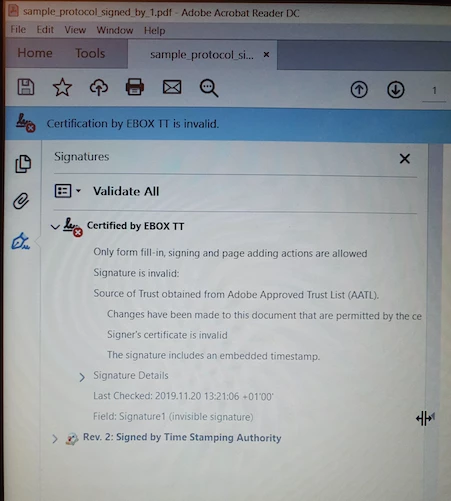


The other PC is still fine, even after update. Both are about a year old and have the same settings as far as I can tell:
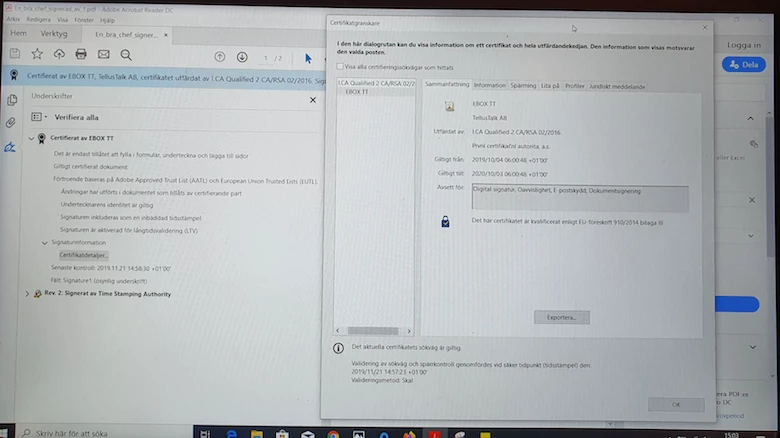
 

What is wrong? I know the certificate is valid, why wont Reader validate agains EUTL all of a sudden? 😞

3 replies

Known Participant
October 6, 2021

The problem here is, that certificate issuer "I.CA Qualified 2 CA/RSA 02/2016" is registered both in AATL and in EUTL, but the registrations are not identical.


When you first load EUTL, addressbook.acrodata contains:

/Country(CZ)/Editable true/Enabled true/ID ..../Source[(EUTL)(AATL)]/

and the signature is verified according to EUTL.


However, the default is to load AATL first, which results in addressbook.acrodata containing:

/Editable true/ID ..../Source[(AATL)(EUTL)]/

and the signature fails verification with Invalid policy constraint

New Participant
October 6, 2021

I see! So, who did something wrong? Is it Adobe or the TSP who manages the registrations in AATL?

Known Participant
October 6, 2021

I think the same TSP should not be registered in both AATL and EUTL, this is useless. Out of 1220 TSPs in EUTL, only 9 have duplicate registration also in AATL: 5 from Italy, 2 from France and 2 from Czech republic. This is probably some historical relict.


I'll recommend to contact I.CA and notify them about this problem


New Participant
May 25, 2021

I managed to find a workaround for this.

However this is still a bug that needs fixing by Adobe.


  1. Close Adobe Reader
  2. Delete addressbook.acrodata from
    C:\Users\<username>\AppData\Roaming\Adobe\Acrobat\DC\Security
  3. Launch Adobe Reader and go to
    Edit > Preferences > Trust Manager
  4. Update the EUTL list and wait for the confirmation message.
    If you do AATL first the error in OP occurs and addressbook.acrodata needs to be deleted again.
  5. Update the AATL list.
  6. Open or refresh the signed document.
    Both the certificate and the signature is now marked as valid and the signature panel shows that the certificate is validated against both AATL and EUTL.


The settings in Preferences > Signatures > Verification > Windows Integration doesn't seem to have any impact on this. I have tried the above steps with these settings disabled and enabled and the result is the same.


I have tried this several times on different computers(and clean VMs). The result is always the same. If you update AATL first Reader doesnt use EUTL to verify.

New Participant
May 26, 2021

I have also reported this as a bug on the Adobe Acrobat UserVoice:

BUG: EUTL corrupted by default – Share your feedback on Acrobat DC (uservoice.com)

try67
Community Expert
December 21, 2019

Go to Edit - Preferences - Trust Manager and click both Update Now buttons.

New Participant
December 30, 2019

Hi try67, sadly that did nothing for us.

Adobe (DC) still says it Validates toward AATL only!


Any other ideas to solve that issue?


It also seems that computers using Adobe Reader before September do not have this issue but computers that get PDF's with this certificate after September for the forst time almost always get this problem.

New Participant
January 10, 2020

Does anyone have any solution to this problem?

That Adobe Reader does not validate toward EUTL at all? (See orignial post for details)