


Participating Frequently
May 5, 2015
Question

Registered IFilter is not found

  • May 5, 2015
  • 2 replies
  • 28429 views

Hello,

I am receiving this message when I am in Indexing Options>Advanced Options>File Types.
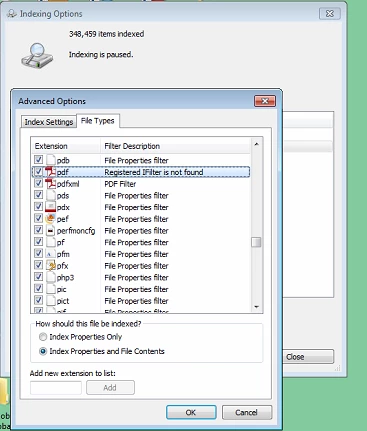
I am unable to search within PDF documents.

Adobe Version - Adobe Acrobat X Standard 10.1.13

IFilter version - PDF iFilter 64 11.0.01

Thank you,

Matt

This topic has been closed for replies.

2 replies

tom8hall
New Participant
July 19, 2018

Wow... several years later and this is still an issue.  I am on Win10 and the search index config shows "Registered IFilter is not found".  The link you provided is for several operating systems but not Win10.   What is the fix for those of us on Win10?    

Many thanks!   I live and die on being able to search my data!  

AadeshSingh
Community Manager
Community Manager
May 5, 2015

Hi Matt,

Please let me know the version of Operating System installed on your computer?

In the mean time please refer to this KB doc. iFilter PDF search stops working on Windows 8 x64

Regards,

Aadesh

Participating Frequently
May 5, 2015

Windows 7 x64

AadeshSingh
Community Manager
Community Manager
May 5, 2015

Hi Matt,

Please follow the below steps:-

  • Click on the Start Menu and choose Control Panel
  • Change View By to Small Icons and click on Indexing Options
  • Click the Advanced button
  • On the Indexing Settings tab, hit Rebuild.

*this could take a long time, so do it before you are going to bed or something.

Let me know if the issue persist.

Regards,

Aadesh