

richardr74482496
New Participant
August 16, 2017
Answered

Repeated requests to sign in

  • August 16, 2017
  • 4 replies
  • 27458 views

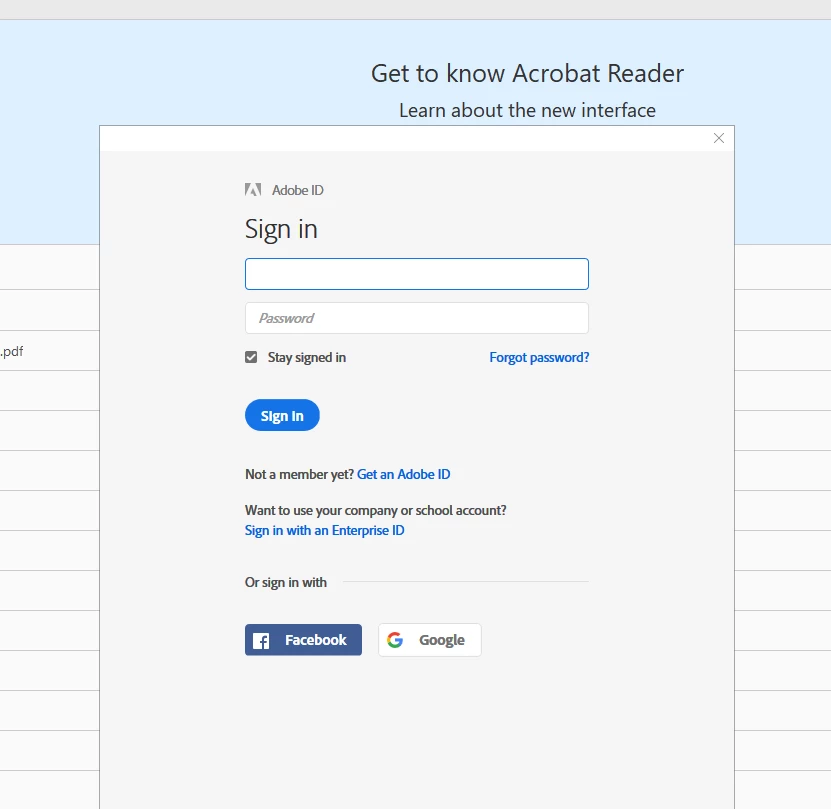
Reader DC keeps asking me to sign in each time a pdf is opened, despite the "Stay signed in" box being ticked. Screen shot attached.

This topic has been closed for replies.
Correct answer sumitash1

Appreciate the prompt response, Richard.

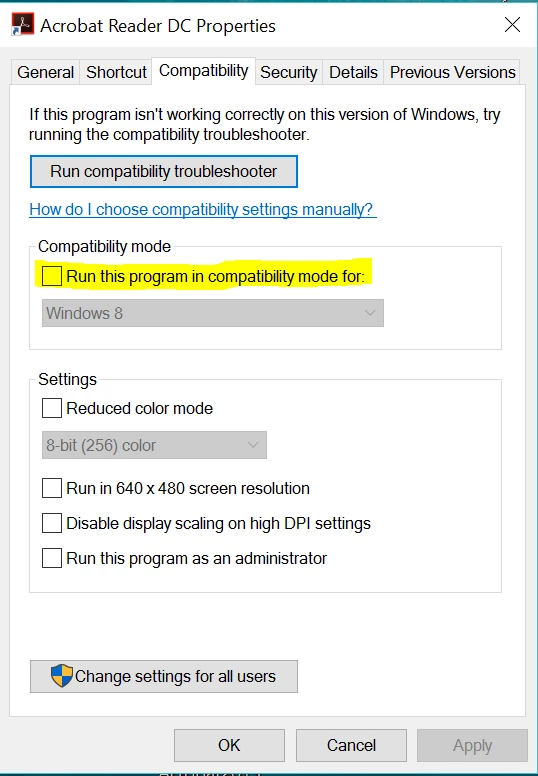
Could you verify if compatibility mode checkbox is checked for Reader DC ? It may cause the issue with "Stay signed in". Please un-check it and relaunch Reader, then it should remember sign-in. 
Thanks,

Sumita

4 replies

New Participant
January 10, 2022

Still happens on macbook! Is there any solution to it?

New Participant
January 10, 2022

I think i found a solution for mac: Preferences >> Adobe Online Services >> uncheck "sync settings" option

New Participant
August 21, 2022

That was helpful, thank you

New Participant
November 13, 2020

Hello, 


I am using a Mac computer and I am having the same issue that I need to sign in everytime I login Adobe Acrobat. I did not have this issue before the latest updates. My Adobe Acrobat version is: 2020.013.20064.

I tried to find the "compartibility mode" tab as suggested and could not find it. 


Kindly help.


I could not find the 

New Participant
January 7, 2021

Same here with my Mac! It drives me nuts. And once I get signed in, it either does not reopen the PDFs I had open before (even though I have that option turned on), but the "recently open" list is also wildly out of date.

Known Participant
September 17, 2020

I am on a Macintosh but I think the Windows directions gave me a clue what to look for in that version. There' nothing like Compatibility Mode in the long list of options in preferences in this version. My suggestion would be that when such advice is given that the 20% or so who use Macintosh computers not be ignored.

sumitash1
Adobe Employee
Adobe Employee
August 17, 2017

Hi richardr74482496,

Sorry for the inconvenience caused. It would really help, if you could provide some more information around the workflow like:

1) Does the sign-in window comes every time you open a pdf (is it local pdf), on Reader? Is it coming with each pdf, or some specific pdf?

2) Did you signed-in in Reader (as Adobe-id, or via Google/ Facebook) and seeing sign-in dialog again (despite stay sign-in being checked)?

3) Does Reader DC gives Sign-in prompt at launch? Or is it only when a pdf is opened?

4) Could you tell the Adobe Reader version (Help->About Acrobat Reader DC) and OS, where you are getting this issue.

Thanks for your support,

Sumita

richardr74482496
New Participant
August 17, 2017

Hi Sumita

Thanks for your attention. To answer your questions:

1. The sign-in window always appears when I open Acrobat Reader. Once open, and signed-in, the window does not appear with every pdf. It seems to be somewhat random. It doesn't seem to matter whether the pdf is already on the system or being downloaded from another source.

2.  I sign in using an Adobe ID, and have to provide the password - even though the Srat signed in box is ticked.

3.  The prompt appears at the launch, and sometimes subsequently when a pdf is opened.

4. Windows 10. Acrobat Reader DC Version 2017.012.20095.

Thanks again

Richard

sumitash1
Adobe Employee
sumitash1Correct answer
Adobe Employee
August 18, 2017

Appreciate the prompt response, Richard.

Could you verify if compatibility mode checkbox is checked for Reader DC ? It may cause the issue with "Stay signed in". Please un-check it and relaunch Reader, then it should remember sign-in. 

Thanks,

Sumita