Participant
August 19, 2020
Answered

Sending MAPI Mail via Send Button still works but when closing the Reader it will crash

  • August 19, 2020
  • 2 replies
  • 7542 views

We are using Adobe Reader 

And Office 2013 Version 

on Windows Server 2012 (not R2) with all Udpates installed - August 2020.


This happen after successfully send the Mail via Outlook in the Moment when we close the Adobe Reader. It happens every Time. I would be happy to receive any Help. Thank You, Jens from Hamburg, Germany
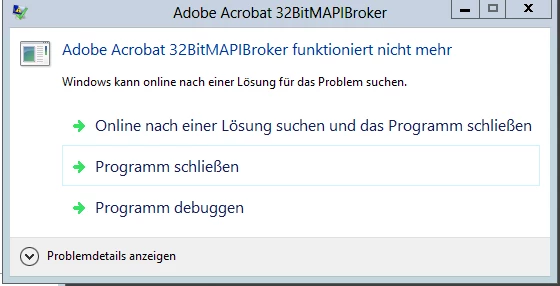
 

Problemsignatur:
Problemereignisname: APPCRASH
Anwendungsname: 32BitMAPIBroker.exe
Anwendungsversion: 20.12.20041.1044
Anwendungszeitstempel: 5f235099
Fehlermodulname: 32BitMAPIBroker.exe
Fehlermodulversion: 20.12.20041.1044
Fehlermodulzeitstempel: 5f235099
Ausnahmecode: c0000005
Ausnahmeoffset: 000059fc
Betriebsystemversion: 6.2.9200.2.0.0.16.7
Gebietsschema-ID: 1031
Zusatzinformation 1: 5861
Zusatzinformation 2: 5861822e1919d7c014bbb064c64908b2
Zusatzinformation 3: d8b5
Zusatzinformation 4: d8b5eca0c5e4432f58aa293d866a59d7

Lesen Sie unsere Datenschutzbestimmungen online:
http://go.microsoft.com/fwlink/?linkid=190175

Wenn die Onlinedatenschutzbestimmungen nicht verfügbar sind, lesen Sie unsere Datenschutzbestimmungen offline:
C:\Windows\system32\de-DE\erofflps.txt

This topic has been closed for replies.
Correct answer arvindy

Hi,

Adobe Acrobat and Reader official update (20.013.20064) containing the fix for this issue is now available. This update will be automatically pushed to all existing installations of Acrobat and Reader. You may also manually trigger the update early by opening the application and going to Help > Check for Updates.

There is no need to set any registry, fix will work with or without the earlier shared reg file.
More information about this release is here: https://helpx.adobe.com/acrobat/release-note/release-notes-acrobat-reader.html 
Please try it out and let us know your feedback!
Thanks for your patience and support!


Regards,
Arvind

2 replies

arvindyCorrect answer
Adobe Employee
November 3, 2020

Hi,

Adobe Acrobat and Reader official update (20.013.20064) containing the fix for this issue is now available. This update will be automatically pushed to all existing installations of Acrobat and Reader. You may also manually trigger the update early by opening the application and going to Help > Check for Updates.

There is no need to set any registry, fix will work with or without the earlier shared reg file.
More information about this release is here: https://helpx.adobe.com/acrobat/release-note/release-notes-acrobat-reader.html 
Please try it out and let us know your feedback!
Thanks for your patience and support!


Regards,
Arvind

Participant
August 31, 2021

Hello Adobe, 


We are experiencing this same error message on Windows Server 2012 R2 with Adobe Acrobat Reader DC 21.005.20060 and Office 2013 Standard. We have crashdumps from the 32BitMAPIBroker.exe program if needed but to reproduce the issue is the same as the original posted. The registry fix also did not resolve the issue. Please advise.

Meenakshi Negi
Community Manager
Community Manager
August 19, 2020

Hi there,


Thank you for reaching out and sorry for the trouble.


We have released an update today for Acrobat and Reader DC (Continuous Track) desktop application.
Please update the application to the latest version by going to the Help menu > Check for updates in the application.


For more information on the recent update, you may refer to this link: https://www.adobe.com/devnet-docs/acrobatetk/tools/ReleaseNotesDC/continuous/dccontinuousaug2020qfe.html#dccontinuousaugtwentytwentyqfe


Let us know if the issue persists.


Thanks,
Meenakshi

Jens5F96Author
Participant
August 20, 2020

Hallo Meenakshi,


even with Version 2020.012.20043 is the Issue still the same.


Greetings from Germany, Hamburg

Jens

Adobe Employee
August 20, 2020

Hi Jens,

We are looking into the issue.

Meanwhile, could you please try the following workaround and let us know if it resolves the issue at your end.

Try the following steps to do that: 

-Quit Adobe Acrobat Reader if already running.

-Download the registry file from: https://documentcloud.adobe.com/link/track?uri=urn:aaid:scds:US:81721873-7907-45dc-9616-ca429b31c008

-Right click on the reg file and select “Merge” then click “Yes” to apply the reg file

-Now try your workflow


Kindly let us know if this helps.

Regards,

Arvind