


Participant
November 29, 2018
Answered

Signature does not appear in file sent by email

  • November 29, 2018
  • 1 reply
  • 725 views

My engineer just sent me a file signed electronically. I can view the signature at the file on the email but when I save the file the signature disappear.

This box appears:
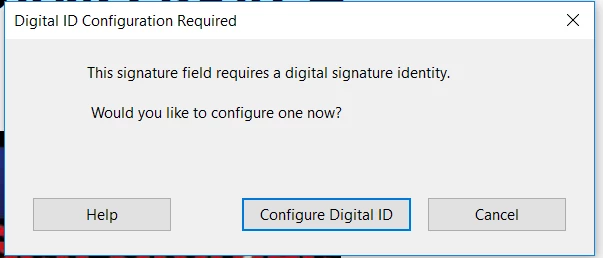
I am not suppose to configure any signature for this file. Does the engineer need to save the file in another way for the signature to "stick" to it?

Please let me know. Thank you

This topic has been closed for replies.
Correct answer AkanchhaS8194121

Hi Seoinage,

If we understand correctly, you have received a signed PDF which was supposed to open at your end but when you save it and try to open, it gives you pop-up to Configure ID?

Since its asking for you to configure your Digital Signature, then you may try the following steps-

  • Save the file locally to your computer, rather than opening it from web and open in Reader.
  • There might be security set-up by the sender (engineer) that needs authentication and document need to have Digital ID configured to open it. (as message says in picture)
  • So you may select "Configure Digital ID" to proceed further or "Create new Digital ID" (in next step) if its never created.

For more details you must read: Digital IDs in Acrobat

Let us know how it goes.

Regards,

Akanchha

1 reply

AkanchhaS8194121
AkanchhaS8194121Correct answer
Legend
November 29, 2018

Hi Seoinage,

If we understand correctly, you have received a signed PDF which was supposed to open at your end but when you save it and try to open, it gives you pop-up to Configure ID?

Since its asking for you to configure your Digital Signature, then you may try the following steps-

  • Save the file locally to your computer, rather than opening it from web and open in Reader.
  • There might be security set-up by the sender (engineer) that needs authentication and document need to have Digital ID configured to open it. (as message says in picture)
  • So you may select "Configure Digital ID" to proceed further or "Create new Digital ID" (in next step) if its never created.

For more details you must read: Digital IDs in Acrobat

Let us know how it goes.

Regards,

Akanchha