


New Participant
April 4, 2019
Answered

Unable to enter text in the (ADVANCED) SEARCH box

  • April 4, 2019
  • 1 reply
  • 6109 views

I am using Adobe Acrobat Reader DC Version 2019.010.20098.  Starting yesterday, when I attempt to perform an advanced search in a local document library, the search box appears, but I can't enter text.  The cursor blinks, but when I attempt to enter text, nothing is displayed. 
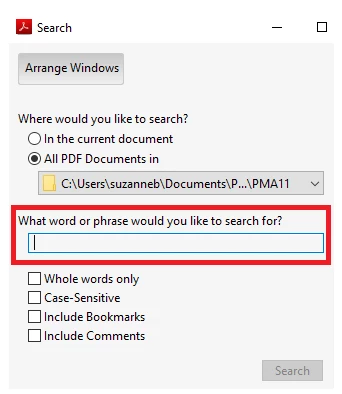
When I try to perform a regular SEARCH (CNTL F), the search box is displayed, but the same problem occurs...nothing appears in the search box when I type.

I went into EDIT/PREFERENCES/SEARCH and selected PURGE CACHE CONTENTS, but the problem persists.

Thanks!

Suzanne

    This topic has been closed for replies.
    Correct answer AnandSri

    Hello Suzannes,

    I am sorry for the trouble you had while using the Advanced search option in Adobe Reader, please reboot the machine once and reset the preferences of Adobe Reader.

    To reset the preferences, please refer to the article How to reset Acrobat Preference settings to def... | Adobe Community

    Reboot the machine after resetting the preferences and try the Advanced search.

    Are you experiencing this issue with all the PDF files or with one specific PDF file?

    If it is with all the PDF files, you may remove Adobe Reader once using Acrobat cleaner tool Download Adobe Reader and Acrobat Cleaner Tool - Adobe Labs

    Reboot the machine and download Adobe Reader from Adobe - Adobe Acrobat Reader DC Distribution

    If it is specific to one PDF file, is it possible to share the file with us so that we can test it at our end? Share the file by private message only How Do I Send  Private Message | Adobe Community

    Let us know how it goes and share your observation.

    Thanks,

    Anand Sri.

    1 reply

    AnandSri
    Community Manager
    AnandSriCommunity ManagerCorrect answer
    Community Manager
    April 9, 2019

    Hello Suzannes,

    I am sorry for the trouble you had while using the Advanced search option in Adobe Reader, please reboot the machine once and reset the preferences of Adobe Reader.

    To reset the preferences, please refer to the article How to reset Acrobat Preference settings to def... | Adobe Community

    Reboot the machine after resetting the preferences and try the Advanced search.

    Are you experiencing this issue with all the PDF files or with one specific PDF file?

    If it is with all the PDF files, you may remove Adobe Reader once using Acrobat cleaner tool Download Adobe Reader and Acrobat Cleaner Tool - Adobe Labs

    Reboot the machine and download Adobe Reader from Adobe - Adobe Acrobat Reader DC Distribution

    If it is specific to one PDF file, is it possible to share the file with us so that we can test it at our end? Share the file by private message only How Do I Send  Private Message | Adobe Community

    Let us know how it goes and share your observation.

    Thanks,

    Anand Sri.

    New Participant
    August 1, 2019

    i had the same issue and tried the above steps but to no avail. i'm running the latest win 10 v1903 build 18362.267 and the latest acrobat reader DC build.

    New Participant
    March 6, 2024

    this has worked for me:

    locate Adobe Reader shortcut>right click>Properties>Compatibility>check the box Run this program in compatibility mode for>select Windows 7>Apply>OK

    hope this helps.


    SO frustrating!! I tried everything else, your fix is the only thing that worked. Thank you!!!