


New Participant
May 7, 2023
Answered

Unable to find snapshot tool in Acrobat Reader 2023

  • May 7, 2023
  • 15 replies
  • 189146 views

Acrobat Reader 2023 changed menu layouts and snapshot tool cannot be found. Find tool in top right says "Find text or tools" but it cannot find snapshot tool. Any ideas how to take snapshot in Acrobat Reader 2023?
Correct answer Zendu

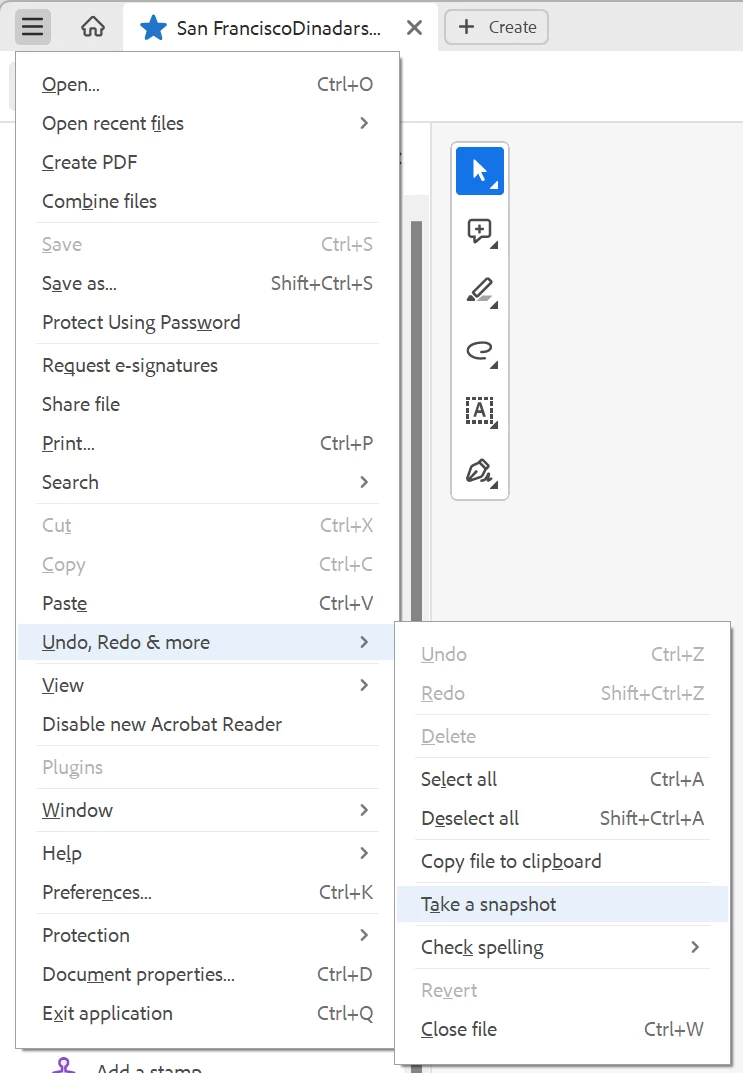
Snapshot has been moved to unified File menu -> Undo, Redo & More -> Take a snapshot.


Such a radical change in UI should have been accompanied by documentation update. But the documentation still refers to old ways.

15 replies

New Participant
September 28, 2023

Thanks so much for that! But where is the support? You press Help, you get instructions for an old interface. This is basic stuff - we were getting it right in 90s when I used to write help! How can Adobe be so useless?

New Participant
August 24, 2023
New Participant
September 20, 2023

see above.  It's under the main menu, top left, then see Undo, Redo and More.  It is hidden in there


New Participant
August 21, 2023

Why would they choose to hide one of its most widely used features in an Undo, Redo & More submenu?... This is crazy...

New Participant
January 24, 2024

Main triple bar dropdown .... Disable New Adobe 
Gets us back to the Toolbar (with the TAKE SNAPSHOT feature). 
That's my workaround... for now. 
Not sure how to revert to begin using the New version again, but not in a hurry.

New Participant
January 25, 2024

From Adobe Acrobat Pro (64-bit) old version
To return to using the New version:  View dropdown | Enable New Version
May be awhile until I do so.  Just an FYI for others.

New Participant
August 7, 2023

you sacks of crap at Adobe


You make it impossible and frig us around to try to get us to start free trials by hiding averything useful.....

Just wated time here when my non edit version could extract text and take a snapshot which is all i need...


a search within the pdf inside Adobe  is USELESS doent even reckognize word snapshot


peice of poo...had to sign in even to comment 

New Participant
November 2, 2023

There's a new feature under Menu>View>Disable New Acrobat that I find particularly useful.  Restart Acrobat then right click on your toolbar (Just to the left of the Page Up and Page Down arrows) and under Show Edit Tools check "Take a Snapshot".  This will put it back where it belongs.  I was going to show screenshots, but once New Acrobat is disabled, it seems the option to enable it is gone on mine.  Perhaps this was due to the Acrobat team's insight that no one would ever want to go back to that crap....

New Participant
December 15, 2023

Actually you can enable it back from View -> Enable new Acrobat Reader. I am not sure why you want to use that crappy UI though.

ZenduAuthorCorrect answer
New Participant
May 7, 2023

Snapshot has been moved to unified File menu -> Undo, Redo & More -> Take a snapshot.


Such a radical change in UI should have been accompanied by documentation update. But the documentation still refers to old ways.

New Participant
July 7, 2023

What the %&%$ ... I was searching for that since march .... I even installed old version every time I need to use it ... That's every day ... I even registerd here to give you a thumbs up man ... I love you!!!


try67
Community Expert
July 7, 2023

Alternatively, you can disable the new UI, via the same menu. Click on "Disable new Acrobat Reader".