


New Participant
May 7, 2023
Answered

Unable to find snapshot tool in Acrobat Reader 2023

  • May 7, 2023
  • 15 replies
  • 189166 views

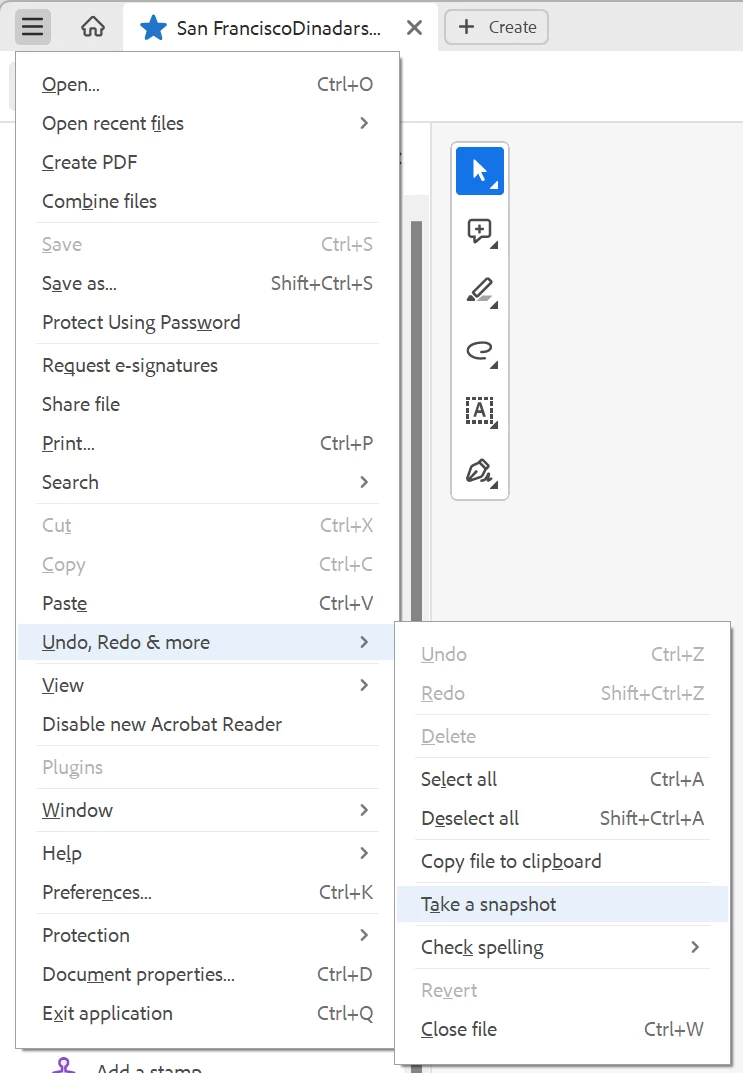
Acrobat Reader 2023 changed menu layouts and snapshot tool cannot be found. Find tool in top right says "Find text or tools" but it cannot find snapshot tool. Any ideas how to take snapshot in Acrobat Reader 2023?
Correct answer Zendu

Snapshot has been moved to unified File menu -> Undo, Redo & More -> Take a snapshot.


Such a radical change in UI should have been accompanied by documentation update. But the documentation still refers to old ways.

15 replies

New Participant
December 26, 2024

I am paying for Adobe. I am tired of this. I hate this progam which becomes harder every time they touch it. I give up. I will cancel my subscription and find an easier editor to use.

New Participant
December 27, 2024

I suggest PDFGear, a neat little esitor with a simple and straightforward UI.

For a more customisable UI, PDF-Xchange Editor outdoes them all.

New Participant
May 8, 2024

Hi, just to add, i was also looking to find the snapshot tool shortcut, thanks for providing the solution. Alternative is to select the image using the select tool, and choose copy image. 


Meenakshi Negi
Community Manager
Community Manager
May 8, 2024


Hi All,


Thank you for reaching out.


In the new version, the "Take a Snapshot" tool is available under the Menu > Undo, Redo & more. You can also select the area/ image in the PDF using the select tool and right-click on it. You will get a pop-up with the option to take a snapshot.

Refer to the screenshot below:


Let us know if you have any questions.


Thanks,

Meenakshi


Marking a reply or response "Correct" will help future users with the same issue quickly identify the correct answer.

New Participant
October 29, 2024

That option only lets you Take A Snapshot. If you want to sent to the Snapshot to Print, you still have to go through the Menu>Undo etc etc. How come we can't have a shortcut icon for this on one of the Toolbars?

New Participant
March 25, 2024

Hidden in an "Undo, redo & other things" submenu is ridiculously out of the way. We used to have it in the page contextual menu so accessible in two clicks anywhere. Adobe has been worsening Reader more and more since the beginning, that's why I've been using PDF-Xchange Viewer, that's an app with an efficient and customisable interface.

New Participant
March 12, 2024

The new location of the snapshot tool in Acrobat makes it a pain to use now.

I recommend using the "Snipping Tool" or "Snip & Sketch" in Windows. It works with anything you see on your screen, and it can be pinned to your Windows Taskbar.  Its also great for adding images to a PowerPoint.

New Participant
March 12, 2024
Thank you for the tip about the Snipping Tool!

*Kelly Swertfager*
7407 N. Woodson Avenue
Fresno, California 93711
559-435-3527 Home
559-970-7414 Cell
New Participant
March 7, 2024

You can now find the "take a snapshot tool" in the default Select tool/ the white arrow "Right Click" context menu. You can right click anywhere and find it in the middle of the menu.

Good work to the Adobe team.

New Participant
February 29, 2024

It is now available in the mouse Right Click. This is awesome.


New Participant
February 29, 2024
Thank you! I'll give it a try.

*Kelly Swertfager*
7407 N. Woodson Avenue
Fresno, California 93711
559-435-3527 Home
559-970-7414 Cell
New Participant
November 16, 2023

so effing annoying


New Participant
October 30, 2023

I couldn't locate an option to add a "Snapshot" feature directly to the toolbar in this version, which is very disappointing.


However, I've found a workaround to avoid sifting through numerous menus.

When you're in select mode (as opposed to pan mode), you can activate "rectangular select" over "text select" by dragging with the "Ctrl" key pressed, even if you're hovering over text. Once you've made the rectangular selection, right-click and choose the "Take a Snapshot" option.

New Participant
January 11, 2024

I have also found that if you are in "pan" mode, you can simply right click anywhere on the page and the menu has the "take a snapshot" option there. Much faster than going through the menu. Hope this helps someone. I use it a lot to print certain sections of a page. 

New Participant
February 12, 2024

I don't see snapshot after r-click.

New Participant
October 20, 2023

Adobe is f***ing garbage.  Useless cra*.  I found Foxit PDF to be WAY WAY better.  Everyone, ditch Adobe.  Go to Foxit PDF.  I highly recommend it

Participating Frequently
October 17, 2023

Can you developers at Adobe please stop mucking around with the menus and toolbars.  Improve the features and technology by all means but can you just stop mucking about with the user interface.  Some dude in the develpment team seems to think it is a good idea to moved stuff around in each new version.  That seriously reduces user efficiency and workflow speed.