


New Participant
March 31, 2021
Question

unreadable text on PDF for some users

  • March 31, 2021
  • 1 reply
  • 12845 views

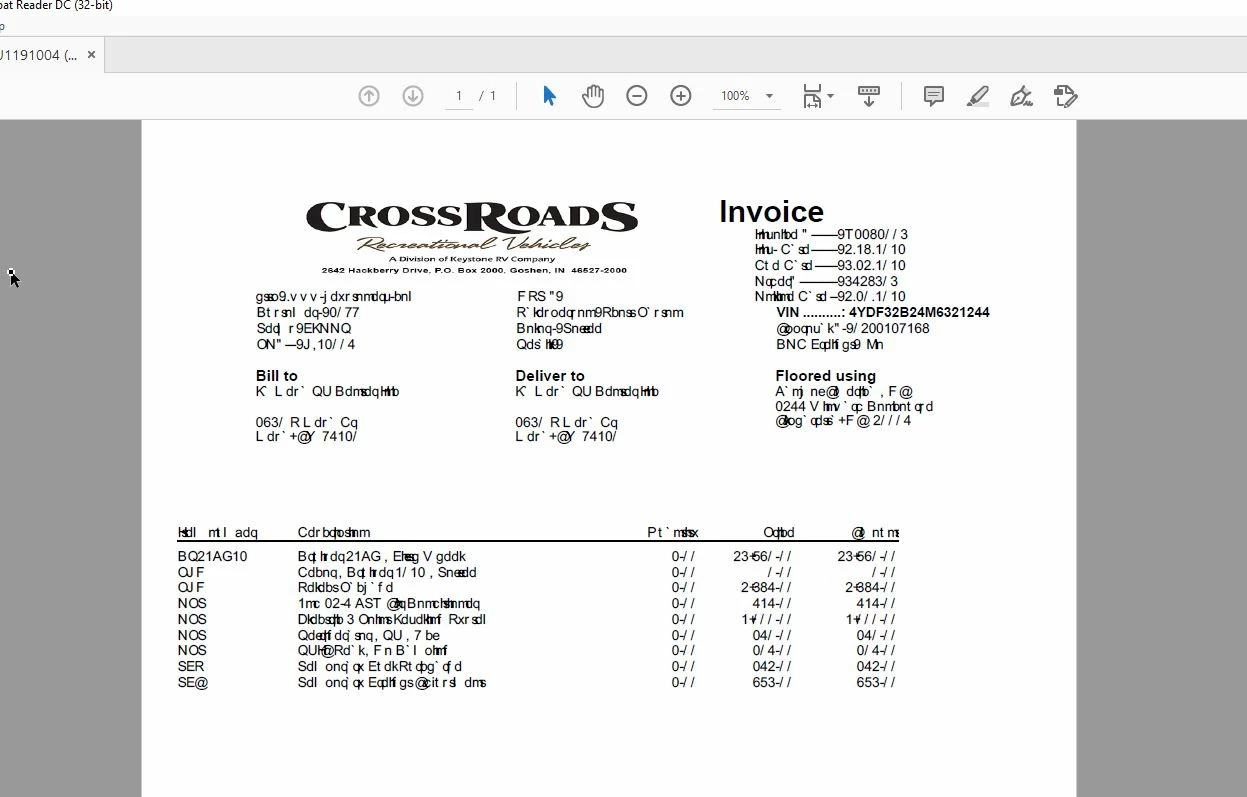
I am having an issues where a few users are opening PDFs from a vendor and getting unreadable text (see image), but others with the same version of Adobe Reader DC are able to see the same PDF just fine.

Copying and pasting into a Word doc converts the test to a readable font, and opening the PDF in Edge displays everything fine. Seems like it's only when opening the PDFs from this vendor in Reader that we encounter this issue, and again, not for all users, only a couple.

I have tried repairing and uninstalling/reinstalling Reader, but does not fix the issue.
 

This topic has been closed for replies.

1 reply

Amal.
Community Manager
Community Manager
April 1, 2021

Hi Michael


Hope you are doing well and sorry for the trouble. As described, PDFs from a vendor are not readable for some of the users.


It looks like the font is not properly embedded in PDF or not present on the users machine which is making the text unreadable. Web browsers use their own PDF mechanism to render and display the PDF content and they are not Adobe dependant.


Please try the following settings and see if that works for you. Go to Edit (Win) , Adobe Acrobat (Mac) >Ppreferences > Page Display > Under Rendering select 'Use local Fonts' > Click OK


For additional information about font embedding please check out the help page: https://helpx.adobe.com/acrobat/using/pdf-fonts.html


Regards

Amal

New Participant
February 29, 2024

This doesn't help. Where do I go to edit? I use a PC. Same problem as the guy that started this thread. Certain websites that opens a PDF in Chrome is completely unreadable and unusable. I tried your suggestion, but don't know where I need to go to do the Edit. Where is the edit in (Win) for adobe. I do also have the extension in chrome and removed it but that didn't work either. I tried going into preferences but no edit there and tried changing the preferences but there is no option for  fonts

Amal.
Community Manager
Community Manager
February 29, 2024

Hi there


Hope you are doing well.


Web browser use their own PDF mechanism to render and display the PDF file and content.


Please try to recreate the PDF from the original source file via Adobe Acrobat Pro as described here https://helpx.adobe.com/acrobat/using/creating-simple-pdfs-acrobat.html and see if that works.


Let us know if you experience any trouble and need more help.


~Amal