s_malik
Participating Frequently
May 17, 2016
Answered

Use of extended features is no longer available on the document

  • May 17, 2016
  • 13 replies
  • 156365 views

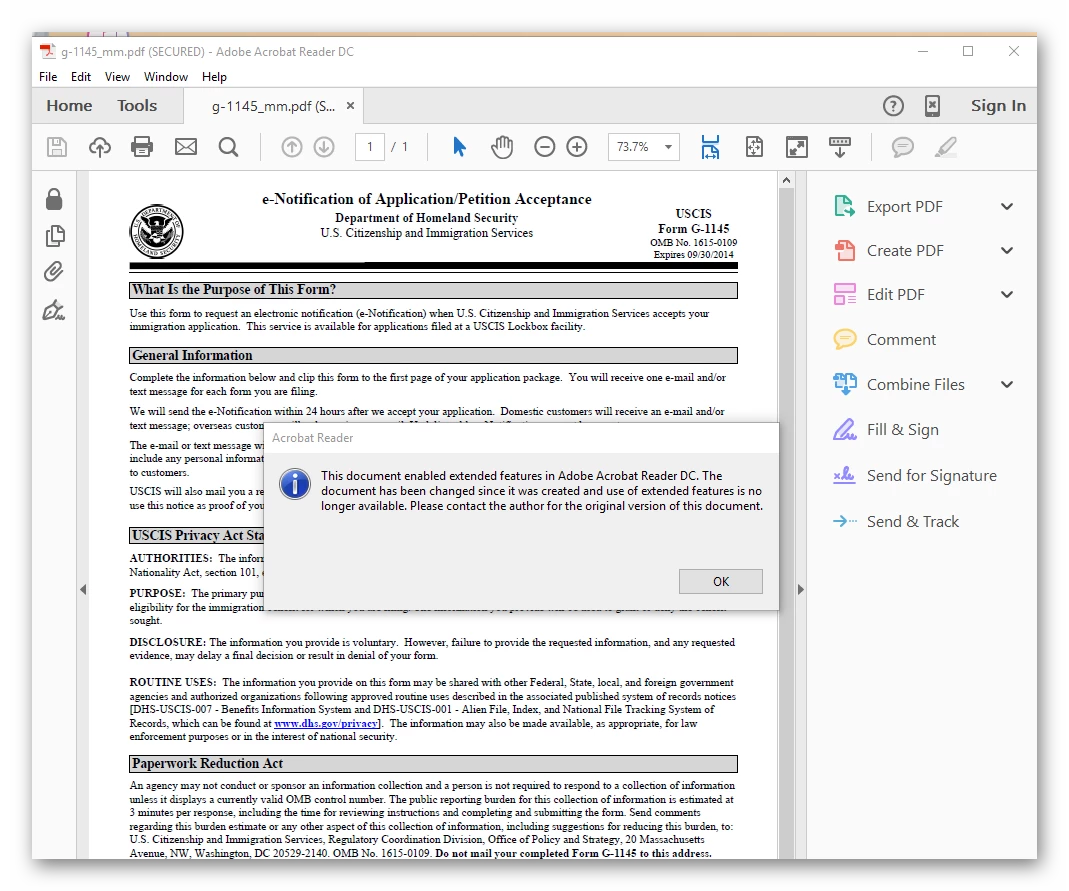
I have Adobe Acrobat Reader DC 2015.016.20039 on my system. I have filled up a form using Foxit Reader. When I tried to open the form with Adobe Acrobat Reader DC I got error "The document enabled extended features in Adobe Acrobat Reader DC. The document has been changed since it was created and use of extended features is no longer available. Please contact the author for the original version of this document".


I tried some other PDF programs, no issue when opening this form.


This topic has been closed for replies.
Correct answer maxwyss

The "Reader-enabling" feature comes from the original form, and it is essentially a digital signature. It is specific for the free PDF viewer product by Adobe (aka Adobe (Acrobat) Reader).

The problem is that only Adobe products are able to (re)save such documents without breaking the seal of the digital signature.

So, what happened in your case is that the Foxit viewer broke the seal when saving back, and that's it. Using Acrobat, you could save a copy of the form, and then continue filling it out. Otherwise, you will be better off to start again, but stay with Adobe PDF viewers all the time working with the form, or with another viewer, again all the time you are working with the form.

BTW, Reader XI and newer no longer need the Extended Rights for most featured blocked by earlier Reader versions. This does not help in this case; it would only be helpful for the issuer of the form.

Update (after rereading the original message): If it is just for viewing or printing out the form you may ignore that message. You may also try to just save it, as you have a Reader version which no longer needs the Extended Rights (at your risk).

Hope this can help.

13 replies

s_malik
s_malikAuthor
Participating Frequently
May 17, 2016

By the way, I installed Adobe Acrobat DC 2015.016.20039 and opened that file with it. No issue, then I tried opening the file with Adobe Acrobat Reader DC, same issue again.

Legend
May 17, 2016

This is just the predictable and correct behavior.

It is only Reader which depends on the Extended Rights. Acrobat can actively ignore them.

maxwyssCorrect answer
Legend
May 17, 2016

The "Reader-enabling" feature comes from the original form, and it is essentially a digital signature. It is specific for the free PDF viewer product by Adobe (aka Adobe (Acrobat) Reader).

The problem is that only Adobe products are able to (re)save such documents without breaking the seal of the digital signature.

So, what happened in your case is that the Foxit viewer broke the seal when saving back, and that's it. Using Acrobat, you could save a copy of the form, and then continue filling it out. Otherwise, you will be better off to start again, but stay with Adobe PDF viewers all the time working with the form, or with another viewer, again all the time you are working with the form.

BTW, Reader XI and newer no longer need the Extended Rights for most featured blocked by earlier Reader versions. This does not help in this case; it would only be helpful for the issuer of the form.

Update (after rereading the original message): If it is just for viewing or printing out the form you may ignore that message. You may also try to just save it, as you have a Reader version which no longer needs the Extended Rights (at your risk).

Hope this can help.

Sarojini_Nagar
Community Manager
Community Manager
May 17, 2016

Hi S-Malik ,

Please refer and follow the steps mentioned in  this article : Acrobat Pro 8 and Reader X - Enable Extended Features for Form .

You can refer this article also :  : Getting error messages when trying to reader enable documents. (Acrobat Reader PDF Forms)

Let us know if this helps.

Regards
Sarojini

Participant
March 22, 2022

When the link for Getting error messages when trying to reader enable documents. (Acrobat Reader PDF Forms) is selected, the following is returned: