


New Participant
October 21, 2022
Question

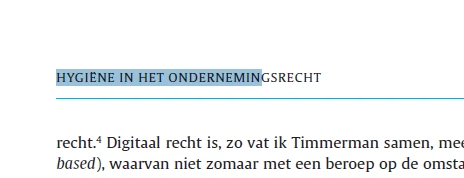
When selecting not all text is selected
  • October 21, 2022
  • 1 reply
  • 366 views

Using the latest Acrobar Reader and trying to select the running headline, only the first part is selected (see above).

With other headlines some parts in the middle are skipped and are not in the selection.

The same happens in Adobe Acrobat Pro and when e.g. we try to strikethrough only the now selected part is done.

On the other hand, when copying and pasting, the whole tekst appears.

Is there a way to get this right? Do more people have this issue?


The pdf fil is attached


Kind regards,

Bert


This topic has been closed for replies.

1 reply

MikelKlink
Participating Frequently
October 22, 2022

It looks like a bug of Adobe Acrobat handling marked content with ActualText properties. It may be relevant that the header line in question is the last text drawn in the page content stream.

This is the end of the page content stream:

/Artifact <</O /Layout >>BDC 
BT
0 0 0 1 k
/GS1 gs
/T1_1 1 Tf
0.06 Tc 7.02 0 0 6 56.6929 781.0394 Tm
(HY)Tj
/Span<</ActualText<FEFF00670069>>> BDC 
1.439 0 Td
(GI)Tj
EMC 
(\313)Tj
/Span<</ActualText<FEFF006E0065>>> BDC 
(NE)Tj
EMC 
( )Tj
/Span<</ActualText<FEFF0069006E>>> BDC 
(IN)Tj
EMC 
( )Tj
/Span<</ActualText<FEFF006800650074>>> BDC 
(HET)Tj
EMC 
( )Tj
/Span<</ActualText<FEFF006F006E006400650072006E0065006D0069006E0067007300720065006300680074>>> BDC 
[(ONDERNEMIN)12 (GSREC)-4.9 (HT)]TJ
EMC 
ET
EMC  

As you see, the header text "HYGIËNE IN HET ONDERNEMINGSRECHT" is marked as a Layout Artifact and drawn in multiple pieces, many of which are Spans with their own ActualText attribute:

  • "HY"
  • "GI" as span with actual text "gi"
  • "Ë"
  • "NE" as span with actual text "ne"
  • " "
  • "IN" as span with actual text "in"
  • " "
  • "HET" as span with actual text "het"
  • " "
  • "ONDERNEMIN", "GSREC", and "HT" as span with actual text "ondernemingsrecht"


Apparently, when Adobe Acrobat marks that text line, it erroneously considers the final span already to finish at the end of the first string drawn as part of it.


Another symptom of that bug: If you put the text cursor in Adobe Acrobat at the start of that header line and move right using the right-key, you'll jump over the spans as a whole... except the last one where you only jump to the end of the first string and cannot go any further!


As this clearly is an Adobe Acrobat bug, you can report it and wait for a fix. Alternatively you can ask the producer of the PDF to change their software to tag the PDF slightly differently to circumvent the bug.