


Participant
March 25, 2023
Answered

Why does Acrobat force me to install McAfee, and adds Chrome Extensions?

  • March 25, 2023
  • 4 replies
  • 2907 views

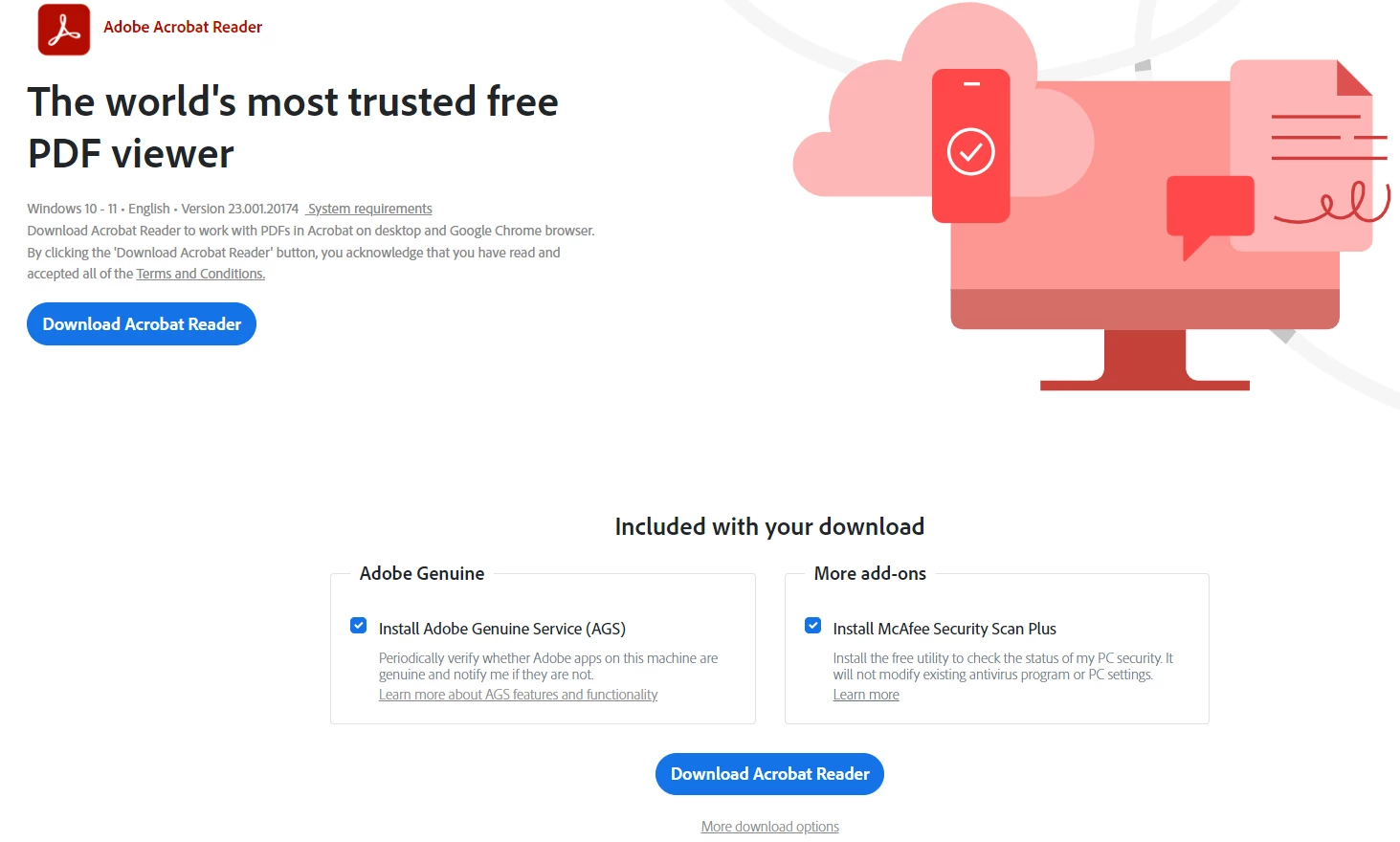
I wanted to install Acrobat Reader and downloaded the installer.  The installer itself automatically -- without any option to decline -- installed two McAfee programs.  It also went into my Chrome and installed some extensions that it never asked me about.  This is unacceptable behavior from a company like Adobe.  McAfee always conflicts with existing antivirus programs, which come built into Windows.  It's as if Adobe wants to intentionally break our computers or slow them down.  Unacceptable that the installer doesn't even give an option to decline the McAfee products.  Despicable.  
Correct answer Meenakshi Negi

Hi Taras29071405t1vj,


Thank you for reaching out.


Acrobat Reader installer download includes the optional McAfee installer and Chrome add-ons. You may disable the option if you do not wish to install the McAfee installer. You may click on More download options at the bottom of the page to check all the optional installers. Refer to the screenshot below:


If you have already installed Acrobat Reader and trying to uninstall McAfee, uninstall the Acrobat Reader application.

Then reboot the machine and install Acrobat Reader from this page: https://get.adobe.com/reader/enterprise/


Let us know if you need any help.


Thanks,

Meenakshi


Marking a reply or response “Correct” will help future users with the same issue quickly identify the correct answer.


4 replies

Known Participant
November 20, 2025

Another customer is paying for two hours of labor because Adobe decided to infect them. Over 20 viruses right after Adobe infected them with McAfee. This is just malice, it's that simple. It's am immediate back stab to customers who are now avoiding Adobe because of this.

Meenakshi Negi
Community Manager
Meenakshi NegiCommunity ManagerCorrect answer
Community Manager
June 7, 2023

Hi Taras29071405t1vj,


Thank you for reaching out.


Acrobat Reader installer download includes the optional McAfee installer and Chrome add-ons. You may disable the option if you do not wish to install the McAfee installer. You may click on More download options at the bottom of the page to check all the optional installers. Refer to the screenshot below:


If you have already installed Acrobat Reader and trying to uninstall McAfee, uninstall the Acrobat Reader application.

Then reboot the machine and install Acrobat Reader from this page: https://get.adobe.com/reader/enterprise/


Let us know if you need any help.


Thanks,

Meenakshi


Marking a reply or response “Correct” will help future users with the same issue quickly identify the correct answer.


Participant
September 13, 2025

Having the download option in 2 places, with one being well above the "optional" add-on information is sneaky and borderline misleading.  Either way it makes Adobe seem disingenuous when it comes to transparency and full disclosure.  It's a bad look.

AnandSri
Community Manager
Community Manager
September 15, 2025

Hello @ABQmedic505


Thank you for your feedback. Your feedback helps us identify areas where we can improve the clarity of our interface. You can use the direct Enterprise download link to install Acrobat Reader without any add-ons: https://adobe.ly/4n0xTyV


You can also raise a feature request with the product team and share your observation and feedback using the Adobe Wish form.


Thanks,

Anand Sri.

JR Boulay
Community Expert
Community Expert
June 6, 2023

[MOVED TO THE ACROBAT READER DISCUSSIONS]

Acrobate du PDF, InDesigner et Photoshopographe
Participant
June 6, 2023

Uncheck the "Install McAfee,,," box in the "Included With Your Download" section before downloading.