jackc18297270
New Participant
June 5, 2018
Answered

Word Search in PDF not working as expected

  • June 5, 2018
  • 8 replies
  • 106570 views

I have a brand new computer using Windows 10 & Office 2016. I just edited an old PowerPoint file and saved it to PDF. I then did a word search in the newly created PDF which did not work as large blue boxes appeared. I tried this using both Adobe Reader DC & Adobe Acrobat X with similar results. I sent the document to a colleague and she cannot do a word search either. I then did a similar word search using older PDFs and it worked as expected. Any help would be appreciated.  

    Correct answer AnandSri

    Hello Jackc,

    Sorry for the delayed response and inconvenience caused. As per the description above, I can understand that you are not able to search a Word in a PDF which was converted from a powerpoint document, is that correct?

    Are you getting any error message while searching any word? Are you using the Find function CTRL + F or the Advanced Search Feature Shift+Ctrl+F?

    Have you tried searching any word in another PDF file? If not, please try. Make sure that you have the latest version of Adobe Reader DC installed, check for any pending updates of Adobe Reader DC from help>check for updates, reboot the machine after updating the Adobe Reader.

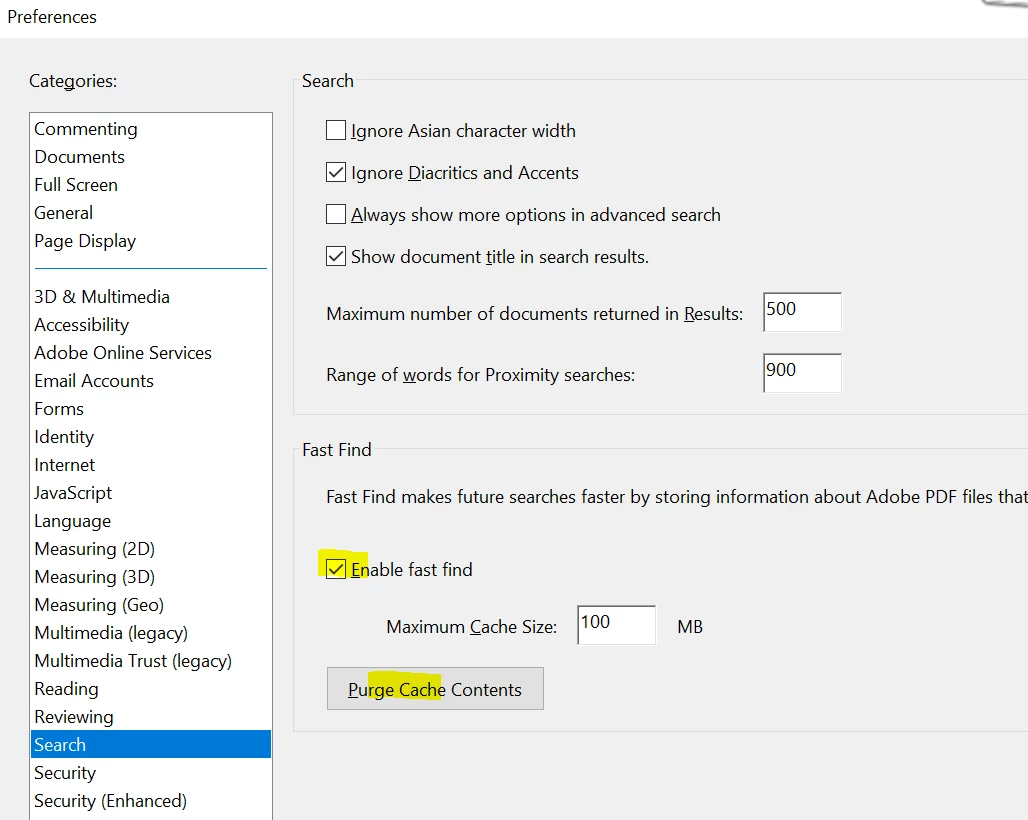
    Navigate to Adobe Reader's Preferences once and disable the "Enable Fast Find" and Click on "Purge cache Contents", Click OK, close Adobe Reader and try again.
    If it is specific to one PDF file, Is it possible to share the PDF file with us so that we can test it at our end? To share the file, please use Adobe Send feature, upload the file, share the link to files via private message only, How Do I Send Private Message

    What is the dot version of Adobe Reader DC installed? To identify, please refer to Adobe article Identify the product and its version for Acrobat and Reader DC

    Let us know how it goes and share your findings.

    Regards,

    Anand Sri.

    8 replies

    New Participant
    August 26, 2022

    I found the fix!!! See the link 

    Though the only difference is in my Adobe Acrobat 9 pro extended I had to go to document then down to ORC text recognition, recognize text using ORC.

    I use this on scanned PDFs and it's such an amazing tool!!!


    https://help.illinoisstate.edu/accessibility/website-and-digital/pdf-accessibility-with-adobe-acrobat-pro/convert-an-image-only-pdf-with-text-recognition-in-adobe-acrobat-pro


    New Participant
    July 28, 2022

    Thanks, but there under document there is no such link as > OCR Text Recognition > Recognize Text

    New Participant
    July 26, 2022

    Shame Adobe Acrobat guys cannot answer.  One has to go around and eventually find no solution.  I have similar problem and not finding a correct solution or answer.  My PC is NEW has Windows10 and I dowloaded Adobe Acrobar Reader DC only yesterday.  

    New Participant
    July 5, 2022

    Enable all Features and export the document to Ritch Text Format. You will be able to use the search function in MS Word.

    New Participant
    October 16, 2021

    I'm having hte same issue.  I never had that before.  Now, the seach is horrible and sometimes the search takes me to a word that is similar in spelling but definitely not the right word.  Like I could be looking for "hydrophilic" and it shoes me words that say "hydrogen".  


    I've tried all the tricks and now must conclude something is wrong with adobe.  I've resorted to old school use of my index in the textbooks I'm using it for. 

    New Participant
    May 13, 2020

    I had the same problem where I try to search a certain word in the pdf file ,but it always crashes when i press ctrl+f .So what I did is that I pressed help then repair installation,and it is working perfectly fine now .

    Hope that's what your looking for.

    New Participant
    December 8, 2020

    This solved my problem, which was that the "find" was taking me to words that resembled the search term, but not directly to the exact search term. Now it seems to be fixed and I know what to do in the future: Thank you "osaydmq"! 

    New Participant
    May 5, 2020

    No that is not my issue. I'm using WordPerfect I am needing to combine a total of 5 documents into 1 searchable pdf and cannot.  I'm sorry I could not understand you...as I told you your call was breaking up and crackling - I have a deadline and could not wait any longer for you to get back on the line. I'll find another way.


    Cari Duda

    Zollie C. Steakley PLLC


    AnandSri
    Community Manager
    AnandSriCommunity ManagerCorrect answer
    Community Manager
    June 6, 2018

    Hello Jackc,

    Sorry for the delayed response and inconvenience caused. As per the description above, I can understand that you are not able to search a Word in a PDF which was converted from a powerpoint document, is that correct?

    Are you getting any error message while searching any word? Are you using the Find function CTRL + F or the Advanced Search Feature Shift+Ctrl+F?

    Have you tried searching any word in another PDF file? If not, please try. Make sure that you have the latest version of Adobe Reader DC installed, check for any pending updates of Adobe Reader DC from help>check for updates, reboot the machine after updating the Adobe Reader.

    Navigate to Adobe Reader's Preferences once and disable the "Enable Fast Find" and Click on "Purge cache Contents", Click OK, close Adobe Reader and try again.

    If it is specific to one PDF file, Is it possible to share the PDF file with us so that we can test it at our end? To share the file, please use Adobe Send feature, upload the file, share the link to files via private message only, How Do I Send Private Message

    What is the dot version of Adobe Reader DC installed? To identify, please refer to Adobe article Identify the product and its version for Acrobat and Reader DC

    Let us know how it goes and share your findings.

    Regards,

    Anand Sri.

    New Participant
    October 17, 2020

    I am using Adobe Acrobat Reader DC Nederlands [AAR DC NL] (version 20.012.20048, with all updates installed) on Windows 10 (with latest automatic updates installed) with MS Office Home 365 (all updates installed).
    During the last weeks I am unable to search in all my PDF files. Always same message: " .. has searched document ... no corresponding word were found ..." even for words that appear in the title of the pdf and that appear 50 times in the whole pdf document. CTRL+F and Shift+CTRL+F do not work. 
    In preferences I have disabled  "Enable Fast Find, purged cache, clicked OK". does not help.
    In preferences I have increased max cache size from 100 MB to 20000 MB: same message (after searching in more pages of large document) that nothing was found. Is max cache size thereason? Do I have to increase max cache size to 100000 MB or more? 
    There seem to be several issues with this version (Adobe Acrobat Reader DC Nederlands, version 20.012.20048). E.g. Copying a few marked sentences of the pdf into a Word document in order not to have to retype them does no longer work either. 

    New Participant
    December 11, 2020

    Not with the free Reader, no.


    I don't know if the software was for free. I have the following software on my PC.
