


- Home
- Acrobat Reader Mobile
- Discussions
- Re: google drive with android chromebook
- Re: google drive with android chromebook

Copy link to clipboard
Copied
How do I view PDFs from google drive as easily as from dropbox in the adobe app on a samsung chromebook? I saw the instructions on how to add google drive to adobe on an ipad/iphone, but does it work for android? I am a big google drive user and I don't want to have to move all my textbooks to dropbox. Thank you.




Copy link to clipboard
Copied
Hello Emblum,
Thanks for sharing the additional information. The above details are general information to access the PDF files. However, the Google drive as a storage account in the Adobe Reader app is not available. You can file a feature request using the following URL Feature Request/Bug Report Form
For now, the Adobe Reader is not available for ChromeOS.
Thanks,
Anand Sri.
 7
Replies
7
7
Replies
7


Copy link to clipboard
Copied
Hello Emblum,
If you want to access the PDF files stored in google drive, then you can access them from the following steps:
- Open your file sharing service. For example, Google Drive.
- Select a PDF.
- If the service does not provide a default PDF viewer, you may be asked how to complete the action. Choose Adobe Acrobat.
- If the PDF opens in the 3rd party app, tap the Open With icon to select Acrobat Reader. See the Dropbox image below for an example.
- Tap Always or Just Once.
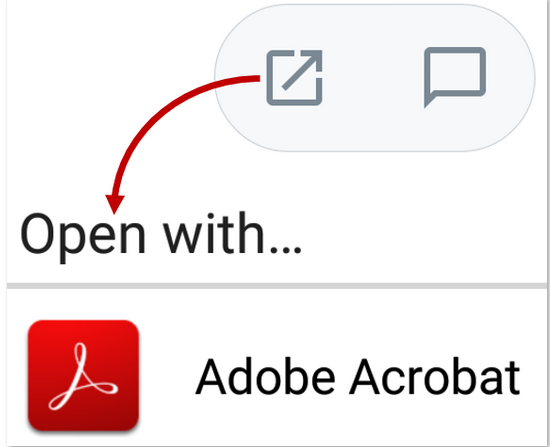
However, the Google drive as a storage account in the Adobe Reader app is not available. You can file a feature request using the following URL Feature Request/Bug Report Form
Feel free to update this discussion for any further assistance.
Thanks,
Anand Sri.
Copy link to clipboard
Copied
I was asking specifically about SAMSUNG CHROMEBOOK, not an apple product. Below are screen shots of me attempting to open a PDF from Google Drive and Adobe is not an option. I also am not able to open PDFs from Google Drive on the Adobe Acrobat Reader App side. Am I SOL?


Copy link to clipboard
Copied
Hello Emblum,
Thanks for sharing the additional information. The above details are general information to access the PDF files. However, the Google drive as a storage account in the Adobe Reader app is not available. You can file a feature request using the following URL Feature Request/Bug Report Form
For now, the Adobe Reader is not available for ChromeOS.
Thanks,
Anand Sri.

Copy link to clipboard
Copied
Your screenshot doesn't look like Adobe Acrobat Reader. What is it?
Copy link to clipboard
Copied
Hello Graffiti,
The user's screenshot is from his Samsung Chromebook, and the screenshot shared by me is from Adobe article Acrobat Reader Help for Android: Opening PDFs
- Anand Sri
Copy link to clipboard
Copied
Thank AdandSri. I knew what yours was. I just hadn't seen anything like what the OP posted (but I don't use a Chromebook).
Copy link to clipboard
Copied
it was a screenshot from a PDF on google drive (not the adobe reader app), but I can't connect the two directly from either side.


Get ready! An upgraded Adobe Community experience is coming in January.
Learn more
 AdChoices