lucasso
New Participant
June 22, 2018
Answered

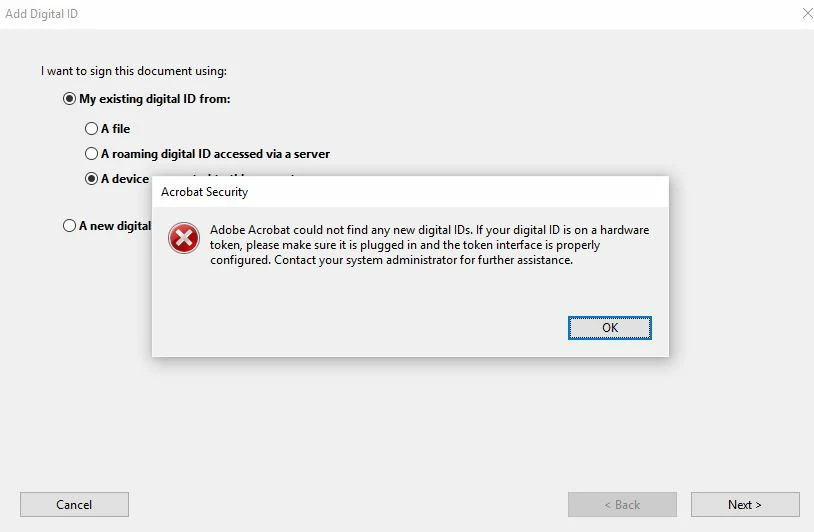
Adobe Acrobat could not find an new digital IDs

  • June 22, 2018
  • 2 replies
  • 29477 views

I am trying to sigh a PDF document on my personal computer. The document requires a Common Access Card (CAC) digital certificate which I have.

Every time I try to sign an Adobe PDF I get the below error.

The CAC reader is installed and functional (confirmed by logging on to various DOD sites with my PIN).

How do i get Adobe Acrobat DC to recognize my certificates and sign the document?

I am using Adobe Acrobat DC version 2018.011.20040

Windows 10 Pro version 10.0.15063 build 15063

This topic has been closed for replies.
Correct answer AnandSri

Hello Lucasso,

We apologize for the inconvenience caused, as per the description above, you are not able to sign a PDF file using the CAC digital certificate, Is that correct?

Using Adobe Reader, only PDFs with Reader Usage Rights enabled (through Acrobat software) can be signed using a digital ID.

Assuming you are using freeware Adobe Reader to sign the PDF file as I have checked the records with your current Adobe ID(email) and could not find any Acrobat license registered.

Try resetting Adobe Reader's Preferences once and reboot the machine, to reset the Preferences, please refer to the article How to reset Acrobat Preference settings to default.

Try disabling the Protected Mode once from Edit>Preferences>Security(Enhanced)>uncheck "Enable Protected mode at startup"

Note: Disabling the protected mode is only for testing purpose, please enable it back. Protected View feature for PDFs (Windows), Adobe Reader

If the issue persists, remove Adobe Reader using Acrobat cleaner tool Download Adobe Reader and Acrobat Cleaner Tool - Adobe Labs

Reboot the machine and install the latest Adobe Reader from Adobe - Adobe Acrobat Reader DC Distribution

You may also refer to the following Adobe article and discussion Reader DC won't accept digital signature from smart card reader

Certificate-based signatures, Adobe Acrobat DC

Let us know how it goes and share your findings.

Regards,

Anand Sri.

[Edited response]

2 replies

New Participant
May 29, 2021

You have to create a new digital ID. 

AnandSri
Community Manager
AnandSriCommunity ManagerCorrect answer
Community Manager
June 25, 2018

Hello Lucasso,

We apologize for the inconvenience caused, as per the description above, you are not able to sign a PDF file using the CAC digital certificate, Is that correct?

Using Adobe Reader, only PDFs with Reader Usage Rights enabled (through Acrobat software) can be signed using a digital ID.

Assuming you are using freeware Adobe Reader to sign the PDF file as I have checked the records with your current Adobe ID(email) and could not find any Acrobat license registered.

Try resetting Adobe Reader's Preferences once and reboot the machine, to reset the Preferences, please refer to the article How to reset Acrobat Preference settings to default.

Try disabling the Protected Mode once from Edit>Preferences>Security(Enhanced)>uncheck "Enable Protected mode at startup"

Note: Disabling the protected mode is only for testing purpose, please enable it back. Protected View feature for PDFs (Windows), Adobe Reader

If the issue persists, remove Adobe Reader using Acrobat cleaner tool Download Adobe Reader and Acrobat Cleaner Tool - Adobe Labs

Reboot the machine and install the latest Adobe Reader from Adobe - Adobe Acrobat Reader DC Distribution

You may also refer to the following Adobe article and discussion Reader DC won't accept digital signature from smart card reader

Certificate-based signatures, Adobe Acrobat DC

Let us know how it goes and share your findings.

Regards,

Anand Sri.

[Edited response]