


April 22, 2015
Answered

Adobe Reader DC has errors and crashes with Windows Server 2012 R2

  • April 22, 2015
  • 15 replies
  • 115882 views

We recently installed Adobe Reader DC version of Adobe on our Windows Server 2012 R2 servers and are having issues since the launch. Few of the issues we have seen are as follows:

  1. This version is a bit clunky and hangs.
  2. Has a lot of pop-up boxes that appears each time I open a document.
  3. Each time I open a document there is a Welcome pop-up box
  4. It is a bit slow to respond between clicks
  5. If I click on any options like File. The application hangs and then crashes. (see attached crash message)

Any help to resolve this would be helpful.

Thank you
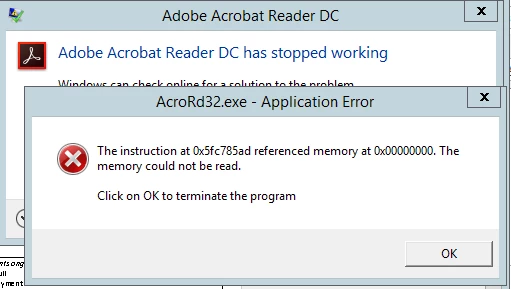

This topic has been closed for replies.
Correct answer ashutoshmehra

Questions to the users facing this issue:

1. Do you have the Preview Pane enabled in File Explorer? If so, can you disable it temporarily to see if the problem goes away? On Windows 8, in Explorer go to the View tab, and if the "Preview Pane" button is pressed, un-press it. On Windows 7, towards the top-right (towards the left of the help icon) there's a "Show the preview pane" button; un-press it.

2. Make sure the following directories exist on your machine. If not, please create them:

C:\Users\USERNAME\AppData\Local\Adobe\Acrobat\DC\ToolsSearchCacheAcro

C:\Users\USERNAME\AppData\Local\Adobe\Acrobat\DC\ToolsSearchCacheRdr

replace USERNAME with your user name.

Does doing 1 and/or 2 resolve this issue?

15 replies

Participant
June 18, 2015

Hello,

we have the same issue. We use W2012 R2 as Remotedesktop Servers. Editing vor each user the regestry on a Remotedesktop Server Farm is no solution. We installed on a new system.

The issue was raised here 6 weeks ago and it looks that there is now solution in the time between.

User need to reed PDF on the Remote Desktopn - but can't.

I would realy appriciate a solution.

Thanks

Gerhard

Participant
June 18, 2015

Well yes, the solution is to set the value in the GPO. It works now on our farm!

June 11, 2015
Participant
May 22, 2015

I'm having exactly the same problem, brand new servers and it just refuses to work.

jeffm57819078
Participant
April 22, 2015

I just had the same issue on a 2012 R2 Remote Desktop server. I fixed it by creating a registry key called Privileged under HKEY_CURRENT_USER\Software\Adobe\Acrobat Reader\DC and then creating a DWORD value in that key called bProtectedMode and setting the value to 0. This was on a brand-new server that never had a previous version of any Adobe software on it.

This is a major kludge. Hopefully Adobe will fix it soon. By the way, here's the crash signature we were getting:

Problem signature:

  Problem Event Name: APPCRASH

  Application Name: AcroRd32.exe

  Application Version: 15.7.20033.2203

  Application Timestamp: 5507d7da

  Fault Module Name: AcroRd32.dll

  Fault Module Version: 15.7.20033.2203

  Fault Module Timestamp: 5507d7bf

  Exception Code: c0000005

  Exception Offset: 00a085ad

  OS Version: 6.3.9600.2.0.0.16.7

  Locale ID: 1033

  Additional Information 1: ac05

  Additional Information 2: ac0507478d1c5bd693cfc4fe3987e900

  Additional Information 3: ac05

  Additional Information 4: ac0507478d1c5bd693cfc4fe3987e900

Reference:

Protected Mode — Acrobat Application Security Guide

techs99274037
Participant
November 9, 2018

I just had the same issue on a 2012 R2 Remote Desktop server. I fixed it by creating a registry key called Privileged under HKEY_CURRENT_USER\Software\Adobe\Acrobat Reader\DC and then creating a DWORD value in that key called bProtectedMode and setting the value to 0. This was on a brand-new server that never had a previous version of any Adobe software on it.

This also fixed it on an RDS 2016 server.

I don't know why this is still an issue.

AadeshSingh
Community Manager
Community Manager
April 22, 2015

Hi Sandy,

I am so sorry that you are experiencing this issue, lets try to get this issue resolved.

I will recommend you to uninstall Adobe Acrobat Reader DC & then re-install it again using this link  Adobe Acrobat Reader DC Install for all versions

*Make sure that you have disabled the protected mode before re-installing the application. Please refer to this KB doc. Protected Mode troubleshooting | Adobe Reader

Let me know if the issue persist.

Regards,

Aadesh

Participant
July 21, 2015

I'm having the same issue.  However, I do not have Adobe Acrobat Reader DC installed.  I uninstalled it a few months ago.  This error just started showing up a last week.  I exclusively use Adobe Acrobat Pro, the newest version.  Over 6 months ago, I had Reader DC, but it kept acting up and crashing.  Therefore, I uninstalled it, since I have Acrobat Pro.  However, as i mentioned above, last week this message keeps popping up even though I say "Close the program". 

The odd thing is, I do not have Reader DC as I stated above, I uninstalled it, so why am I having this issue?  I uninstalled my Acrobat Pro and reinstalled it and I'm still having the same issue.  Does anyone have any suggestions? Thank you.

Problem Details:

Adobe Acrobat Reader DC has stopped working. 

Problem signature:

  Problem Event Name: APPCRASH

  Application Name: acrord32.exe

  Application Version: 15.8.20082.15957

  Application Timestamp: 55960b88

  Fault Module Name: acrord32.exe

  Fault Module Version: 15.8.20082.15957

  Fault Module Timestamp: 55960b88

  Exception Code: 40000015

  Exception Offset: 000dfb9d

  OS Version: 6.1.7601.2.1.0.256.48

  Locale ID: 1033

  Additional Information 1: 7196

  Additional Information 2: 71966aa44fc90d07542da354f1126cf0

  Additional Information 3: 9a61

  Additional Information 4: 9a613412be2432f1284ee0e39530abfa

Read our privacy statement online:

  http://go.microsoft.com/fwlink/?linkid=104288&clcid=0x0409

If the online privacy statement is not available, please read our privacy statement offline:

  C:\Windows\system32\en-US\erofflps.txt

pwillener
Legend
July 22, 2015

Please see my responses.  It is my first time posting a question and I am not as tech savy as the rest of this group. 

Some things do not make sense in your post

  1. "Over 6 months ago, I had Reader DC": Acrobat DC and Reader DC was released in April 2015 - My apologizes - I have had Acrobat Pro DC and Reader DC since it was released.  However, about 1-2 months ago I uninstalled Reader DC. 
  2. "I do not have Reader DC": yet it is the latest Reader DC version that is crashing - As I stated above, I uninstalled Reader DC, but I keep getting this error.  It may be possible there are still something left of the program - Also, I have only been receiving this error message as of last week. 

Two questions:

  1. do you see Acrobat Reader DC in your Programs & Features?  As I stated above and in my questions - I do not have Acrobat Reader DC in my Programs & Features - it is not in the Programs panel - therefore I cannot delete it.
  2. do you actually use Reader DC when it is crashing?  As I stated before - I do not use Reader DC - which is why I am asking this question - to my knowledge, I do not have Reader DC at all - since I uninstalled it a couple months ago - therefore I should not be receiving an error that it is crashing - but I am, hence my question to this forum. 

I would appreciate any suggestions. Thank you.


Try running the Cleaner Tool http://labs.adobe.com/downloads/acrobatcleaner.html - this will remove all Acrobat and Reader versions.