


Adobe Reader DC "Find" function is broken in the latest releases
This is for Adobe Reader DC on Windows 10 Pro x64.
If the user hits "Ctrl+F" immediately after starting Adobe Reader DC with a document and performs contextual search for some keyword(s), the results are nonsensical. The search acts weirdly (makes a long delay before producing the first result) and then the entries reported by the search have little or no relation to what was actually searched. Usually, the first letter of the word matches, but the rest doesn't
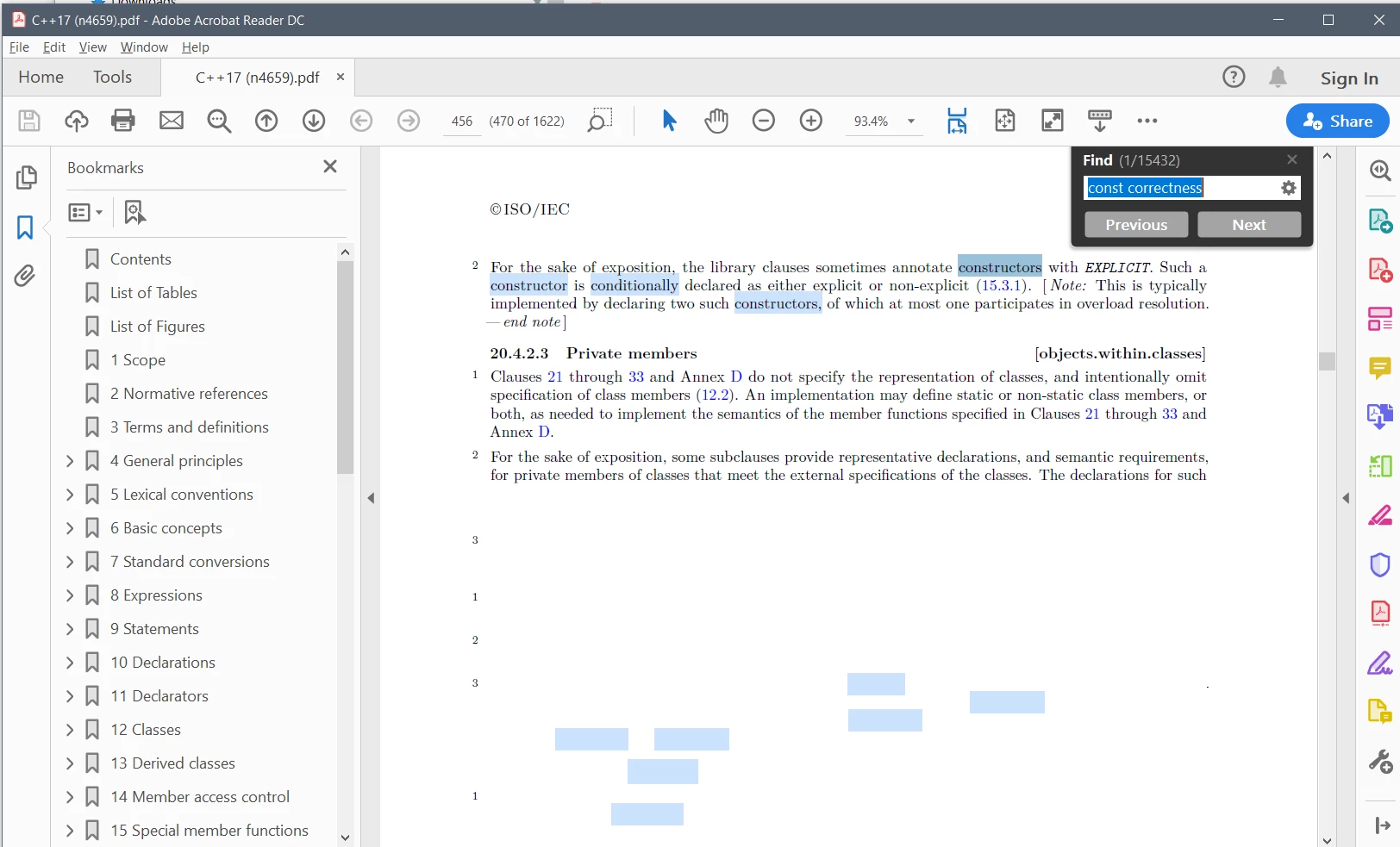
Also, some portions of the document are not rendered for some reason: they appeared to be covered by a white rectangle (see the screenshot above). I don't know if these two issues are related. I believe the "white rectangle" issue has been present for a while, while "nonsensical search results" issue began to appear relatively recently.
Closing the "Find" window and restarting the search again usually makes it work properly.
This bug (bugs?) has been present in Adobe Reader DC for quiate a while already. Would you please tell me how long it will take to have it fixed? I would like to elevate the priority and have it fixed immediately. Please, do it now.
 AdChoices