


Participant
November 1, 2015
Answered

How do I install Acrobat Reader DC on my D drive?

  • November 1, 2015
  • 2 replies
  • 48101 views

My C drive is a flash drive, big enough for the operating system but not much else. Therefore, I want to keep all my applications (wherever possible) on my D drive, but there doesn't appear to be a "destination drive" option in the the installer.

Kind regards,

Peter Clark.
    This topic has been closed for replies.
    Correct answer AadeshSingh

    Hi peteeclark,

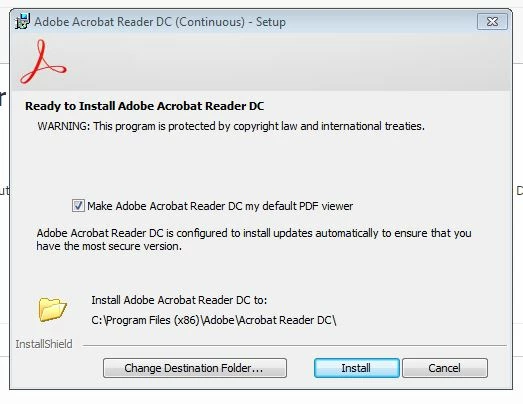
    Download Acrobat Reader DC using this link Adobe - Adobe Acrobat Reader DC Distribution, while installing you will get the below screen, try to Change the Destination Folder to D drive & proceed with the installation.

    Let me know if it works.

    Regards,
    Aadesh

    2 replies

    Legend
    May 9, 2018

    Get much more space on C.

    AadeshSingh
    Community Manager
    AadeshSinghCommunity ManagerCorrect answer
    Community Manager
    November 1, 2015

    Hi peteeclark,

    Download Acrobat Reader DC using this link Adobe - Adobe Acrobat Reader DC Distribution, while installing you will get the below screen, try to Change the Destination Folder to D drive & proceed with the installation.

    Let me know if it works.

    Regards,
    Aadesh

    Participant
    November 1, 2015

    Yes, it works. Thank you.

    Kind regards,

    Peter.

    AadeshSingh
    Community Manager
    Community Manager
    November 2, 2015

    Hey peteeclark,

    You're welcome!

    Regards,

    Aadesh