


New Participant
July 16, 2018
Answered

How to delete/remove recent directories in Acrobat Reader on Mac OS High Sierra

  • July 16, 2018
  • 1 reply
  • 4078 views

Hi all

In one of the last versions of Acrobat Reader, it became possible to change the recent file list to 0, thus eliminating the reading history.

However, what is still there is the directory history. When selecting "Save As", it shows you the recently used directories. There goes the privacy ...

Is there a way to remove those recent directories? On Windows there is some Registry tampering possible, but I haven't been able to locate something that is valid for MacOS.

Your help is appreciated.
    This topic has been closed for replies.
    Correct answer AnandSri

    Hello Oakie,

    We're sorry for the trouble you had with Adobe Reader. Disabling the feature is not possible, however, you can make changes in the Adobe Reader's Preferences on Mac to hide the recent directories.

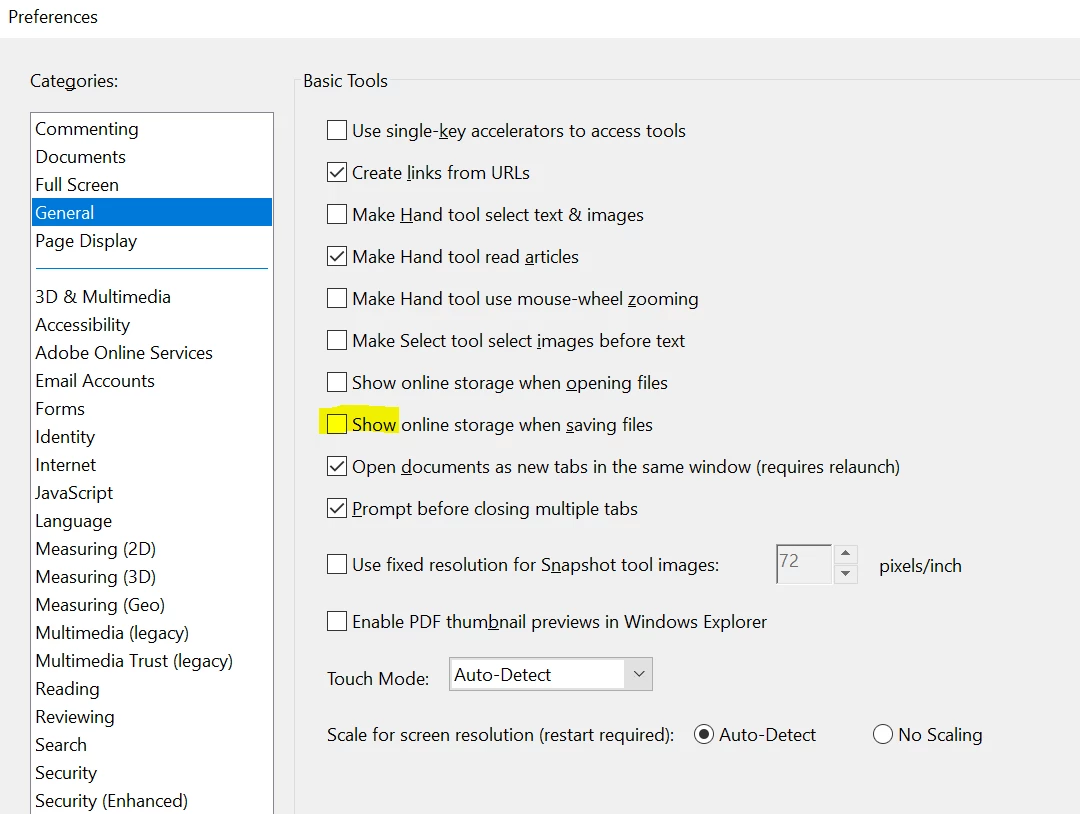
    Navigate to Edit>Preferences>General>uncheck 'Show online storage when saving files'>Click OK, close the PDF and Adobe Reader, launch it back and check.

    Let us know how it goes and share your observation.

    Thanks,

    Anand Sri.

    1 reply

    AnandSri
    Community Manager
    AnandSriCommunity ManagerCorrect answer
    Community Manager
    July 16, 2018

    Hello Oakie,

    We're sorry for the trouble you had with Adobe Reader. Disabling the feature is not possible, however, you can make changes in the Adobe Reader's Preferences on Mac to hide the recent directories.

    Navigate to Edit>Preferences>General>uncheck 'Show online storage when saving files'>Click OK, close the PDF and Adobe Reader, launch it back and check.

    Let us know how it goes and share your observation.

    Thanks,

    Anand Sri.

    New Participant
    July 17, 2018

    Hi Anand Sri

    Thanks much, that works perfectly. Now the standard MacOS "save-as"-window shows up instead of the Acrobat internal "save as"-Window, with just the standard selection. And that selection can be modified to show no recent directory, with tools like OnyX for example.

    This helps a lot, thank you for the precise and quick answer. Much appreciated.

    Regards
    Oakie

    AnandSri
    Community Manager
    Community Manager
    July 17, 2018

    Hello Oakie,

    Glad to hear that the issue got fixed and you are back on track. Feel free to update this discussion for any further assistance.

    Thanks,

    Anand Sri.