


Participant
November 13, 2018
Answered

Unable to install Adobe Reader DC

  • November 13, 2018
  • 1 reply
  • 2750 views

New Dell Inspiron 5000, Windows 10, McAfee Total Protection

Go from PDF reader, PDF viewer | Adobe Acrobat Reader DC

Goes to Adobe Acrobat Reader DC Install for all versions

Uncheck the 2 McAfee offers as already installed

Exe file downloads

Run Exe as Admin

Adobe Acrobat DC Installer get to 50% and then
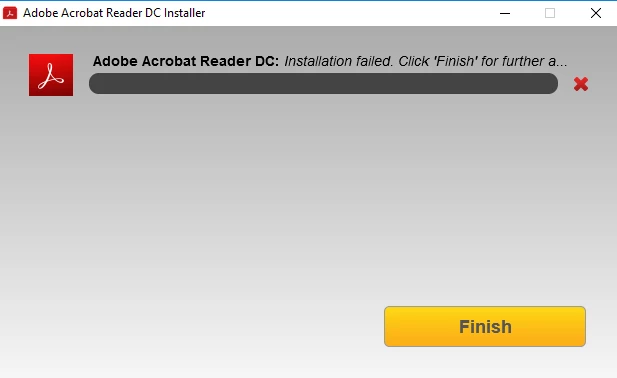
Loop to Adobe - Download Adobe Acrobat Reader DC

Pretty sure I have tried all of the options and suggestions in the Troubleshoot section but am now stuck... any help is appreciated...

This topic has been closed for replies.
Correct answer LeoUpdaterX

Download and run installer from ftp://ftp.adobe.com/pub/adobe/reader/win/AcrobatDC/1900820081/

(Select your language executable file)

If it fails, you should see actual error. Please provide error screen shot and AdobeSFX.log file from the User Temp folder.

Ideally, you should also enable verbose MSI logging and provide latest MSIxxxx.log file from the User Temp folder. Do not post MSI log here, it might be fairly large. instead send it to me directly.

1 reply

LeoUpdaterXCorrect answer
Participating Frequently
November 13, 2018

Download and run installer from ftp://ftp.adobe.com/pub/adobe/reader/win/AcrobatDC/1900820081/

(Select your language executable file)

If it fails, you should see actual error. Please provide error screen shot and AdobeSFX.log file from the User Temp folder.

Ideally, you should also enable verbose MSI logging and provide latest MSIxxxx.log file from the User Temp folder. Do not post MSI log here, it might be fairly large. instead send it to me directly.

michaelf12452677
Participant
November 26, 2018

Thank you! That worked for me too. I am also using a Dell Inspiron (15 7000 2-in-1), so maybe there's a bigger issue?