


Windows Server 2016 (VM) From AcroRd32.exe Cannot Open URL, But IE Works
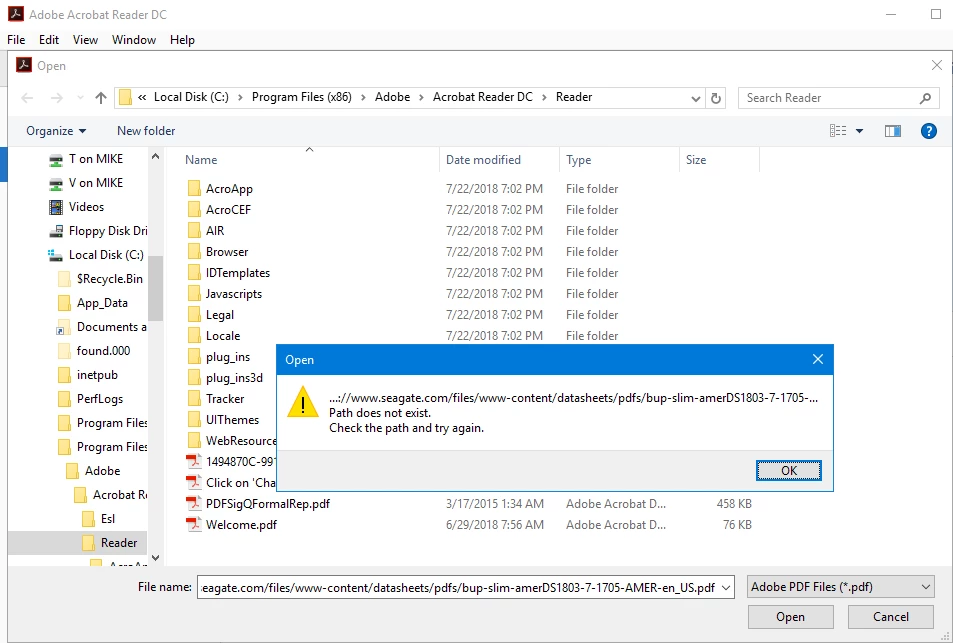
I have two computers: 1) Windows 8.1 (Hyper-V Host) and 2) Windows Server 2016 (Virtual Machine).
Both of them have Acrobat Reader DC (v2018.001.2055). The issue is from the WS2016 VM computer
running AcroRd32.exe when I try to open a URL (File à Open), I get the error message: “Path does not
exist. Check the path and try again.” When I do the exact same steps using the Win8.1 Host computer
the PDF opens. From the WS2016 VM computer I can use Internet Explorer and the Adobe Reader Plug-in
opens the file without issue. The Plug-in is good, but sometimes I want the actual AcroRd32.exe application,
because in some areas I think it’s superior.
I have Reinstalled and ran a Repair, I’ve removed all Protection from Advanced Security and nothing helps.
I looked through Group Policies and Firewall Settings, but I could did not recognize anything that would help.
Can anyone help me get Reader DC running on my Windows Server 2016 computer?
 AdChoices